Zero Trust in Practice: Migrating from Istio Sidecar to Ambient Mode
A hands-on comparison of Istio sidecar and ambient mode for zero-trust service mesh. Same app, same policy, two architectures proven step by step on a local cluster.

On this page (22)
- Missing Piece
- Two Architectures, One Goal
- The Project
- Standing Up the Cluster
- Deploying the Baseline: No Mesh at All
- Phase 1: Sidecar Mode, Step by Step
- Install and Inject
- mTLS Is Already Working, Before Any Policy Says So
- Locking It Down: The Sidecar AuthorizationPolicy
- Resetting Cleanly Before Switching Architectures
- Phase 2: Ambient Mode, Step by Step
- Install and Label: No Restart Required
- mTLS Active by Default
- Where Ambient Draws Its Line: The Fail-Safe Behavior
- The Bridge: Why Waypoints Use Gateway API
- Bringing in a Waypoint for the One Service That Needs It
- The Full Picture, Running
- The Nuance
- What Actually Changed, Side by Side
- What Istio's Own Comparison Publishes
- Why Run This Yourself Instead of Reading a Comparison Table
- What's Next
Microservices split one problem into many. What used to be a function call inside a single process becomes a network call between separately deployed services and every one of those calls now needs the things a function call got for free - encryption, a way to know who's actually calling and a rule for whether that call should be allowed at all.
Handle that inside application code and every team ends up building its own partial version of the same three problems. A service mesh exists to pull all three out of application code entirely into an infrastructure layer that sits next to every service and handles them the same way everywhere.
Istio is a service mesh technology where most of that conversation converges. It runs Envoy as its data plane, uses Kubernetes ServiceAccounts as its source of identity and treats encryption, identity and policy as one connected system rather than three separate tools bolted together.
What Istio actually operationalizes underneath the feature list is zero trust, the principle that nothing on your network gets trusted just because of where it sits. Not "this pod is inside the cluster so it's fine." Every call gets encrypted. Every caller gets a cryptographic identity. Every request gets checked against an explicit rule regardless of where it originated. A zero-trust migration is the actual work of moving a running system from "anything in the cluster can call anything" to that model without rewriting the applications themselves.
mTLS covers the encryption and identity half. AuthorizationPolicy covers the access-control half.
Istio ships two different architectures for delivering both: sidecar mode and ambient mode. They arrive at the same zero-trust outcome through totally different mechanics.
Let's try to concretely understand what changes when you move from Istio's sidecar model to ambient mode. The mechanical differences, what gets installed, what a pod looks like before and after, what a policy that works in one mode behaves in the other.
So I used a small microservice app, secured it twice on the same cluster once with Istio sidecars and once with ambient.
To follow along you'll need: a Kubernetes cluster (a local kind cluster is enough), kubectl and istioctl. Everything here runs on a single local cluster. No cloud account required. The full repo is at github.com/Prianshu-git/Service-mesh-Zero-Trust-migration.
Missing Piece #
Before touching Istio at all we deploy four plain Kubernetes services with no mesh whatsoever: frontend, orders, payments, inventory. Frontend and orders can reasonably call payments. Nothing else should be able to. With no mesh in place none of that was enforced by default.
Three things were missing and everything that follows is just those three gaps getting closed twice two different ways:
→ No confidentiality. Traffic between services was plain HTTP.
→ No authentication. Payments had no way to cryptographically verify who was actually calling it.
→ No authorization. Even if it wanted to enforce "only orders may call me" there was nowhere to put that rule.
Note on the demo architecture: For this demonstration each "service" is deployed as
kennethreitz/httpbin: an echo server that reflects back request headers. This lets us inspect mTLS identity headers directly. The actual policy tests are performed by runningcurlfrom temporary pods or bykubectl execinto thefrontendpod which usescurlimages/curl. The app logic is irrelevant. What matters is whether the mesh allows or blocks the traffic.
Two Architectures, One Goal #
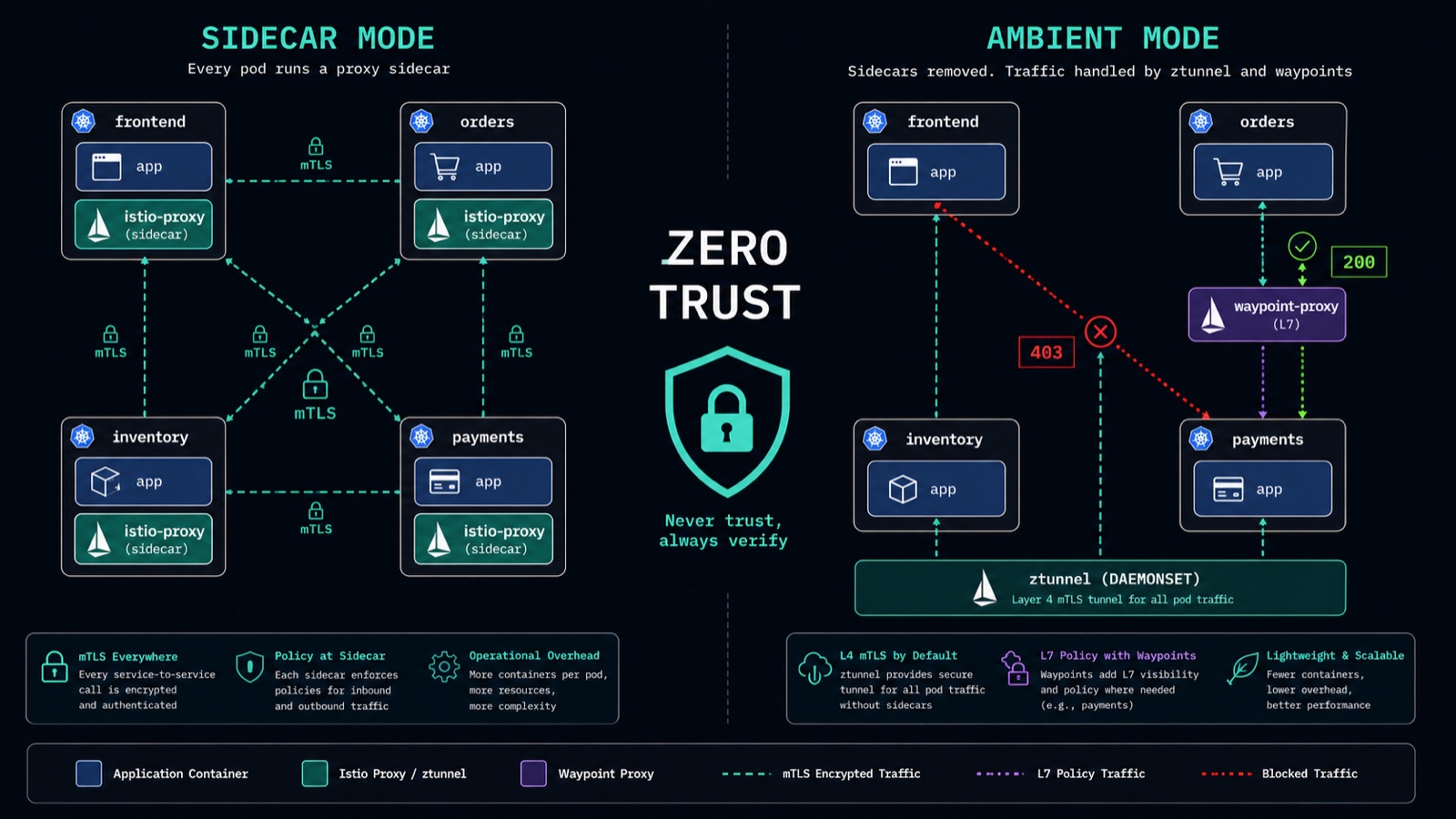
Sidecar mode has been Istio's model since 2017. Every pod that joins the mesh gets a second container injected into it, an Envoy proxy running as istio-proxy. A one-time init container installs iptables rules inside the pod's own network namespace so every byte in or out of your app container gets silently rerouted through that sidecar first. The sidecar terminates and originates mTLS, holds that pod's certificate and enforces whatever AuthorizationPolicy applies to it. Your application code never changes. But every pod whether or not it ever handles a sensitive request now carries a full proxy.
Ambient mode splits that same job into two layers instead of bolting a proxy onto every pod. A ztunnel runs once per node not once per pod as a DaemonSet. It handles mTLS and workload identity for every pod scheduled on that node using an HTTP CONNECT-based tunnel protocol called HBONE to talk to other nodes. It does not read HTTP. It has no concept of a path or a method. For that ambient adds a second optional component: a waypoint, the exact same Envoy binary the sidecar uses but deployed as its own independent workload attached only to the specific service that actually needs L7 rules.
In practice this changes how you join the mesh, how you write policy and what you're troubleshooting when the system doesn't do what it says. The rest of this post is that difference proven step by step on the same app on the same cluster.
The Project #
To make the comparison honest I set one constraint: the same application, the same intended policy under both architectures so nothing could be explained away by "the app was different."
The app is deliberately small and one design detail that matters: each service gets its own Kubernetes ServiceAccount not a shared one. Istio's identity model is built entirely on the ServiceAccount a pod runs as not the pod itself. If all four services shared one ServiceAccount there'd be no way to write a policy that says "only orders may call payments" because Istio would have no way to tell orders traffic apart from frontend's. Four ServiceAccounts is what makes the whole zero-trust story expressible at all.
The target policy is narrow on purpose: payments only accepts POST requests to /post and only from orders. Everything else including a direct call from frontend gets denied. That one rule gets implemented twice: once as a sidecar-mode policy and once as an ambient-mode one on the same cluster torn down cleanly between runs so neither phase could quietly lean on leftovers from the other.
Standing Up the Cluster #
A local kind cluster is enough for this:
kind create cluster --name zt-demokubectl get nodesOne node, one control plane, Ready status. No Istio components exist yet.
Deploying the Baseline: No Mesh at All #
kubectl apply -f app/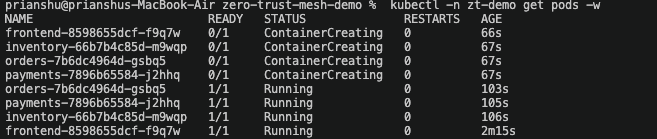
Four services coming up with zero Istio anywhere in the cluster. READY 1/1: one container, no sidecar because there's no mesh to inject one yet.
At this point calling payments directly from frontend with no policy anywhere just worked. No mesh means no gate. That's the baseline everything else in this post is measured against.
kubectl -n zt-demo exec deploy/frontend -- curl -s http://payments/post -X POST -d '{"amount": 500}'{
"args": {},
"data": "",
"files": {},
"form": {
"{\"amount\": 500}": ""
},
"headers": {
"Accept": "*/*",
"Content-Length": "15",
"Content-Type": "application/x-www-form-urlencoded",
"Host": "payments",
"User-Agent": "curl/8.21.0"
},
"json": null,
"origin": "10.244.0.8",
"url": "http://payments/post"
}The response is plain HTTP. No X-Forwarded-Client-Cert header. No encryption. No identity. The origin field shows the raw pod IP (10.244.0.8).
Phase 1: Sidecar Mode, Step by Step #
Install and Inject #
istioctl install --set profile=minimal -y
kubectl label namespace zt-demo istio-injection=enabled --overwrite
kubectl -n zt-demo rollout restart deployment orders payments inventory frontend✓ Istio core installed
✓ Istiod installed
✓ Installation complete
namespace/zt-demo labeled
deployment.apps/orders restarted
deployment.apps/payments restarted
deployment.apps/inventory restarted
deployment.apps/frontend restartedLabeling a namespace for sidecar injection does nothing to pods that already exist. Kubernetes has no mechanism to add a container to a running pod so every workload has to be recreated. Watch the READY column: pods that were 1/1 a moment ago come back 2/2. The 0/2 pending rows are pods still finishing sidecar startup. This is the first real operational cost of sidecar mode and it's visible directly in the pod list.
kubectl -n zt-demo wait --for=condition=Ready pod -l app=inventory --timeout=600s
kubectl -n zt-demo wait --for=condition=Ready pod -l app=orders --timeout=600s
kubectl -n zt-demo wait --for=condition=Ready pod -l app=payments --timeout=600s
kubectl -n zt-demo get podsNAME READY STATUS RESTARTS AGE
frontend-599cd6b667-8sw7c 2/2 Running 0 40s
inventory-6656996d9d-k798x 2/2 Running 0 40s
orders-858bc67b6-txzzq 2/2 Running 0 40s
payments-5cbcb64d66-6jmws 2/2 Running 0 40sAll pods now at 2/2. Every pod carries its own proxy.
mTLS Is Already Working, Before Any Policy Says So #
kubectl apply -f - <<EOF
apiVersion: security.istio.io/v1beta1
kind: PeerAuthentication
metadata:
  name: default
  namespace: zt-demo
spec:
  mtls:
    mode: STRICT
EOF

kubectl -n zt-demo exec deploy/frontend -- curl -s http://payments/post -X POST -d '{"amount": 500}'{
"args": {},
"data": "",
"files": {},
"form": {
"{\"amount\": 500}": ""
},
"headers": {
"Accept": "*/*",
"Content-Length": "15",
"Content-Type": "application/x-www-form-urlencoded",
"Host": "payments",
"User-Agent": "curl/8.21.0",
"X-Envoy-Attempt-Count": "1",
"X-Forwarded-Client-Cert": "By=spiffe://cluster.local/ns/zt-demo/sa/payments;Hash=07f2362afe60ca7b0c09b171b56591ad11cb0e1d24683d3b439887e438f8e824;Subject=\"\";URI=spiffe://cluster.local/ns/zt-demo/sa/frontend"
},
"json": null,
"origin": "127.0.0.6",
"url": "http://payments/post"
}This is frontend calling payments directly and it still succeeds because no AuthorizationPolicy exists yet. But look at the X-Forwarded-Client-Cert header that httpbin echoed back: URI=spiffe://cluster.local/ns/zt-demo/sa/frontend. Nothing in the app added that. The destination sidecar (payments' istio-proxy) extracted the caller's verified mTLS identity from the TLS handshake and attached it to the request before forwarding to the app container. The sidecar already knows exactly who's calling. It just isn't blocking anyone yet.
Transparent proxy note: application code always sends plain
http://to its local proxy. The sidecar transparently upgrades the connection to mutual TLS across the wire, you never change application code tohttps://.
What's
127.0.0.6? It's Envoy's internal loopback redirect IP, used in sidecar mode only. The iptables rules installed inside the pod redirect all outbound traffic through the local Envoy proxy first, so the upstream application sees127.0.0.6as the source instead of the real pod IP. Hold onto that, it flips to the real pod IP once we get to ambient mode, where there's no per-pod proxy to redirect through.
Locking It Down: The Sidecar AuthorizationPolicy #
Before applying one, here's the anatomy of an Istio AuthorizationPolicy:
action-ALLOWorDENYselector/targetRefs- which workload or Gateway this policy attaches torulesfrom- source identities (principals) allowed to connectto- operations allowed: HTTP methods, paths, or portswhen- optional extra conditions The policy below attaches directly to the workload usingselector.matchLabels. The sidecar inside thepaymentspod evaluates this rule. Theprincipalsfield references the SPIFFE identity derived from theordersServiceAccount.
kubectl apply -f - <<EOF
apiVersion: security.istio.io/v1
kind: AuthorizationPolicy
metadata:
  name: payments-only-orders
  namespace: zt-demo
spec:
  selector:
    matchLabels:
      app: payments
  action: ALLOW
  rules:
    - from:
        - source:
            principals:
              - "cluster.local/ns/zt-demo/sa/orders"
      to:
        - operation:
            methods: ["POST"]
            paths: ["/post"]
EOFNow the actual proof. First from orders:
kubectl run curl-orders -n zt-demo --image=curlimages/curl --restart=Never \
  --overrides='{"spec":{"serviceAccountName":"orders"}}' \
  -- curl -s -o /dev/null -w '%{http_code}\n' \
http://payments.zt-demo.svc.cluster.local/post -X POST -d '{"amount": 500}'200Orders gets a 200.
Then from frontend:
kubectl -n zt-demo exec deploy/frontend -- \
  curl -s -o /dev/null -w '%{http_code}\n' \
http://payments/post -X POST -d '{"amount": 500}'403Frontend gets a 403. Same cluster, same service, same everything except its identity. That gap (200 vs 403 based purely on cryptographic identity) is the entire point of this project.
Resetting Cleanly Before Switching Architectures #
Running sidecar and ambient side by side on the same cluster would result in double the control and data plane cost and for our purpose doing that would make it impossible to tell which architecture was responsible for which behavior later. So between phases everything is stripped down.
istioctl uninstall --purge -y
kubectl delete namespace zt-demo
kubectl delete namespace istio-systemBoth namespaces terminating, back to a clean slate. No leftover certificates, no leftover policies, no ambiguity about which mesh is enforcing what.
Phase 2: Ambient Mode, Step by Step #
Install and Label: No Restart Required #
istioctl install --set profile=ambient -y
kubectl label namespace zt-demo istio.io/dataplane-mode=ambient --overwrite✓ Istio core installed
✓ CNI installed
✓ Istiod installed
✓ Ztunnel installed
✓ Installation complete
The ambient profile has been installed successfully, enjoy Istio without sidecars!
namespace/zt-demo labeledCompare the AGE column here to the rollout-restart output from Phase 1. Every pod is still the exact same age, the exact same pods that were already running, because ambient mode has no per-pod container to inject. Labeling the namespace was the entire operation. No restart, no downtime.
At this point mTLS is already active for every pod in the namespace with zero PeerAuthentication resource applied because ztunnel enforces it by default for anything in the mesh.
Note on ambient mTLS defaults: In ambient mode ztunnel automatically encrypts in-mesh traffic using mTLS. You only need a
PeerAuthenticationresource if you want to explicitly control the mode (for examplePERMISSIVEto allow plaintext from outside the mesh orSTRICTto reject anything non-mTLS). For this demo we rely on the ambient default.
mTLS Active by Default #
kubectl -n zt-demo exec deploy/frontend -- curl -s http://payments/post -X POST -d '{"amount": 500}'{
"args": {},
"data": "",
"files": {},
"form": {
"{\"amount\": 500}": ""
},
"headers": {
"Accept": "*/*",
"Content-Length": "15",
"Content-Type": "application/x-www-form-urlencoded",
"Host": "payments",
"User-Agent": "curl/8.21.0"
},
"json": null,
"origin": "10.244.0.20",
"url": "http://payments/post"
}The call succeeds (200) confirming ztunnel is encrypting traffic. But notice: no X-Forwarded-Client-Cert header and the origin is the real pod IP (10.244.0.20), not 127.0.0.6. In sidecar mode the destination proxy injects the identity header and redirects through localhost. In ambient mode without a waypoint, ztunnel handles encryption at L4 without touching HTTP headers. The identity is still cryptographically verified - you just can't see it in the HTTP response yet.
Where Ambient Draws Its Line: The Fail-Safe Behavior #
Here is the critical learning moment. When applying the exact same AuthorizationPolicy shape that worked cleanly in sidecar mode directly in ambient mode, it got accepted but with a warning attached to its status field:
kubectl apply -f - <<EOF
apiVersion: security.istio.io/v1
kind: AuthorizationPolicy
metadata:
  name: payments-only-orders
  namespace: zt-demo
spec:
  selector:
    matchLabels:
      app: payments
  action: ALLOW
  rules:
    - from:
        - source:
            principals:
              - "cluster.local/ns/zt-demo/sa/orders"
      to:
        - operation:
            methods: ["POST"]
            paths: ["/post"]
EOF

kubectl -n zt-demo get authorizationpolicy payments-only-orders -o jsonpath='{range .status.conditions[*]}{.type}{"="}{.reason}{" "}{.message}{"\n"}{end}'ZtunnelAccepted=UnsupportedValue ztunnel does not support HTTP attributes (found: methods, paths). In ambient mode you must use a waypoint proxy to enforce HTTP rules. Within an ALLOW policy, rules matching HTTP attributes are omitted. This will be more restrictive than requested.Istio's own status field states it plainly: ztunnel does not support HTTP attributes (methods, paths). In ambient mode you must use a waypoint proxy to enforce HTTP rules. But here is what the warning does not fully capture: ztunnel fails safe. When an ALLOW policy contains L7 rules that ztunnel cannot evaluate, ztunnel omits those rules and the policy becomes more restrictive than requested - effectively a DENY-all for traffic that would have matched the omitted rules. It does not silently do less than asked. It protects you from misconfiguration by blocking traffic it cannot properly evaluate.
In our test the result was a connection failure (000) rather than an HTTP 403.
000vs403:000is what curl prints for%{http_code}when it never receives an HTTP response at all - here, because ztunnel dropped the TCP connection at Layer 4 before any HTTP exchange could happen.403is an actual HTTP response returned by a Layer 7 proxy (like Envoy) after it inspected the request and rejected it. In the frontend test below, curl's own process exit code is56("failure in receiving network data") - a separate number from the000status placeholder, and further confirmation that the connection was cut, not answered.
# Test from orders
kubectl run curl-orders -n zt-demo --image=curlimages/curl --restart=Never \
  --overrides='{"spec":{"serviceAccountName":"orders"}}' \
  -- curl -s -o /dev/null -w '%{http_code}\n' \
http://payments.zt-demo.svc.cluster.local/post -X POST -d '{"amount": 500}'000# Test from frontend
kubectl -n zt-demo exec deploy/frontend -- \
curl -s -o /dev/null -w '%{http_code}\n' --max-time 5 \
http://payments/post -X POST -d '{"amount": 500}'000
command terminated with exit code 56Both denied. Orders with the correct identity and frontend without it both get blocked. ztunnel is L4-only by design. L4 gives you identity-based rules like "A can call B" which is exactly what ztunnel enforces. The path-and-method rule I wrote needed the L7 layer which is exactly what the waypoint below exists to provide.
The Bridge: Why Waypoints Use Gateway API #
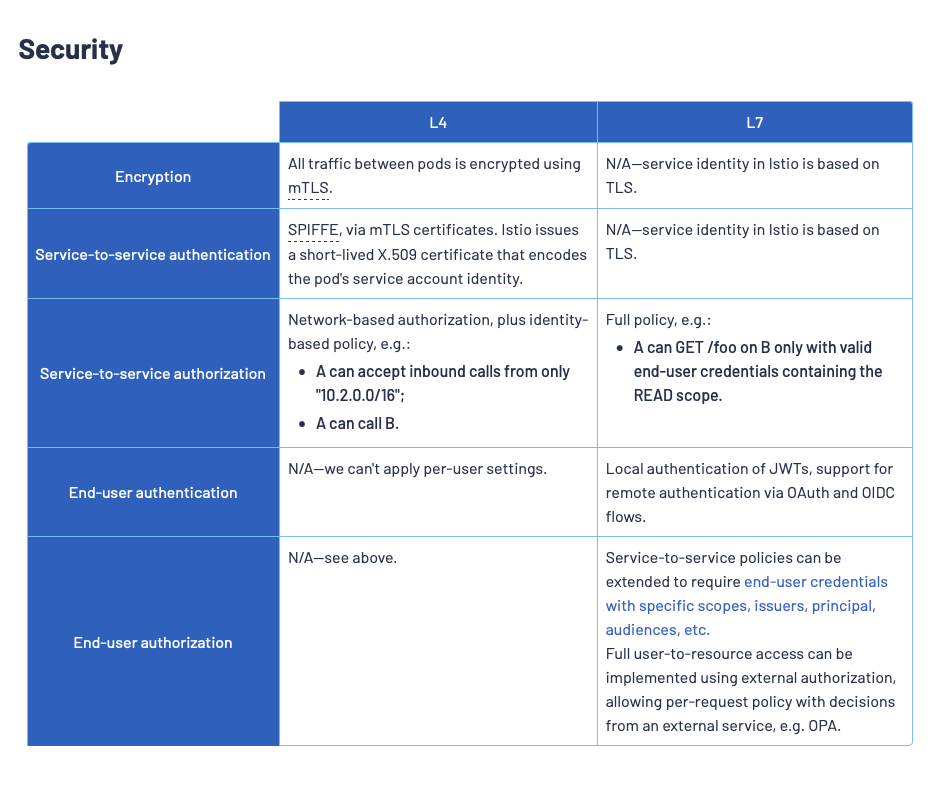
ztunnel handles Layer 4 (TCP + mTLS) only. It secures the wire and authenticates peers, but it cannot look inside HTTP requests. To enforce policies based on HTTP paths, methods, or headers, Ambient Mesh deploys an on-demand Envoy pod called a Waypoint. Istio models waypoints using the standard Kubernetes Gateway API resources rather than inventing a new CRD. The Waypoint acts as an L7 proxy for a specific service, sitting in the data path only when needed.
Bringing in a Waypoint for the One Service That Needs It #
# Install Gateway API CRDs first
kubectl apply -f https://github.com/kubernetes-sigs/gateway-api/releases/download/v1.1.0/standard-install.yaml

# Create the waypoint
istioctl waypoint apply --namespace zt-demo --name payments-waypoint --for servicecustomresourcedefinition.apiextensions.k8s.io/gatewayclasses.gateway.networking.k8s.io created
customresourcedefinition.apiextensions.k8s.io/gateways.gateway.networking.k8s.io created
...
✓ waypoint zt-demo/payments-waypoint appliedOnly payments gets a waypoint. Frontend, orders and inventory never do because none of them need HTTP-level policy. ztunnel's L4 identity and encryption is all they ever require.
A waypoint is not a custom Istio object. It is a standard Kubernetes Gateway API resource. Here is what gets created:
apiVersion: gateway.networking.k8s.io/v1
kind: Gateway
metadata:
  name: payments-waypoint
  namespace: zt-demo
spec:
  gatewayClassName: istio-waypoint
  listeners:
    - name: mesh
      port: 15008
protocol: HBONEWaypoints plug into the same Gateway API model Kubernetes already has rather than inventing a new one.
Once istiod finishes reconciling it, istioctl waypoint status confirms it: Programmed, assigned to payments-waypoint.zt-demo.svc.cluster.local:15008, ready to receive traffic.
The Full Picture, Running #
echo '--- namespace labels ---' && kubectl get namespace zt-demo --show-labels
echo '--- app pods ---' && kubectl -n zt-demo get pods -o wide
echo '--- ztunnel pods ---' && kubectl -n istio-system get pods -l app=ztunnel -o wide
echo '--- waypoint pods ---' && kubectl -n zt-demo get pods -l gateway.networking.k8s.io/gateway-name=payments-waypoint -o wide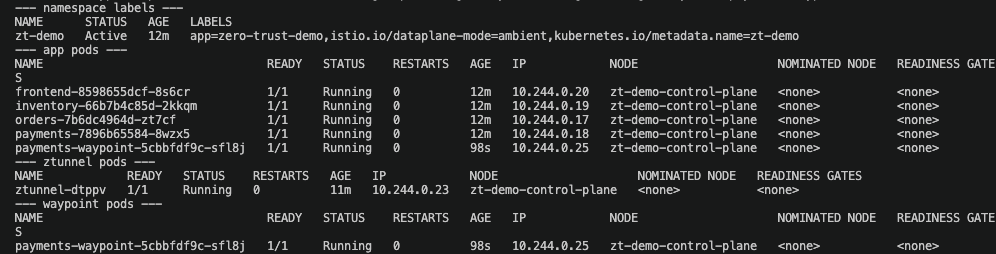
The entire ambient mesh in one view. Every application pod sits at 1/1 READY. No sidecar anywhere. One ztunnel pod for the node. One payments-waypoint pod and only one because it's the only service that needed L7. This is the resource story ambient mode makes visible directly in a pod list rather than asserted in a comparison table.
The Nuance #
Getting the waypoint running was the easy part. The AuthorizationPolicy that worked perfectly in sidecar mode does not immediately start enforcing anything once the waypoint existed.
In sidecar mode an AuthorizationPolicy attaches to a workload with a plain label selector (selector: matchLabels: app: payments) because the enforcement point (the sidecar) lives inside that exact pod. In ambient mode HTTP-level enforcement happens on the waypoint, a separate workload. The policy has to explicitly target that waypoint resource.
First attempt: targetRefs pointing at the Gateway:
kubectl apply -f - <<EOF
apiVersion: security.istio.io/v1
kind: AuthorizationPolicy
metadata:
  name: payments-only-orders
  namespace: zt-demo
spec:
  targetRefs:
    - group: gateway.networking.k8s.io
      kind: Gateway
      name: payments-waypoint
  action: ALLOW
  rules:
    - from:
        - source:
            principals:
              - "cluster.local/ns/zt-demo/sa/orders"
      to:
        - operation:
            methods: ["POST"]
            paths: ["/post"]
EOF# From orders
kubectl run curl-orders -n zt-demo --image=curlimages/curl --restart=Never \
--overrides='{"spec":{"serviceAccountName":"orders"}}' \
-- curl -s -o /dev/null -w '%{http_code}\n' \
http://payments.zt-demo.svc.cluster.local/post -X POST -d '{"amount": 500}'200# From frontend
kubectl -n zt-demo exec deploy/frontend -- \
curl -s -o /dev/null -w '%{http_code}\n' \
http://payments/post -X POST -d '{"amount": 500}'200Both get 200. The policy does not enforce. The waypoint exists. The policy was applied. But traffic bypasses the waypoint entirely.
The reason: the Service has to be told to use the waypoint. The fix is a label on the Kubernetes Service not an annotation and the value is just the waypoint name, not a namespace-qualified path.
kubectl label service payments istio.io/use-waypoint=payments-waypointkubectl -n zt-demo get service payments --show-labelsNAME TYPE CLUSTER-IP EXTERNAL-IP PORT(S) AGE LABELS
payments ClusterIP 10.96.80.235 <none> 80/TCP 31m app=payments,istio.io/use-waypoint=payments-waypointNow the service carries the label istio.io/use-waypoint=payments-waypoint. Traffic to payments is routed through the waypoint.
Istio's docs recommend targetRefs: Service as the more precise option because it binds the policy to the service abstraction rather than the proxy instance. In this demo I used targetRefs: Gateway because it feels intuitive: the waypoint is the actual enforcement point so targeting it directly makes the mechanics explicit. Both patterns work. The real gotcha we hit was the use-waypoint label on the Service. That is what routes traffic through the waypoint without it, neither Gateway targeting nor Service targeting would have enforced anything. If you are building this for production, use targetRefs: Service. It decouples your policy from waypoint lifecycle and reads more naturally: you are protecting the payments service, not the payments-waypoint proxy.
# Test from orders
kubectl run curl-orders -n zt-demo --image=curlimages/curl --restart=Never \
  --overrides='{"spec":{"serviceAccountName":"orders"}}' \
  -- curl -s -o /dev/null -w '%{http_code}\n' \
http://payments.zt-demo.svc.cluster.local/post -X POST -d '{"amount": 500}'200Orders gets a 200.
# Test from frontend
kubectl -n zt-demo exec deploy/frontend -- \
  curl -s -o /dev/null -w '%{http_code}\n' \
http://payments/post -X POST -d '{"amount": 500}'403Frontend gets a 403. Same cluster, same service, same everything except its identity. The gap is identical to sidecar mode. The mechanism underneath is completely different.
What Actually Changed, Side by Side #
| Aspect | Sidecar Mode | Ambient Mode |
|---|---|---|
| Joining the mesh | Full rollout restart of every deployment required | One label applied to already-running pods. Zero restarts. |
| Pod shape | Full Envoy proxy in every application pod (2/2 READY) | No sidecar in application pods. A waypoint is deployed as its own separate pod, only for the service that needs L7 rules. |
| Policy authoring | selector.matchLabels targets the workload directly | targetRefs targets the Gateway or Service, plus an istio.io/use-waypoint label on the Service |
| Fail-safe when policy exceeds L4 | Not applicable, every pod has a full proxy | ztunnel accepts the policy without erroring, but fails safe to DENY for HTTP attributes it can't evaluate. The AuthorizationPolicy status field explains why. |
| mTLS enforcement | Configured via PeerAuthentication | Active by default for in-mesh traffic. PeerAuthentication is optional, for explicit control. |
What Istio's Own Comparison Publishes #
Worth citing: Istio reports typical p90/p99 latency of roughly 0.6 to 0.9ms per hop in sidecar mode since both the source and destination sidecar process every request versus roughly 0.15 to 0.2ms with ztunnel alone and 0.4 to 0.5ms when a waypoint is in the path. That's Istio's benchmark in their environment, not mine. Worth verifying on your own hardware and environment.
Why Run This Yourself Instead of Reading a Comparison Table #
Every sidecar-vs-ambient article can list the theoretical differences in a table. What a table can't do is show you the exact moment ztunnel refuses your policy and tells you why or make you feel the difference between watching four pods restart and watching a label apply to four pods that never blinked. That gap between reading and running is the actual reason this exists as a runnable project instead of another explainer. Clone it, break it and the L4/L7 split stops being a diagram and starts being something you've debugged.
What's Next #
If you want to take this further here are immediate hands-on next steps that extend the core comparison:
- Verify the fail-safe yourself. Delete the
payments-waypointGateway but keep the L7AuthorizationPolicyapplied. Confirm that all traffic to payments is denied. Then recreate the waypoint, re-apply the Service label and watch access restore. This proves the architecture is protecting you from misconfiguration. - Try
targetRefs: ServicevsGateway. We usedkind: Gatewayin this demo. Try switching tokind: Service(group:"", name:payments) and confirm identical behavior. Understand when each approach is more appropriate. - Add a second waypoint. Give
inventoryits own waypoint and an L7 policy. Show that waypoints are per-service not per-namespace and that you only pay the L7 proxy cost where you actually need it. - Measure latency with Fortio. Run a formal benchmark pass against both modes on the same hardware with Prometheus and Grafana for dashboards to verify Istio's published figures with your own first-hand measurements on a replicable environment.
Repository: github.com/Prianshu-git/Service-mesh-Zero-Trust-migration
AI Platforms engineer, DevRel @kubesimplify. Building hands-on demos to make infrastructure concepts easy to digest.
Get new posts in your inbox.
Spotted a typo or want to improve this post? Edit on GitHub →