Day 1: What Actually Happens When You Type docker run
Containers aren't VMs. They're Linux processes. A Docker Captain explains namespaces, cgroups, and how Docker really works on your Mac in 2026.

On this page (20)
- A Container Is Just a Process
- The Two Ingredients: Namespaces and Cgroups
- Namespaces: What the process can SEE
- Cgroups: What the process can USE
- So What Does Docker Actually Do?
- "But Wait — I'm on a Mac"
- Your First Containers (For Real This Time)
- Run an entire operating system
- Run a web server
- Check what's happening inside
- Clean up
- 2026: Docker Isn't Just Containers Anymore
- docker init — Never write a Dockerfile from scratch
- docker ai — Ask Gordon
- docker model — Run LLMs locally
- docker scout — Know your vulnerabilities
- docker debug — Shell into anything
- What You Actually Learned Today
- Quick Reference
- Tomorrow: Day 2
7 Days of Docker (2026) — A Docker Captain's guide. Not your average tutorial.
I'm a Docker Captain. I've seen many Docker tutorials on the internet. And they all start the same way:
"Docker is like a virtual machine, but lighter..."
No. Let's stop doing that.
I'm going to explain Docker the way I wish someone had explained it to me — from the inside out. No VM comparisons. No shipping container analogies. Just what's actually happening on your machine right now.
A Container Is Just a Process #
That's it. That's the tweet.
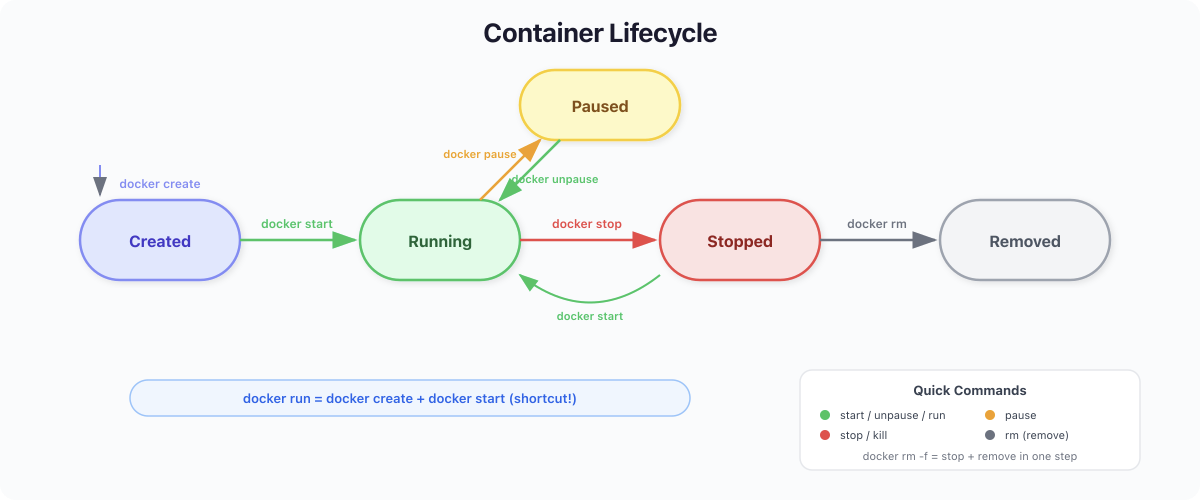
When you run docker run nginx, you're not spinning up a virtual machine. You're not creating a miniature computer. You're starting a Linux process — the nginx binary — with two restrictions:
-
It can only SEE certain things (namespaces)
-
It can only USE certain resources (cgroups)
That's a container. A restricted process. Let me prove it.
docker run -d --name my-nginx nginx:alpineNow let's look at it from the host's perspective:
docker top my-nginxUID PID PPID C STIME TTY TIME CMD
root 15290 15267 0 09:31 ? 00:00:00 nginx: master process nginx -g daemon off;
statd 15327 15290 0 09:31 ? 00:00:00 nginx: worker process
statd 15328 15290 0 09:31 ? 00:00:00 nginx: worker process
statd 15329 15290 0 09:31 ? 00:00:00 nginx: worker process
statd 15330 15290 0 09:31 ? 00:00:00 nginx: worker process
statd 15331 15290 0 09:31 ? 00:00:00 nginx: worker process
statd 15332 15290 0 09:31 ? 00:00:00 nginx: worker process
statd 15333 15290 0 09:31 ? 00:00:00 nginx: worker process
statd 15334 15290 0 09:31 ? 00:00:00 nginx: worker processSee those PIDs? Those are regular processes on your machine. One master, eight workers (one per CPU core on this M2). They show up in the process table just like any other program. They're not in a VM. They're not in a sandbox. They're processes.
So what makes it a "container"?
The Two Ingredients: Namespaces and Cgroups #
Namespaces: What the process can SEE #
Linux namespaces are walls. They control what a process is allowed to perceive:
| Namespace | What it hides |
|---|---|
| PID | Other processes — the container thinks it's PID 1 |
| NET | The host's network — the container gets its own IP |
| MNT | The host's filesystem — the container sees only its own files |
| UTS | The hostname — the container has its own hostname |
| IPC | Inter-process communication — isolated shared memory |
| USER | User IDs — root inside the container isn't root outside |
When you're "inside" a container and type ps aux, you see maybe 2-3 processes. On the host, there are hundreds. The container doesn't know that. Its PID namespace hides everything else.
The container isn't isolated because it's in a separate machine. It's isolated because the kernel lies to it.
Cgroups: What the process can USE #
Control groups limit resources:
docker run --memory=128m --cpus=0.5 nginx:alpineThis process can never use more than 128MB of RAM or half a CPU core. The kernel enforces this. The container starts and runs fine — nginx barely uses 10MB. But if it ever tries to allocate beyond 128MB, the kernel OOM-kills it. The limit is a ceiling, not a cage. Most processes never hit it. But a memory leak or a traffic spike that exhausts the limit? The process dies instantly. That's the point — one runaway container can't take down the entire host.
$ docker run --rm --memory=128m alpine cat /sys/fs/cgroup/memory.max
134217728134,217,728 bytes. Exactly 128 megabytes. The kernel sets this limit at the cgroup level, and the process can never escape it.
That's it. Namespaces + Cgroups = Container. Docker didn't invent containers. Docker made them usable.
So What Does Docker Actually Do? #
If containers are just kernel features, why do we need Docker?
Because doing this manually is miserable. Without Docker, to "containerize" a process, you'd need to:
-
Call
unshare()andclone()system calls to create namespaces -
Set up cgroup hierarchies in
/sys/fs/cgroup/ -
Build a root filesystem by hand
-
Configure networking with
vethpairs andiptables -
Handle image distribution yourself
Docker wraps all of this into one command:
docker run -d -p 8080:80 nginx:alpineOne line. Docker:
-
Pulls the
nginx:alpineimage (a packaged filesystem) -
Creates namespaces (PID, NET, MNT, UTS, IPC)
-
Sets up cgroups for resource limits
-
Configures a virtual network interface
-
Mounts the image as a layered filesystem
-
Starts the process
$ docker run -d --name day1-nginx -p 8080:80 nginx:alpine
a45dc5a898449edc5e4ecfbca6fc3c22db6f77901e1114f26057c45ff3dacaa7

$ curl -s http://localhost:8080 | head -3
<!DOCTYPE html>
<html>
<head>A web server. Running. In under a second. That hash? It's the container ID — a unique identifier for this particular set of namespaces and cgroups.
"But Wait — I'm on a Mac" #
Here's something most tutorials never tell you:
Containers are a Linux kernel feature. macOS doesn't have a Linux kernel.
So how is Docker running on your Mac right now?
$ docker version
Client:
 Version:    29.1.5
 OS/Arch:    darwin/arm64

Server: Docker Desktop 4.58.1
 Engine:
  Version:   29.1.5
OS/Arch: linux/arm64See that? Client: darwin/arm64 (your Mac). Server: linux/arm64 (not your Mac).
Docker Desktop runs a lightweight Linux virtual machine in the background. On Apple Silicon Macs, you get two choices for the Virtual Machine Manager (VMM):
-
Apple Virtualization framework — the stable, well-established option that leverages Apple's native hypervisor. This is what most people use (and what I'm running right now).
-
Docker VMM (Beta) — Docker's own container-optimized hypervisor, built specifically for Apple Silicon. Promises better performance for container workloads.
Both options also let you enable Rosetta for x86_64/amd64 emulation — so you can run Intel-based images on your ARM Mac without QEMU. And for file sharing between Mac and the Linux VM, you choose between VirtioFS (fastest, recommended), gRPC FUSE, or osxfs (legacy).
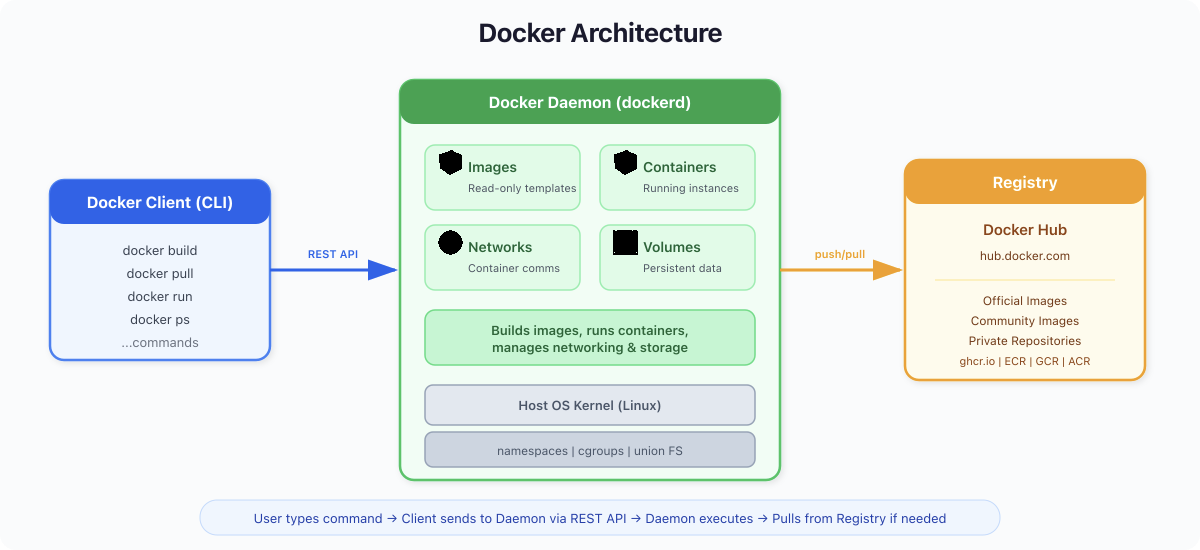
Your containers live inside this Linux VM. The flow:
-
You type
docker runon your Mac (the client) -
The command goes to the Docker daemon inside the Linux VM (the server)
-
The daemon creates namespaces and cgroups in that Linux kernel
-
Your container runs inside the VM
You never see the VM. You never configure it. But it's there. On a Linux server? No VM needed — containers talk directly to the host kernel.
What Nobody Tells You: Your Mac's fan spinning during Docker builds? That's the Linux VM doing the work. The VM has allocated CPU and memory from your Mac. If you're running 10 containers, they're all sharing one VM — not 10 separate machines. This is why Docker on Mac will never be as fast as Docker on Linux. The VM is the tax you pay.
2026 Update: Apple released their own container tool — Apple Containers — which takes the opposite approach: one lightweight VM per container instead of one shared VM. It boots in sub-second, has stronger isolation, and is written in Swift. It's interesting for macOS-native workflows, but Docker remains the standard for production, CI/CD, and cross-platform builds.
Your First Containers (For Real This Time) #
Let's actually do this. Not hello-world — that's a toy. Let's run real software.
Run an entire operating system #
docker run --rm ubuntu bash -c "cat /etc/os-release && uname -a"PRETTY_NAME="Ubuntu 24.04.1 LTS"
NAME="Ubuntu"
VERSION_ID="24.04"
VERSION="24.04.1 LTS (Noble Numbat)"
VERSION_CODENAME=noble
Linux d50e9bad40e9 6.12.65-linuxkit #1 SMP Thu Jan 15 14:58:53 UTC 2026 aarch64 aarch64 aarch64 GNU/LinuxLook at that kernel version: 6.12.65-linuxkit. That's the Linux VM's kernel. The Ubuntu "operating system" inside the container is sharing this kernel. There's no second kernel. Ubuntu here is just a filesystem — the binaries, libraries, and configs that make Ubuntu Ubuntu. The kernel comes from the host (or the VM on Mac).
This is why containers start in milliseconds instead of minutes. There's no OS to boot. It's just a process with a different filesystem view.
Run a web server #
docker run -d --name web -p 8080:80 nginx:alpine$ docker ps
CONTAINER ID IMAGE STATUS PORTS NAMES
a45dc5a89844 nginx:alpine Up 26 seconds 0.0.0.0:8080->80/tcp, [::]:8080->80/tcp webcurl -s http://localhost:8080 | head -5<!DOCTYPE html>
<html>
<head>
<title>Welcome to nginx!</title>
<style>That -p 8080:80 is port mapping. The container's nginx listens on port 80 inside its network namespace. Docker maps your host's port 8080 to it. Traffic flows: your browser → host port 8080 → Docker networking → container port 80 → nginx process.
Check what's happening inside #
docker logs web/docker-entrypoint.sh: Configuration complete; ready for start up
2026/04/12 08:10:22 [notice] 1#1: using the "epoll" event methodLogs. Real logs from the nginx process. Because that's all a container is — a process.
Clean up #
docker stop web && docker rm webContainer stopped (process received SIGTERM). Container removed (namespaces and cgroups cleaned up). The filesystem? Gone too, unless you used a volume. We'll cover that on Day 4.
2026: Docker Isn't Just Containers Anymore #
Here's what separates learning Docker today from learning it in 2020.
docker init — Never write a Dockerfile from scratch #
cd your-project/
docker initDocker scans your project, detects the language (Python, Node.js, Go, Java, .NET), and generates a production-ready Dockerfile, compose.yaml, and .dockerignore. Multi-stage builds. Non-root users. Health checks. All generated in seconds.
docker ai — Ask Gordon #
docker ai "How do I containerize a Flask app with Redis?"Gordon is Docker's built-in AI assistant. It reads your project structure, your Dockerfile, your running containers — and gives you answers that actually understand your context. Not generic advice. Specific to your setup.
docker model — Run LLMs locally #
$ docker model status
Docker Model Runner is running

$ docker model list
MODEL NAME  PARAMETERS  QUANTIZATION    ARCHITECTURE  SIZE
smollm2 361.82 M IQ2_XXS/Q4_K_M llama 256.35 MiBDocker Model Runner lets you pull and run AI models the way you pull Docker images. Powered by llama.cpp, exposed via OpenAI-compatible API, GPU-accelerated on Apple Silicon. Think of it as docker run but for LLMs. We'll deep-dive on Day 6.
docker scout — Know your vulnerabilities #
docker scout quickview nginx:latestEvery image has dependencies. Dependencies have CVEs. Docker Scout scans layers, generates SBOMs (Software Bill of Materials), and shows you what's exposed. In March 2026, compromised Trivy images on Docker Hub stole CI/CD secrets from thousands of pipelines. Security scanning isn't optional anymore.
docker debug — Shell into anything #
docker debug my-broken-containerContainer has no shell? No curl? No debugging tools? docker debug injects a full toolbox into any container or image — even distroless, even crashing. It brings vim, curl, htop, and more. You can install additional tools on the fly.
What You Actually Learned Today #
Not "Docker is like a lightweight VM." You learned:
-
A container is a Linux process restricted by namespaces (what it can see) and cgroups (what it can use)
-
Docker automates the creation of these restrictions, plus image management, networking, and storage
-
On Mac, Docker runs a Linux VM because macOS has no Linux kernel — your containers live inside that VM
-
In 2026, Docker is also an AI platform: Model Runner for local LLMs, Gordon for AI assistance, Scout for security scanning, Debug for troubleshooting, Init for project scaffolding
Quick Reference #
| Command | What it does |
|---|---|
docker run -d -p 8080:80 nginx | Start a process with namespaces + port mapping |
docker ps | List running container processes |
docker logs <name> | View stdout/stderr of the process |
docker top <name> | Show the actual PIDs on the host |
docker stop <name> | Send SIGTERM to the process |
docker rm <name> | Clean up namespaces, cgroups, filesystem |
docker init | Generate Dockerfile for your project |
docker ai "question" | Ask Gordon, Docker's AI assistant |
docker model list | List locally available AI models |
docker scout quickview <image> | Scan image for vulnerabilities |
docker debug <name> | Shell into any container, even distroless |
Tomorrow: Day 2 #
We're looking at images — not just "layers" but what they actually are: OCI artifacts containing filesystem snapshots. Why your images probably have dozens of vulnerabilities. How Docker Scout and Hardened Images change the game. And why the Trivy supply chain attack of March 2026 means security scanning is no longer optional.
Get new posts in your inbox.
Spotted a typo or want to improve this post? Edit on GitHub →