Day 2: Your Images Are a Supply Chain - and It's Probably Broken
7 Days of Docker (2026) - by Saloni Narang, Docker Captain & CNCF Ambassador I'm a Docker Captain. I've seen hundreds of Docker tutorials explain images…

On this page (9)
7 Days of Docker (2026) - by Saloni Narang, Docker Captain & CNCF Ambassador
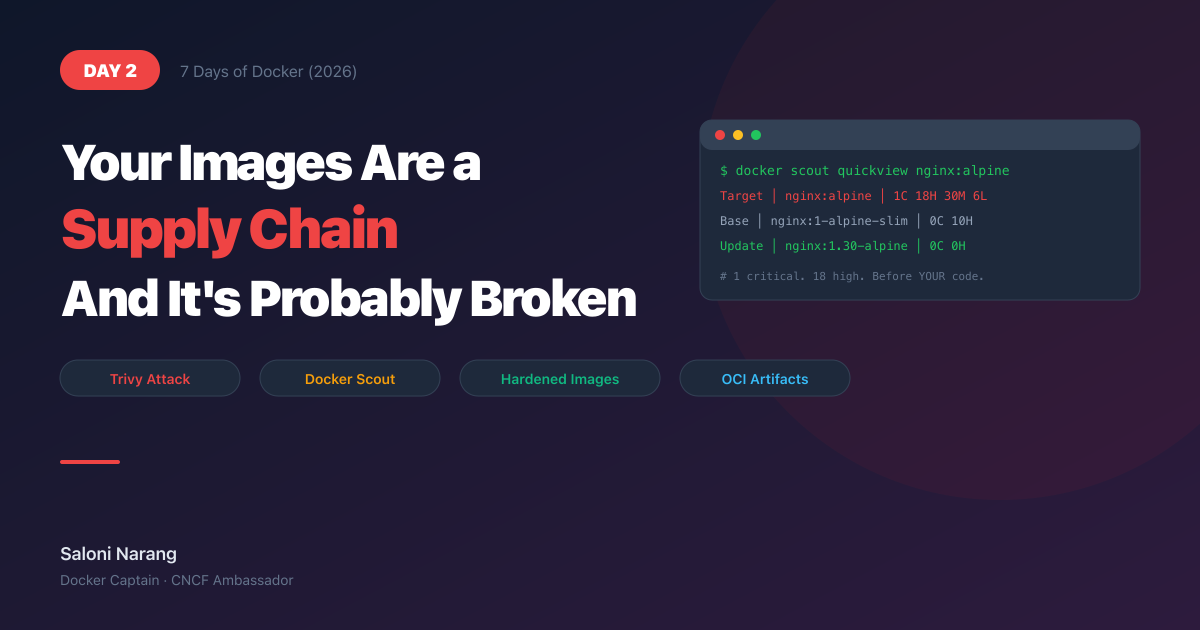
I'm a Docker Captain. I've seen hundreds of Docker tutorials explain images as "blueprints" or "templates" and then move on. That's not good enough anymore. In March 2026, the tool you use to scan for vulnerabilities was the vulnerability - attackers pushed backdoored Trivy scanner images to Docker Hub, and thousands of CI/CD pipelines had their secrets stolen before anyone noticed.
If you don't understand what an image actually is, where it comes from, and how to verify it, you're not just writing bad Dockerfiles. You're leaving the door open.
Today, we fix that.
What IS an Image? (Not "Layers Like a Cake") #
Forget the analogies. Here's what actually happens.
A Docker image is an OCI artifact. It consists of:
-
A manifest - a JSON document listing references to filesystem diffs and configuration
-
Blobs - compressed tarballs containing filesystem changes
-
A config - JSON metadata (environment variables, entrypoint, exposed ports)
When you run docker pull nginx:alpine, Docker contacts a registry, downloads that manifest, then fetches the blobs it doesn't already have. That's it. There is no magic.
The OCI (Open Container Initiative) standardized this format so that images are portable across any compliant runtime — Docker, Podman, containerd, you name it. An image is not a Docker-specific thing. It's a distribution format for filesystem snapshots.
What Nobody Tells You: The word "image" is misleading. There is no single file. An image is a collection of independently addressable, content-hashed blobs assembled by a manifest. When you "pull an image," you are downloading a graph of content-addressed objects. Understanding this changes how you think about caching, sharing, and security.
Layers - The Real Story #
Every instruction in a Dockerfile produces a filesystem snapshot. Docker uses a union filesystem (OverlayFS on Linux) to stack these snapshots and present them as a single coherent filesystem to the container.
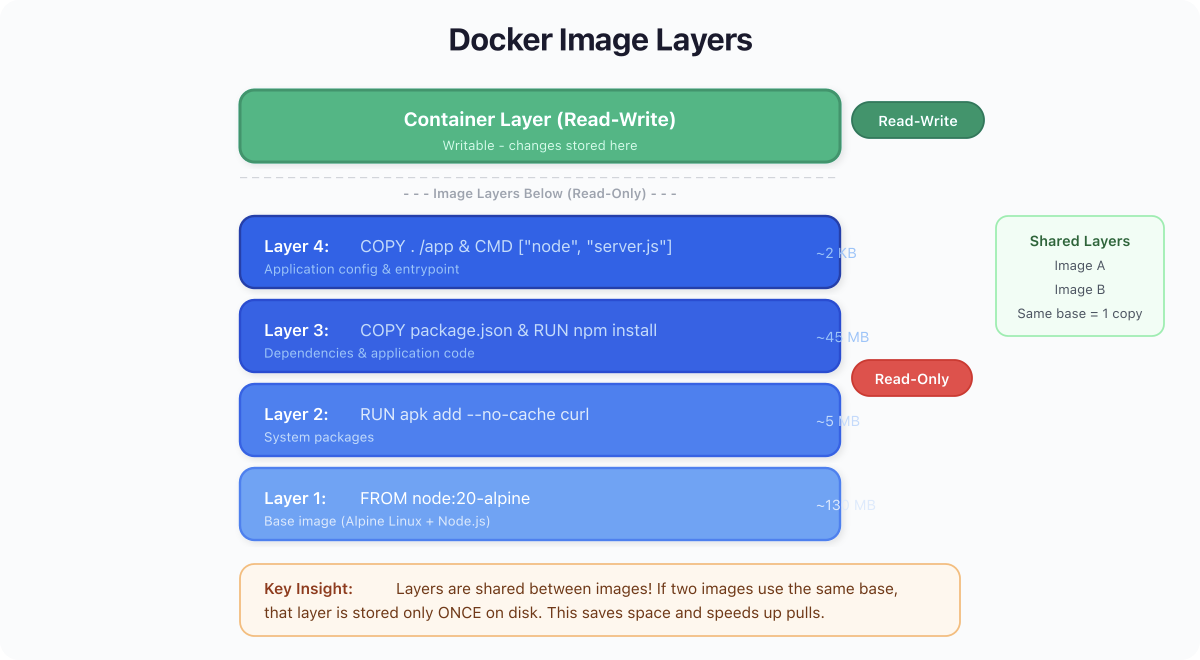
Here's what this means in practice:
-
Each layer is a diff. It records what files were added, modified, or deleted compared to the layer below it.
-
Layers are content-addressed. Each one has a SHA256 digest. Same content = same hash = stored once.
-
Copy-on-write. When a container starts, Docker adds a thin writable layer on top. Reads fall through to the image layers. Writes get captured in the writable layer. The image layers are never touched.
This is why docker pull says "Already exists" for layers you already have from another image. If nginx:alpine and redis:7-alpine share the same Alpine base layer, Docker stores it once, and both images reference it.
Let's see this with a real image. Pull nginx:alpine and then inspect its history:
docker pull nginx:alpinealpine: Pulling from library/nginx
d17f077ada11: Pull complete
910c2a6cad6d: Pull complete
a89d14ef5abe: Pull complete
a96b658a00fe: Pull complete
10cbc192f783: Pull complete
634f1d1ce0f7: Pull complete
83fbf849ee89: Pull complete
662c8d6f6620: Pull complete
Digest: sha256:5616878291a2eed594aee8db4dade5878cf7edcb475e59193904b198d9b830de
Status: Downloaded newer image for nginx:alpine
docker.io/library/nginx:alpineNow look at how the image was built:
docker history nginx:alpineIMAGE CREATED CREATED BY SIZE
7f7dcd27f920 6 days ago RUN /bin/sh -c set -x && apkArch="$(cat ... 48.3MB
<missing> 6 days ago CMD ["nginx" "-g" "daemon off;"] 0B
<missing> 6 days ago STOPSIGNAL SIGQUIT 0B
<missing> 6 days ago EXPOSE map[80/tcp:{}] 0B
<missing> 6 days ago ENTRYPOINT ["/docker-entrypoint.sh"] 0B
<missing> 6 days ago COPY 30-tune-worker-processes.sh... 4.62kB
<missing> 6 days ago RUN /bin/sh -c set -x && addgroup -g 101... 4.51MB
<missing> 6 days ago ENV NGINX_VERSION=1.29.8 0B
<missing> 6 days ago CMD ["/bin/sh"] 0B
<missing> 6 days ago ADD alpine-minirootfs-3.23.3-aarch64.tar.gz 8.7MBRead bottom-to-top. The base Alpine filesystem is 8.51 MB. The nginx install adds 40.5 MB. CMD, ENV, EXPOSE — those create 0-byte metadata-only layers. The <missing> entries mean those layers were built on a remote build server, which is completely normal for pulled images.
What Nobody Tells You: Not every Dockerfile instruction creates a layer that takes disk space. Only
RUN,COPY, andADDproduce filesystem changes. Everything else (CMD,ENV,EXPOSE,LABEL,ENTRYPOINT) is metadata written into the image config JSON. When you see "0B" indocker history, that's why.
The Supply Chain Problem #
Images come from registries. Registries can be compromised. And in March 2026, they were.
Attackers pushed backdoored versions of the Trivy vulnerability scanner to Docker Hub. Trivy — the tool that organizations run in their CI/CD pipelines to detect compromised images — was itself compromised. The backdoored images exfiltrated environment variables, secrets, and CI tokens from every pipeline that pulled them. Thousands of organizations were affected before the images were pulled down.
Think about that. The security tool was the attack vector.
This isn't a hypothetical. This happened. And it happened because most teams treat docker pull it like apt install - They assume the registry is trustworthy and the image is what it claims to be.
Your images are a supply chain. Every FROM in your Dockerfile, every base image you pull, every tool you run in CI — it's a link in that chain. One compromised link and everything downstream is exposed.
Docker Scout: Not Optional in 2026 #
After March 2026, image scanning is not a "nice to have." Docker Scout is built into the Docker CLI and gives you visibility into what's inside your images.
Start with a quick overview:
docker scout quickview nginx:alpine Target │ nginx:alpine │ 0C 2H 9M 1L 1?
digest │ 7f7dcd27f920 │
Base image │ nginx:1-alpine-slim │ 0C 0H 1M 0L
Updated base image │ nginx:1.30-alpine-slim │ 0C 0H 1M 0LZero critical. 2 high. 9 medium. This is actually a good result -> nginx:alpine was just patched days ago. But run this same scan on an image you haven't updated in 3 months and watch the numbers explode. The point is: you wouldn't know without scanning.
Let's dig into what's still there:
docker scout cves nginx:alpine --only-severity critical,high## Packages and Vulnerabilities
0C 1H 0M 0L nghttp2 1.68.0-r0
✗ HIGH CVE-2026-27135
https://scout.docker.com/v/CVE-2026-27135
Affected range : <=1.68.0-r0
Fixed version : not fixed
0C 1H 0M 0L curl 8.17.0-r1
✗ HIGH CVE-2026-3805
https://scout.docker.com/v/CVE-2026-3805
Affected range : <=8.17.0-r1
Fixed version : not fixed
2 vulnerabilities found in 2 packages
CRITICAL 0
HIGH 2Even a freshly-pulled, just-patched image has 2 high-severity CVEs, and both say "not fixed" yet. These are zero-day-adjacent vulnerabilities in curl and nghttp2, sitting in every nginx:alpine container on the planet right now. Imagine what your 6-month-old base image looks like.
Docker Scout generates SBOMs (Software Bills of Materials), tracks CVEs across your image catalog, and integrates with CI. If you're not running this, you're flying blind.
Docker Hardened Images (DHI) #
Docker released Hardened Images as a direct response to the supply chain crisis. Here's what they offer:
-
95% fewer CVEs compared to standard Docker Hub images
-
Rootless by default - no process runs as root
-
Distroless runtime - minimal attack surface, no shell, no package manager
-
7-day fix guarantee - critical CVEs patched within a week
-
1000+ images available and growing
-
Free and open source under Apache 2.0
In practice, switching from nginx:alpine to a Docker Hardened Image means you inherit a fraction of the vulnerability surface. For anything running in production, DHI should be your default starting point.
Pro Tip: DHI images are distroless at runtime - there is no shell to
docker execinto for debugging. During development, use the standard image. In your production Dockerfile stage, switch to the DHI variant. Multi-stage builds (Day 3) make this trivial.
Image Naming - More Than You Think #
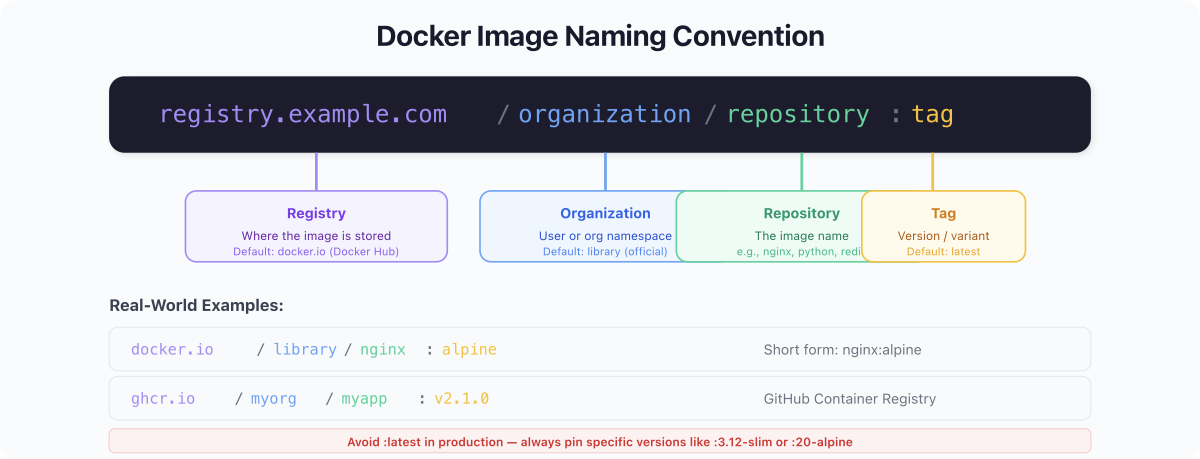
The full format of an image reference:
registry/namespace/repository:tag@sha256:digest| Component | Example | Default |
|---|---|---|
| Registry | docker.io, ghcr.io, 123456.dkr.ecr.us-east-1.amazonaws.com | docker.io |
| Namespace | library (official), myuser, myorg | library |
| Repository | nginx, redis, myapp | (required) |
| Tag | alpine, 1.29.3, latest | latest |
| Digest | sha256:4ff102e6b2d5f84... | (none) |
These are all equivalent:
nginx
nginx:latest
library/nginx:latest
docker.io/library/nginx:latestTags are mutable. Digests are immutable. This distinction matters more than almost anything else in this post.
What Nobody Tells You: An image tagged
:latesttoday and:latesttomorrow can be completely different binaries. Tags are pointers that can be moved. Anyone with push access can retag an image at any time. Digests are content hashes that cannot be faked. In production, pinsha256digests. In the March 2026 Trivy attack, the malicious images were pushed under existing tags — anyone pulling by tag got the backdoor. Anyone pinning by digest was unaffected.
Hands-On: Inspect, Scan, Understand #
Let's put it all together. Run these commands and understand what each one tells you.
Check what's on disk:
docker images --format "table {{.Repository}}\t{{.Tag}}\t{{.Size}}" | head -15REPOSITORY TAG SIZE
node 20-alpine 136MB
nginx alpine 53.4MB
ubuntu latest 101MB
hello-world latest 5.2kB
alpine latest 8.51MB
redis 7-alpine 41.7MBAlpine is 8.51 MB. Ubuntu is 101 MB. For a base image, that's a 12x difference in attack surface before you've installed anything.
Check disk usage across all Docker resources:
docker system dfTYPE TOTAL ACTIVE SIZE RECLAIMABLE
Images 86 17 22.49GB 5.294GB (23%)
Containers 41 0 366MB 366MB (100%)
Local Volumes 14 5 1.721GB 1.676GB (97%)
Build Cache 56 0 1.926GB 278.2kB22.49 GB in images. 41 stopped containers taking 366 MB. 1.9 GB of build cache. Run docker system prune -a periodically, or this grows without bound.
Pull process visualized:
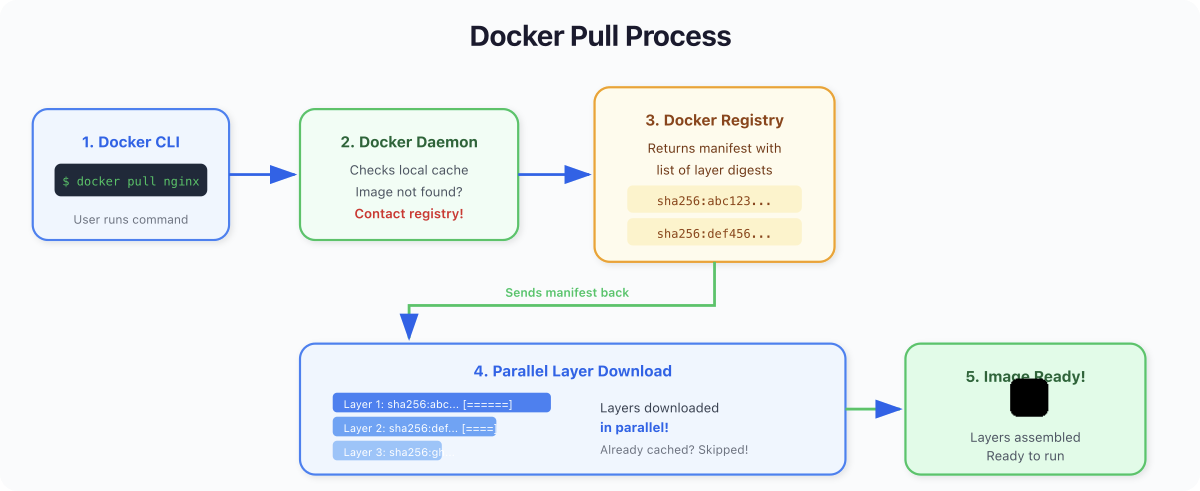
When you docker pull nginx:alpine:
-
Docker resolves
nginx:alpinetodocker.io/library/nginx:alpine -
Contacts the registry, fetches the manifest
-
Checks each layer against local storage
-
Downloads missing layers in parallel (compressed)
-
Verifies every layer's SHA256 digest
-
Assembles the image locally
If any digest doesn't match, the pull fails. This is content-addressable storage doing its job - but it only protects you against tampering in transit, not a compromised image at the source.
Pro Tip: Need to pull for a different architecture? Use
--platform:docker pull --platform linux/amd64 nginx:alpine. This is common when building on Apple Silicon for amd64 deployment targets.
Quick Reference #
| Command | What It Does |
|---|---|
docker pull nginx:alpine | Download image from registry |
docker images | List local images |
docker history nginx:alpine | Show layers and their sizes |
docker inspect nginx:alpine | Full JSON metadata |
docker scout quickview nginx:alpine | Vulnerability summary |
docker scout cves nginx:alpine | Detailed CVE listing |
docker system df | Disk usage breakdown |
docker image prune -a | Remove all unused images |
docker system prune -a | Full cleanup (images, containers, cache) |
| Concept | Key Point |
|---|---|
| OCI image | A manifest + blobs + config, not a single file |
| Layers | Filesystem diffs, content-addressed, shared across images |
| Tags | Mutable pointers — can change at any time |
| Digests | Immutable content hashes — pin these in production |
| Docker Scout | Scan images, generate SBOMs, catch CVEs before deploy |
| DHI | Hardened images: 95% fewer CVEs, rootless, distroless, free |
| Copy-on-write | Containers share image layers, writes go to the writable layer |
What's Next: Day 3 #
You now know what images are, how the supply chain works, and why scanning is non-negotiable. But you've only pulled images other people built.
On Day 3: Building Images with Dockerfiles, you'll write your own. You'll learn the build cache, layer ordering, multi-stage builds, and how to produce images that are small, fast, and don't ship with a shell an attacker can use.
See you tomorrow.
Get new posts in your inbox.
Spotted a typo or want to improve this post? Edit on GitHub →