Introducing kiac: Real Kubernetes Nodes on Your Mac, Each Its Own Lightweight VM
kiac runs local Kubernetes on macOS where every node is its own lightweight VM via apple/container: kubeadm or k3s flavors, Cilium on a custom kernel, built-in LoadBalancer, Grafana, Gateway API, and clusters that survive reboots.
On this page (21)
- A quick intro to Apple containers
- How a kiac cluster works
- Why this is more isolated than a node in a Docker container
- Getting started
- Requirements
- Install and check
- Create a cluster
- Useful flags on create
- Pick your flavor
- What --observability actually hands you
- Seeing the isolation pay off
- kubectl top just works
- type: LoadBalancer gets a real IP you can curl
- Load a locally-built image into every node
- Clusters that survive a reboot
- A web console when you want one
- Honest trade-offs
- Where this is going
- Come build it with me
- Credit where it is due
- Try it
kiac (Kubernetes in Apple Containers) runs local Kubernetes clusters where every node is its own lightweight virtual machine. Each node has its own kernel, its own cgroups, and its own IP that your Mac can reach directly. It is built on apple/container and Apple's Containerization framework, which went 1.0 in June 2026 and made this possible natively, with no Docker Desktop, no Lima, and no QEMU.
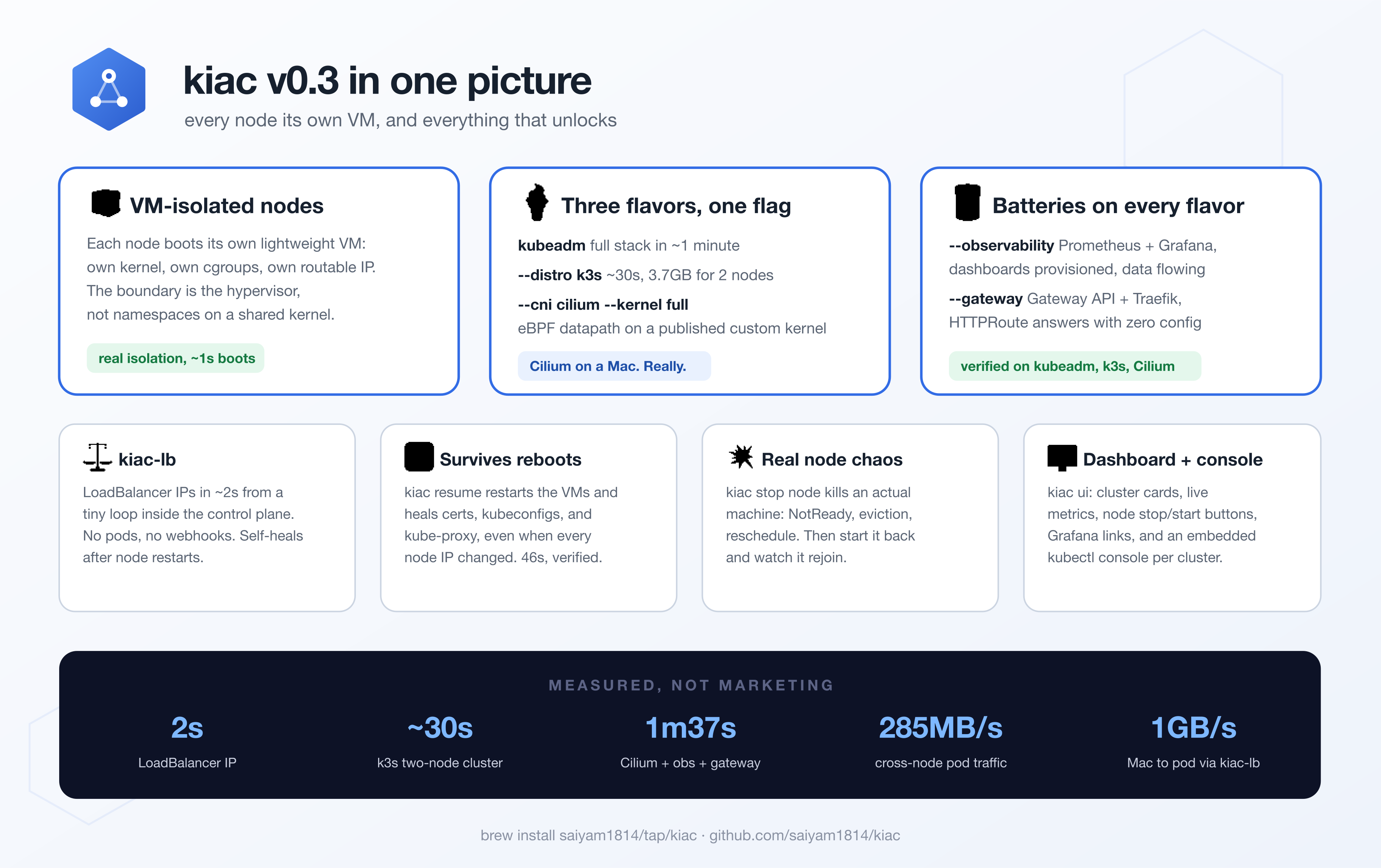
And the per-node-VM idea goes further than you might expect: pick kubeadm or k3s as your flavor, run Cilium's eBPF datapath on a published full-featured kernel, get a working LoadBalancer and Grafana out of the box, survive host reboots, and practice real node failure, all from one small CLI.
brew install saiyam1814/tap/kiac
kiac create cluster --name dev --workers 2
This post explains the parts that make kiac interesting: how an Apple container actually works under the hood, how kiac assembles those into a Kubernetes cluster, and why that gives you a stronger isolation boundary than a node running inside a Docker container.
A quick intro to Apple containers #
First, what apple/container actually is. It is Apple's own open-source container tool for macOS: a Swift-native CLI (container run, container build, container images, the workflow you already know) that Apple announced at WWDC 2025 and shipped as 1.0 in June 2026. It is built on a lower-level Swift framework called Containerization, and both are designed for Apple silicon, talking straight to the hypervisor built into macOS. There is no Docker daemon underneath, no hidden Linux VM you have to manage, and nothing to install besides a signed package from Apple.
The interesting part is what it does differently. An Apple container is not a process sandboxed by namespaces. It is a full virtual machine. The Containerization framework boots a separate, minimal Linux VM for every single container, using Apple's Virtualization.framework on the silicon in your Mac.
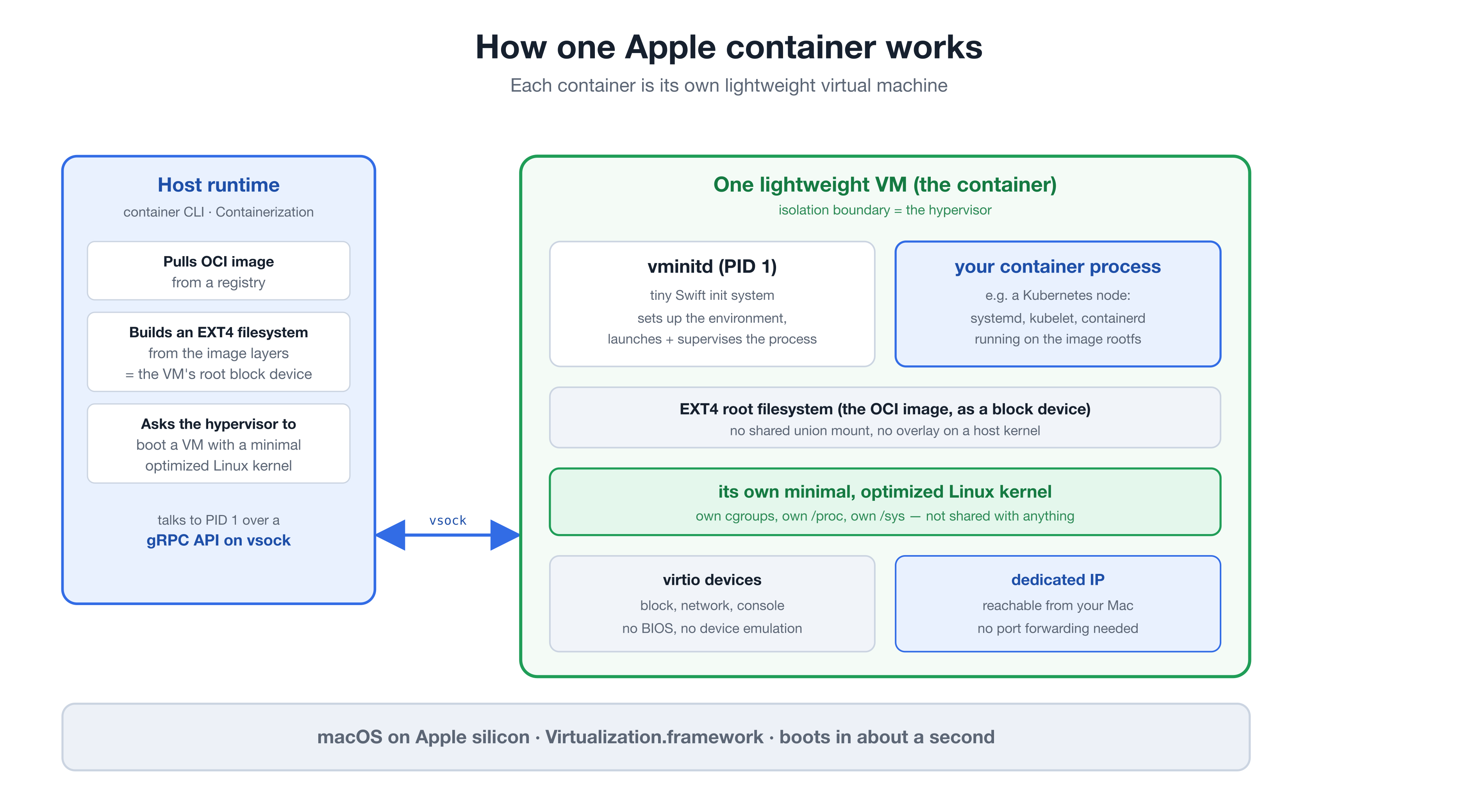
Here is what happens when you run a container:
-
The image becomes a disk. The runtime pulls the OCI image and builds an EXT4 filesystem from its layers. That filesystem is handed to the VM as its root block device. There is no overlay or union mount layered on top of a shared host kernel. The image is literally the VM's disk.
-
A dedicated kernel boots. The runtime asks
Virtualization.frameworkto start a VM with a minimal, optimized Linux kernel that Apple bundles with the runtime (6.12 at the time of writing). This kernel belongs to that one container. It is not shared with the host or with any other container. It is also unusual: it is monolithic, with zero loadable modules. Everything it supports is compiled in, and anything left out simply does not exist inside the VM; there is nomodprobeescape hatch. That is part of how it boots so fast, and it matters later when we talk about CNIs. -
vminitdcomes up as PID 1. Inside the VM, a tiny init system written in Swift, calledvminitd, is the first process. It sets up the environment and launches and supervises your actual container process. The host runtime drives it through a gRPC API carried overvsock, the VM-to-host socket transport. -
Devices are virtio, networking is direct. The VM uses virtio devices for block, network, and console. There is no BIOS and no legacy device emulation to slow the boot, which is why these VMs start in about a second rather than the half-minute a classic VM takes. On a supported macOS, each container also gets its own dedicated IP address, so you reach it directly without port forwarding.
The payoff of this design is that you get the developer experience of containers (OCI images, registries, a docker-style CLI) on top of the isolation primitive of a virtual machine (a real, private kernel). That combination is exactly what makes it a good foundation for Kubernetes nodes.
How a kiac cluster works #
A Kubernetes node wants to be a machine. It expects its own kernel, its own kubelet, its own cgroup hierarchy for resource accounting, and its own network identity. An Apple container gives it all of those. kiac is the glue that turns a handful of these VMs into a working cluster.
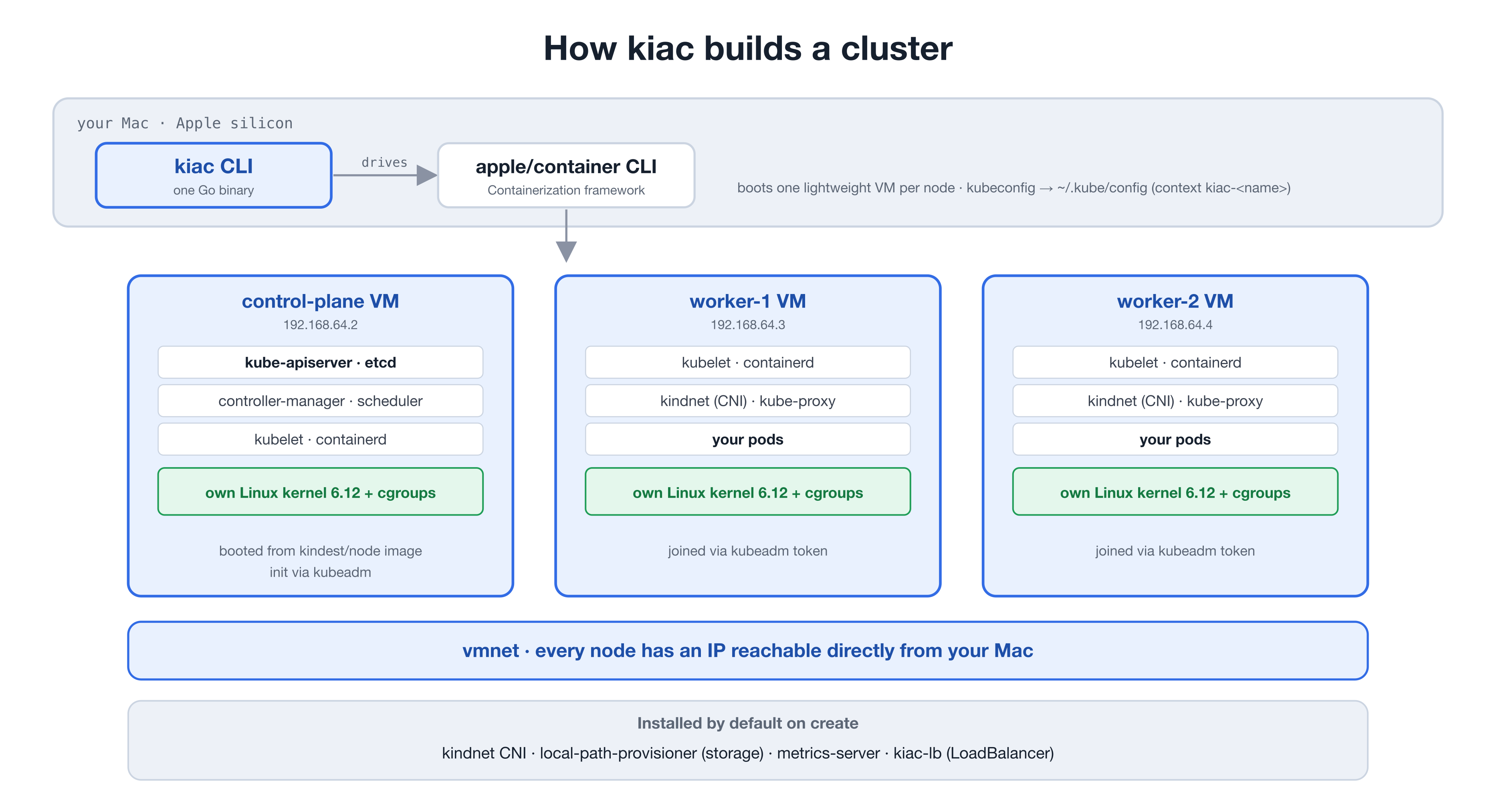
When you run kiac create cluster, the flow is:
-
Boot the node VMs. kiac drives the
apple/containerCLI to start one lightweight VM per node, each booted from the standardkindest/nodeimage. That image already contains systemd, containerd, and kubeadm, so kiac is not reinventing the node, it is reusing a known-good one on a new runtime. -
Initialize the control plane. kiac runs
kubeadm initinside the first VM. This brings up etcd, the API server, the controller manager, and the scheduler. This step is the bulk of the create time, because it is realkubeadmdoing real work. -
Join the workers. Each worker VM runs
kubeadm joinagainst the control plane using a bootstrap token. Because every node has its own routable IP on thevmnetnetwork, they talk to each other like machines on a small LAN. -
Install a usable default stack. A bare cluster is not much fun, so every create installs four things by default:
- kindnet for the pod network
- local-path-provisioner as a default StorageClass, so PVCs bind and StatefulSets work immediately
- metrics-server, configured for kubeadm's self-signed kubelet certs, so
kubectl topworks out of the box - kiac-lb, a purpose-built LoadBalancer controller, so
type: LoadBalancerservices get a real EXTERNAL-IP you can curl from your Mac
kiac-lb deserves a sentence, because it is not what you expect. It is not a set of pods with webhooks and ARP speakers. It is a tiny systemd loop inside the control-plane VM that drives the node's own
kubectland assigns each Service a node IP local to its endpoints, in about two seconds. It shares one IP across Services on disjoint ports, and it re-checks its assignments, so it heals itself after node restarts. Since every node IP is already routable from your Mac, nothing needs to answer ARP at all.
Why is kindnet the default and not Flannel or Cilium? This is where that minimal kernel comes back. Most CNIs build an overlay: they wrap pod traffic in VXLAN or Geneve tunnels, or run an eBPF datapath, and the bundled kernel compiles none of that in (no CONFIG_VXLAN, no br_netfilter, no BPF JIT, and with zero loadable modules nothing can be added at runtime). kindnet needs none of it. It is plain L3 routing: every node already has a routable IP on the same vmnet segment, so kindnet just installs a route on each node for every other node's pod CIDR, and pod traffic is forwarded as ordinary IP packets. No encapsulation, no tunnel device. The only kernel features it needs (veth pairs, a bridge, iptables NAT) are all compiled in. When you do want the fancy datapath, v0.3 has an answer: a published full kernel. More on that in a moment.
- Write the kubeconfig. kiac merges a context named
kiac-<name>into your~/.kube/config(and backs up your existing config the first time). Your normalkubectlworkflow just works.
kiac talks only to the apple/container runtime. It never touches the Docker socket, so it coexists peacefully with Docker Desktop, Rancher Desktop, kind, and k3d if you have them.
Why this is more isolated than a node in a Docker container #
This is the heart of it. When a local Kubernetes tool runs "nodes" as Docker containers, all of those nodes are processes sharing one Linux kernel, separated only by namespaces and cgroups. Namespaces are a software boundary inside a single shared kernel. With kiac, the boundary between nodes is the hypervisor itself, the same hardware-backed boundary that separates virtual machines.
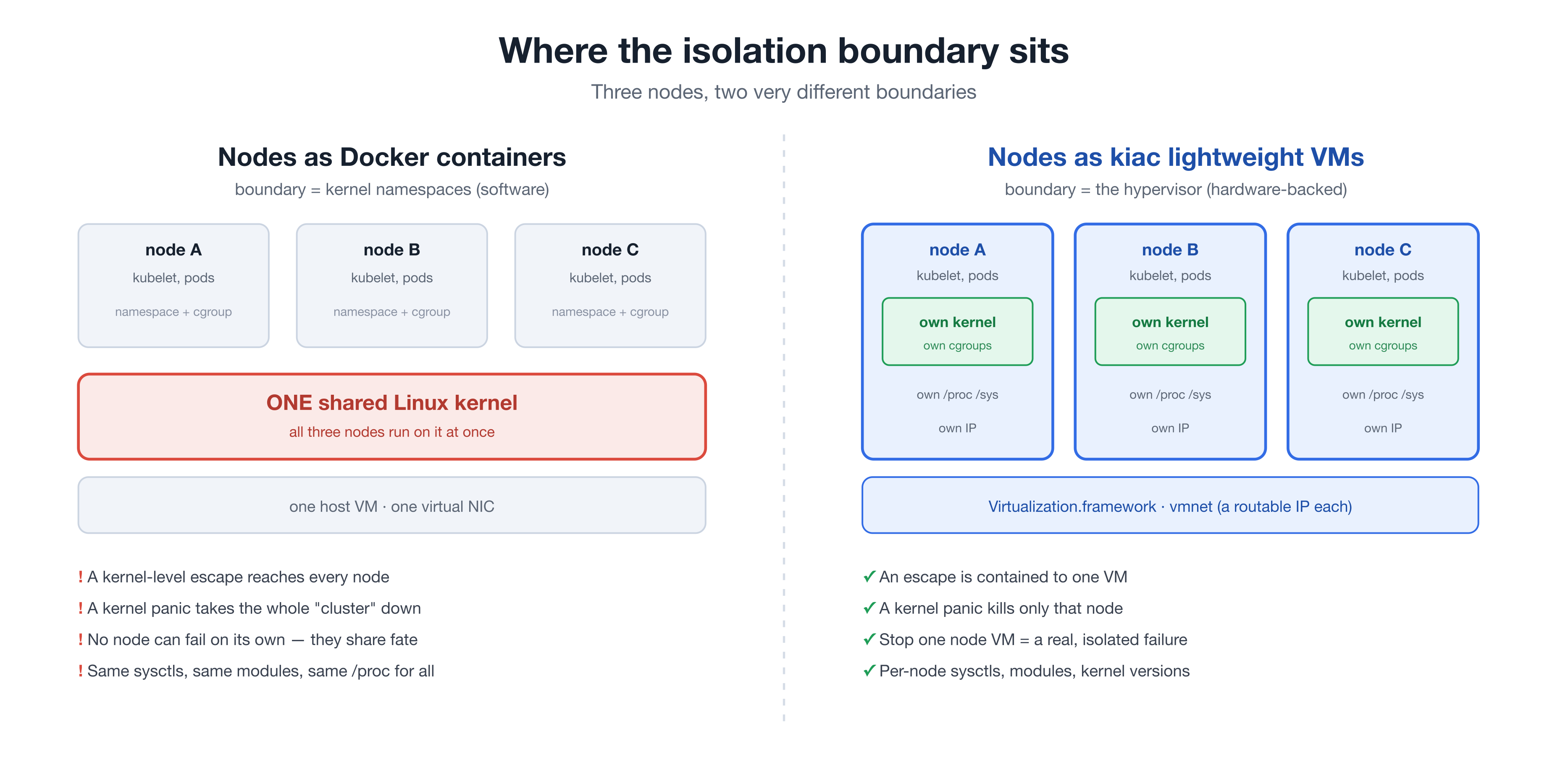
That difference is not academic. It changes what the cluster can actually do:
-
Security blast radius. A container escape is, at its core, a way to break out of the namespace boundary and reach the shared kernel. In a shared-kernel setup, reaching the kernel means reaching every other node on it. With a VM per node, an escape is contained to that one VM. To cross into another node, an attacker would have to break the hypervisor, which is a far harder boundary.
-
Failure domains. A shared kernel is a shared fate. One kernel panic, one runaway sysctl, one bad kernel module, and every node on that kernel goes down together. With kiac, a kernel problem stays inside the VM that caused it. The other nodes do not even notice.
-
Real node failure. Because each node is a separate VM, you can stop one and have it behave like an actual node going offline: the control plane detects NotReady, evicts the pods, and reschedules them elsewhere. kiac ships this as a first-class command pair,
kiac stop nodeandkiac start node, so a chaos drill is two commands. You cannot meaningfully test that when "stopping a node" means killing one of several processes that share a kernel. -
Per-node kernel reality. Each node has its own
/proc, its own/sys, its own sysctls, and, with--kernel, its own kernel build. Node-level behavior is real, not simulated, which is exactly what you want when the thing you are testing is node-level behavior.
None of this means containers are bad. For packaging and shipping software, the container model is excellent, and kiac depends on it. The point is narrower: when the workload you are isolating is itself a machine, a machine-grade boundary is the right tool, and that is what a lightweight VM gives you.
Getting started #
Requirements #
- An Apple silicon Mac
- macOS 26 or newer for multi-node clusters (single-node works on macOS 15, with limitations)
- apple/container 1.0.0 or newer
kubectl
Install and check #
brew install saiyam1814/tap/kiac
kiac doctorkiac doctor verifies your macOS version, that the apple/container CLI is present and recent, that its system service is running, and that kubectl is on your PATH. If the container service is not running, kiac doctor --fix starts it for you.
Create a cluster #
kiac create cluster --name dev --workers 2⬢ kiac v0.3.0 · Kubernetes in Apple Containers
✓ Preflight checks (0.3s)
✓ Pulling node image kindest/node:v1.36.1 (8.2s)
✓ Booting 3 node VM(s) (9.6s)
✓ Initializing Kubernetes control plane (24.8s)
✓ Joining 2 worker(s) (8.4s)
✓ Installing CNI (kindnet) (0.4s)
✓ Installing addons (storage, metrics-server) (0.6s)
✓ Installing LoadBalancer (kiac-lb) (1.9s)
✓ Waiting for nodes to be Ready (7.1s)
✓ Labeling LoadBalancer primary node (0.3s)
✓ Writing kubeconfig (0.2s)
Cluster "dev" is ready in 1m2s. Every node is its own lightweight VM.About a minute for three nodes. The node VMs themselves boot in seconds; most of the time is real kubeadm initializing a real control plane.
Useful flags on create #
| Flag | Default | What it does |
|---|---|---|
--name | dev | cluster name |
--workers | 0 | worker count (the control plane is untainted when 0) |
--k8s-version | 1.36 | Kubernetes minor, pinned digests for 1.32 through 1.36 |
--distro | kubeadm | distribution per node VM: kubeadm (kindest/node) or k3s (rancher/k3s) |
--cni | kindnet | pod network: kindnet, cilium (needs --kernel full), or none to bring your own |
--kernel | Apple's bundled kernel | full downloads the published kiac kernel, or pass a path to your own kernel Image |
--cpus | 4 | vCPUs per node VM |
--memory | 2G | memory per worker VM |
--cp-memory | 4G | memory for the control-plane VM |
--config | cluster config YAML; flags set explicitly on the command line override file values | |
--observability / --gateway | off | opt-in stacks: Prometheus + Grafana, and Gateway API + Traefik |
--no-metrics / --no-storage / --no-lb | off | skip any default addon |
Pick your flavor #
v0.3 gives you three ways to build the same per-node-VM cluster:
# Default: kubeadm on kindest/node, the closest thing to a production cluster
kiac create cluster --name dev --workers 2

# k3s: the lightest and fastest, batteries included
kiac create cluster --name edge --distro k3s --workers 1

# Cilium on the full kernel (prereq: brew install cilium-cli)
kiac create cluster --name lab --cni cilium --kernel full --workers 2k3s takes the VM-per-node idea to its logical extreme: rancher/k3s runs as PID 1 inside each VM, with a sqlite datastore instead of etcd and its bundled servicelb, local-path storage, and metrics-server. No systemd layer, no kubeadm. A two-node cluster is up in about 30 seconds and the whole thing idles around 3.7GB of host RSS. One kiac-specific twist: kiac applies kindnet instead of k3s's default flannel, because flannel's bridge backend without br_netfilter breaks same-node service traffic on the stock kernel. The k3s guide has the details.
Cilium is the fun one, because it should not work here at all. Apple's bundled node kernel is monolithic with zero loadable modules, and it leaves out everything an eBPF CNI needs: no VXLAN or Geneve encapsulation, no br_netfilter, no BPF JIT, no BTF. There is no modprobe, so nothing can be added at runtime. On the stock kernel, Cilium's agent simply cannot bring up its datapath.
The per-node-VM architecture is the way out. Since every node boots its own kernel, kiac can just boot a different one. --kernel full downloads a published kernel build (release kernel-v6.12.28-full, sha-pinned, cached under ~/.kiac/kernels) that kiac builds in CI from kernel.org source: Apple's own config as the base, plus VXLAN, Geneve, br_netfilter, nf_tables, the BPF JIT with BTF, WireGuard, and kprobes compiled in. Same monolithic design, same fast boot, just with the networking features present. On that kernel, the full Cilium stack (Cilium plus the --observability and --gateway addons) comes up verified in 1m37s.
The performance result was the surprise. Cilium's VXLAN overlay rides vmnet's fast path: around 285MB/s of cross-node pod-to-pod throughput, and about 1GB/s from the Mac straight to a pod. Counterintuitively, the encapsulated path is the fast one here; routed CNIs crawl on bulk cross-node transfers over vmnet, which kiac mitigates by assigning LoadBalancer IPs local to the pods they serve. If you want the full walkthrough, see the Cilium guide and examples/cilium-cluster.md.
Whatever the flavor, --observability adds Prometheus v3.5.0 and Grafana 12.0.2 with two provisioned dashboards on a LoadBalancer IP at :3000, and --gateway adds Gateway API v1.5.1 CRDs plus Traefik v3.7.6 with a ready-to-use Gateway. Both are verified on kubeadm, k3s, and Cilium clusters.
What --observability actually hands you #
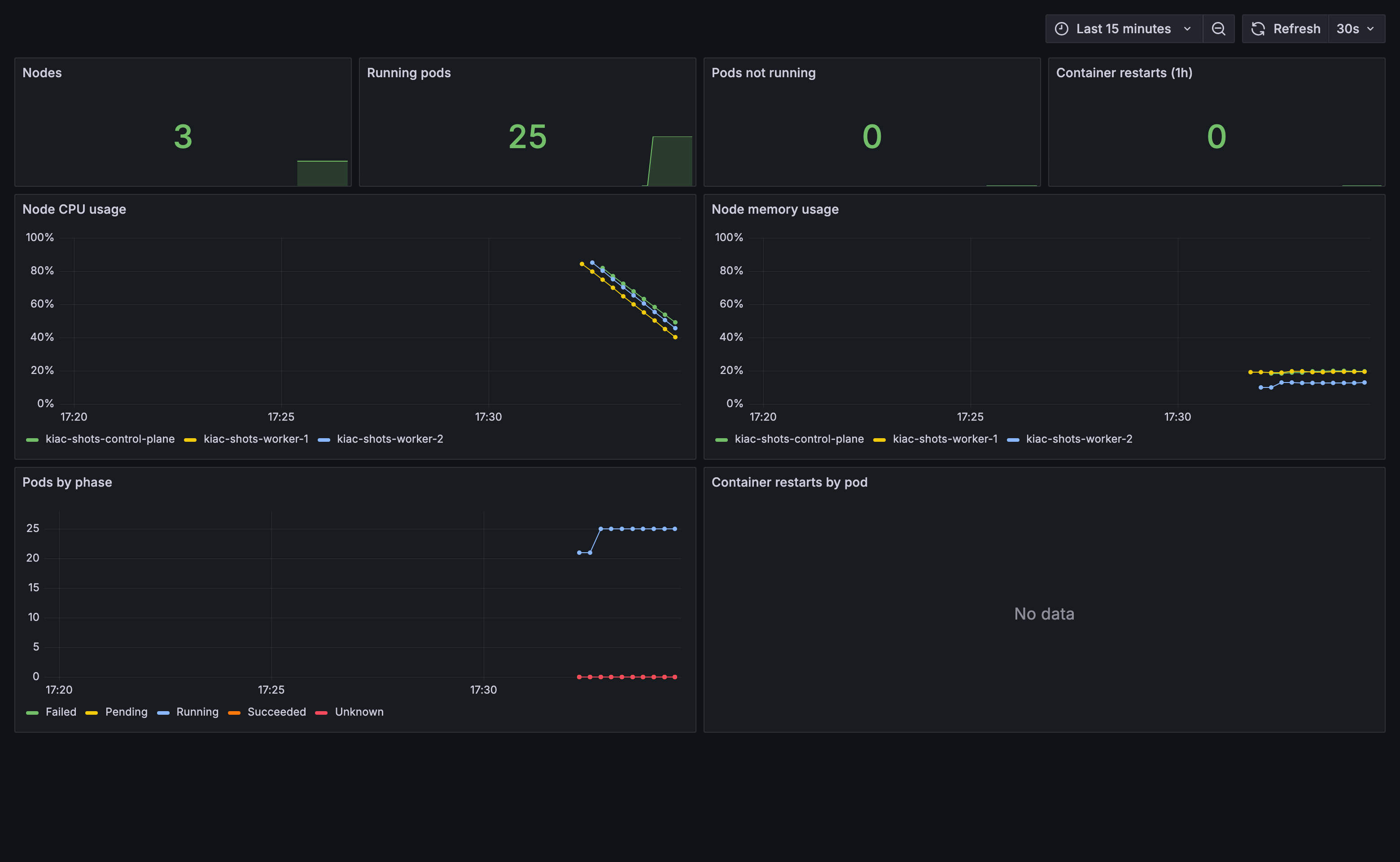
Every flavor takes --observability, and this is the real thing, not a checkbox. Prometheus scrapes your nodes, kubelets, and kube-state-metrics from second one, and Grafana comes up on a LoadBalancer IP with dashboards already provisioned. This screenshot is a three-node cluster a few minutes after kiac create cluster --workers 2 --observability, untouched:
Seeing the isolation pay off #
Here is a real three-node cluster, with kubectl get nodes -o wide.
NAME                       STATUS   ROLES           VERSION   INTERNAL-IP    OS-IMAGE                       KERNEL-VERSION    CONTAINER-RUNTIME
kiac-dev-control-plane     Ready    control-plane   v1.36.1   192.168.64.2   Debian GNU/Linux 13 (trixie)   6.12.28 (arm64)   containerd://2.3.1
kiac-dev-worker-1          Ready    <none>          v1.36.1   192.168.64.3   Debian GNU/Linux 13 (trixie)   6.12.28 (arm64)   containerd://2.3.1
kiac-dev-worker-2 Ready <none> v1.36.1 192.168.64.4 Debian GNU/Linux 13 (trixie) 6.12.28 (arm64) containerd://2.3.1Each node reports its own kernel version and its own INTERNAL-IP on the vmnet network, reachable straight from your Mac.
kubectl top just works #
kubectl top nodesNAME CPU(cores) CPU(%) MEMORY(bytes) MEMORY(%)
kiac-dev-control-plane 269m 5% 828Mi 20%
kiac-dev-worker-1 35m 0% 288Mi 14%
kiac-dev-worker-2 52m 1% 359Mi 18%Real kubelet, real cAdvisor, real cgroups inside a real Linux VM. Give metrics-server about 60 seconds for its first scrape, and kubectl top reports actual numbers with no patching.
type: LoadBalancer gets a real IP you can curl #
kubectl create deploy web --image=nginx --replicas=2
kubectl expose deploy web --port=80 --type=LoadBalancer
kubectl get svc webNAME TYPE CLUSTER-IP EXTERNAL-IP PORT(S) AGE
web LoadBalancer 10.104.197.79 192.168.64.3 80:30495/TCP 4scurl http://192.168.64.3
# HTTP 200 in 0.004s, straight from your Mac. No tunnel, no <pending>.That EXTERNAL-IP appeared about two seconds after the Service was created, courtesy of kiac-lb, and it is a node IP local to the pods behind it.
Load a locally-built image into every node #
container build -t myapp:dev .
kiac load image myapp:dev --name devWhen you are done, tear it all down:
kiac delete cluster --name devClusters that survive a reboot #
Restart your Mac, then run kiac resume cluster --name dev. kiac boots the node VMs back up, waits for the API server, and heals everything a reboot breaks: control-plane certificate SANs, the kubeconfigs inside the VMs and on your Mac, and kube-proxy, even if vmnet handed out a whole new subnet while the cluster was down (verified across a subnet change in 46 seconds). Resume works on kubeadm clusters today; the persistence docs cover exactly what it repairs and why.
A web console when you want one #
kiac ui opens a local dashboard where you can create, watch, and delete clusters, running the same engine as the CLI: cluster cards with live per-node CPU and memory, stop and start buttons for node chaos, and one-click links to Grafana and your Gateway.
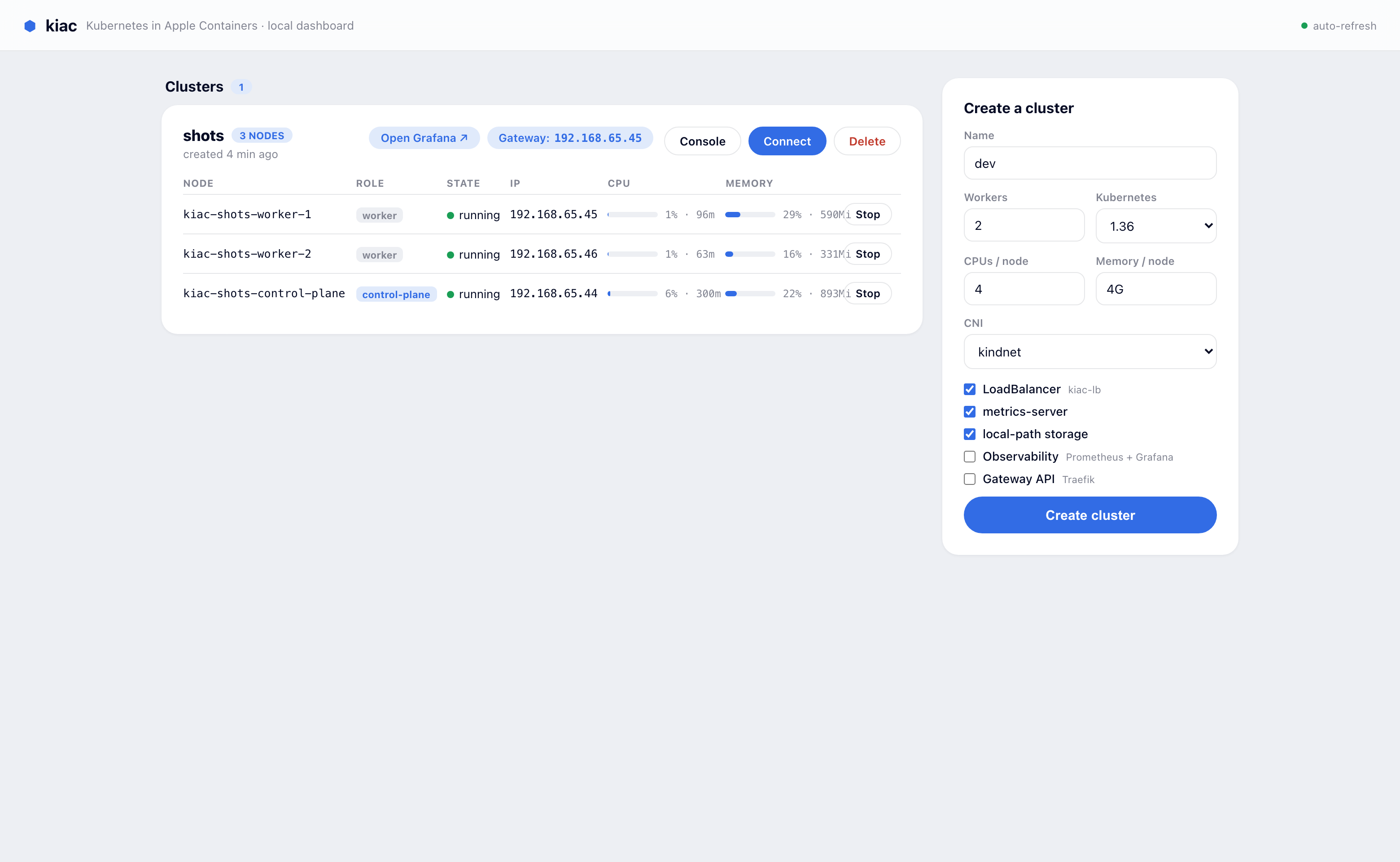
Each cluster also gets a kubectl Console drawer, so you can fire off commands against any cluster without leaving the browser:
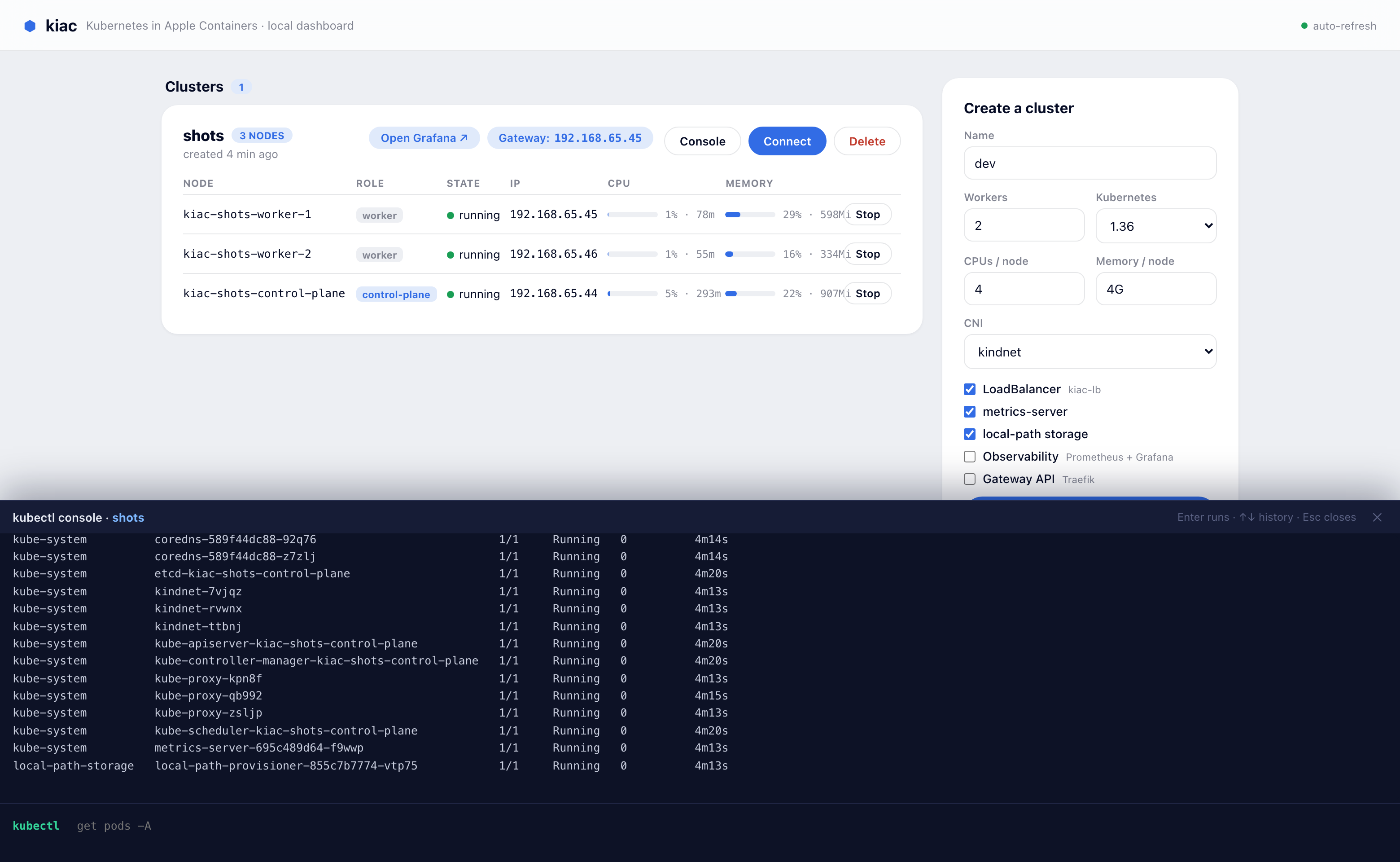
The dashboard docs have a full tour.
Honest trade-offs #
Real isolation is not free, and I would rather you hear the limits from me than discover them mid-demo.
- RAM. Each worker VM reserves 2G and the control plane 4G by default (tunable with
--memoryand--cp-memory). An idle worker only uses a few hundred MB inside the guest, as thekubectl topoutput above shows, but the reservation is real. A three-node cluster is not something you run on an 8GB machine. If memory is tight,--distro k3skeeps a two-node cluster around 3.7GB of host RSS. - macOS 26+ for multi-node. Node-to-node networking relies on
vmnetcontainer-to-container support. Single-node works further back, with limits. - Apple silicon only. This is an arm64 story end to end.
- Restarted VMs and host TCP. After
kiac stop nodeandkiac start node, new TCP connections from your Mac to that specific VM are dropped by a knownapple/containervmnet issue. Traffic inside the cluster is unaffected, and a full host reboot followed bykiac resumedoes not hit it. It makes node chaos drills slightly less pretty than they should be, and it is tracked upstream. - Bulk cross-node throughput on routed CNIs. Large transfers between pods on different nodes are slow over vmnet with routed CNIs like kindnet. kiac mitigates it by assigning LoadBalancer IPs local to the serving pods, and the Cilium flavor avoids it entirely because its overlay rides vmnet's fast path.
- Resume is kubeadm-only today. k3s clusters do not survive a host reboot yet.
- Create takes about a minute for three nodes. The node VMs boot in seconds; most of the time is real
kubeadminitializing the control plane.
Where this is going #
kiac is deliberately small, and there is a clear list of what comes next:
- Persistent clusters backed by
container machine(the persistent Linux environments Apple shipped at WWDC26), so resume becomes a fast path instead of a repair job. - HA control planes, because multiple real control-plane VMs is exactly what this architecture is for.
- One-flag Calico and Flannel now that the full kernel has the features they need.
- Hubble wired into the Cilium flavor for flow observability.
Come build it with me #
kiac is genuinely easy to contribute to: one Go binary with a clean cmd/ + pkg/ layout, a runtime you can poke at directly with the container CLI, and an issues page where items come scoped with context, file pointers, and acceptance criteria so a first PR has a clear finish line.
Two other great ways in:
- Run the example guides and break them. cilium-cluster, k3s-cluster, chaos-drill, and resume-drill are copy-pasteable end-to-end walkthroughs. If a step does not match what you see, that is an issue worth filing.
- Read the contributing guide for the layout, test setup, and how a PR flows.
And if you just run a cluster and something breaks, that is a contribution too: open an issue with the output of kiac doctor.
Credit where it is due #
kiac stands on other people's work. The apple/container and Containerization teams at Apple built the runtime that makes any of this possible. Akihiro Suda's kina was the proof-of-concept that showed Kubernetes on apple/container was viable at all. The node experience reuses the kindest/node image from the kind project, and the k3s flavor reuses rancher/k3s. kiac is the packaging that turns those pieces into a one-command local cluster.
Try it #
brew install saiyam1814/tap/kiac
kiac doctor
kiac create cluster --name dev --workers 2

# or the eBPF flavor
kiac create cluster --name lab --cni cilium --kernel full --workers 2- GitHub: github.com/saiyam1814/kiac
- Docs and site: saiyam1814.github.io/kiac
It is open source and MIT licensed. If you run a cluster on it, I would love to know what you break first. Issues and PRs welcome.
Saiyam is working as Head of DevRel at vCluster Labs. He is the founder of Kubesimplify, focusing on simplifying cloud-native & AI infrastructure. He is KubeCon Co-chair and has worked on many facets of Kubernetes, including machine learning platforms, scaling, multi-cloud, & managed Kubernetes services. When not coding, Saiyam contributes to the community by writing blogs and organizing local meetups for Kubernetes and CNCF. He is also a CNCF TAG OpsRes Chair & can be reached on Twitter @saiyampathak.
Get new posts in your inbox.
Spotted a typo or want to improve this post? Edit on GitHub →