Controlling MCP Tools with agentgateway on Kubernetes (Part 1)
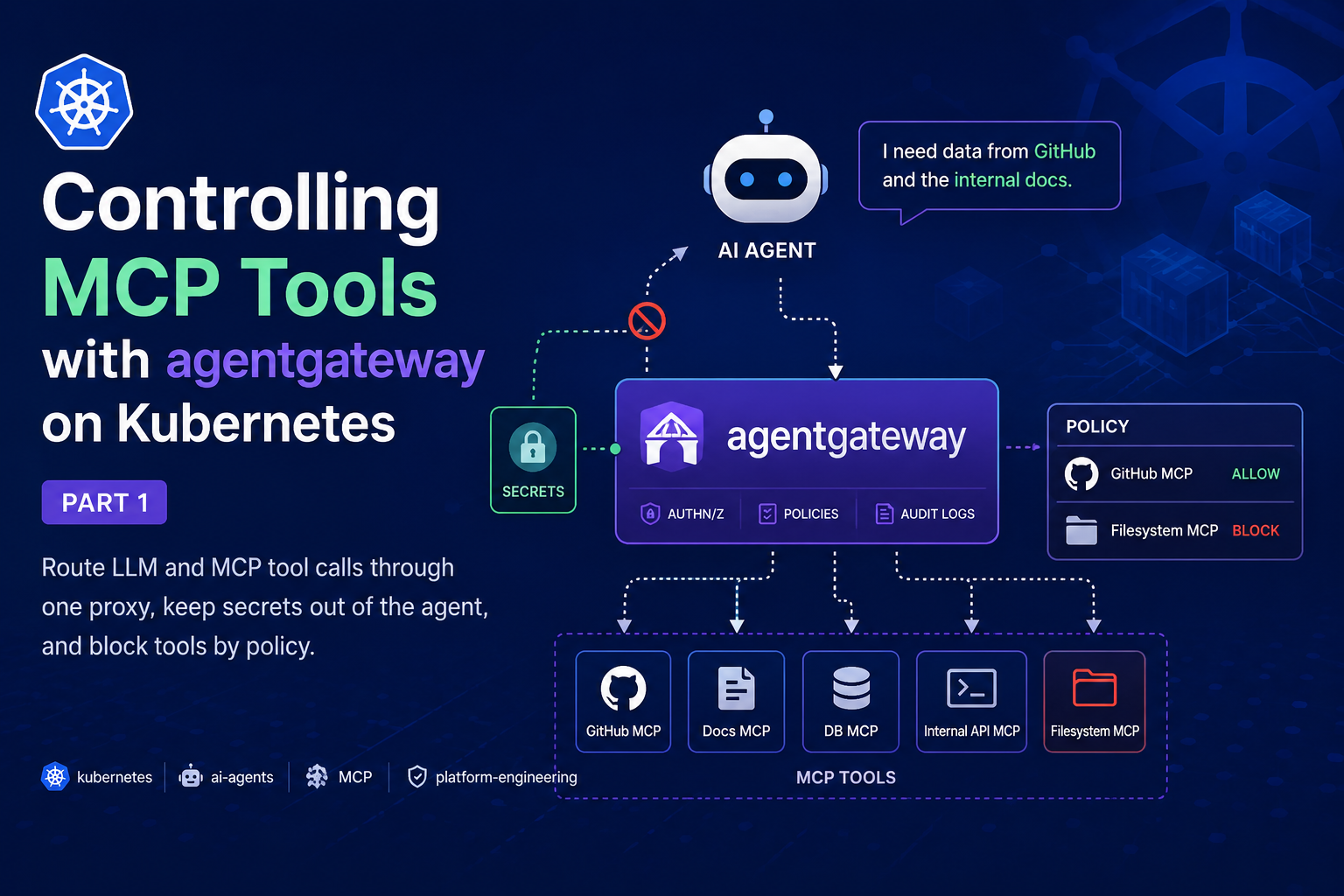
Run AI agents behind agentgateway on Kubernetes: route their LLM and MCP tool calls through one proxy, keep secrets out of the agent, and block tools by policy.

On this page (19)
- Prerequisites
- Why AI Agents Need Their Own Gateway
- What agentgateway Actually Is
- The Three Reasons You'd Actually Reach for It
- Reason 1: Security and governance you can enforce centrally
- Reason 2: Cost and token visibility
- Reason 3: One data plane for any framework and any provider
- How agentgateway Touches Cost, Time, and Developer Experience
- The Architecture We'll Build
- How to Spin Up a kind Cluster
- How to Install agentgateway
- How to Route LLM Traffic Through the Gateway
- How to Connect an MCP Tool Server Through the Gateway
- How to Build the Agent with Google ADK
- How a single turn flows through the gateway
- How to Control Which MCP Tools the Agent Can Use
- The Security Properties Compared
- Common Issues and How to Solve Them
- Conclusion
This is Part 1 of a two-part series. In this part you stand up agentgateway on Kubernetes, put a Google ADK agent behind it so the agent holds zero secrets, and enforce tool-level access control that you can watch block a tool in real time. Part 2 adds cost and observability: Prometheus, Grafana, and a live token-spend dashboard.
The available artifacts are available at https://github.com/shkatara/agentgateway-security-observability.git
agentgateway is an open source, AI-native proxy. By the end of this part, your agent will talk to its tools (over MCP) and its model (over an OpenAI-compatible API) through the gateway, hold none of its own credentials, and be unable to call a tool you have not explicitly allowed.
Who this is for:
- Platform engineers, SREs, and backend engineers who are starting to run AI agents in production and are realizing that "the agent has every API key and can call every tool" is not a strategy.
- Anyone who has shipped one agent, watched three more appear, and now needs a single place to enforce security across all of them.
What you'll build in Part 1:
- A
kindcluster running the agentgateway control plane and proxy. - An LLM route, so the agent's model calls flow through the gateway and the provider key lives only in the gateway.
- An MCP route to the remote GitHub MCP server, with the GitHub token injected by the gateway.
- A Google ADK agent whose model and tools both go through the gateway and which carries no real secrets.
- Tool-level access control: you allow one tool and watch the gateway hide another, so calling it comes back as an
Unknown toolerror.
Note: agentgateway is a fast-moving project (a Linux Foundation / Agentic AI Foundation project, currently around the v1.2 to v1.3 line). Pin the versions shown here, and expect custom resource fields to evolve. Every command below was written against the
v1.2.xcharts and theagentgateway.dev/v1alpha1API.
Prerequisites #
For this tutorial, you'll need:
- A machine with Docker and
kindinstalled. kubectlandhelm(v3+).- Node.js (for
npx, used to run the MCP Inspector verification tool). - Python 3.10+ (required by the Google ADK agent and the
mcpSDK it uses). - An API key for an LLM provider. This guide uses OpenAI; an Anthropic key works too. A note for OpenAI users: the API is billed separately from a ChatGPT Plus or Pro subscription, so you need credit on the API account itself.
- A GitHub Personal Access Token (classic or fine-grained): the agent's tools will be the remote GitHub MCP server, which is perfect for a tool-access demo because it exposes many tools.
Every manifest in this post is inline and copy-pasteable. There is no repo to clone.
Why AI Agents Need Their Own Gateway #
Here's a scenario that is playing out in a lot of companies right now.
A team ships their first agent. It needs an LLM, so they paste an OpenAI key into a Kubernetes Secret and mount it. It needs tools, so they wire it directly to a couple of MCP servers: one for GitHub, one for an internal database, one for filesystem access. It works. Everyone's happy.
Then it scales. Now there are eight agents across four teams. Each one holds its own copy of the LLM key. Each one connects directly to whatever MCP servers it likes. Nobody can answer three questions that suddenly matter a lot:
- Who spent the $14,000 on OpenAI last month, and on which model?
- Which agents can call the
delete_repositorytool, and who approved that? - When an agent does something dumb, where's the trace?
The first instinct is to put the existing API gateway in front of it all. That instinct is wrong, and it's worth understanding why, because it explains the entire reason agentgateway exists.
Traditional API gateways are built for one shape of traffic: stateless, REST-style, one request in, pick a backend, one response out. Agent protocols like the Model Context Protocol (MCP) and Agent-to-Agent (A2A) are a completely different beast:
| Traditional API Gateway | Agent traffic (MCP / A2A) |
|---|---|
| Stateless request/response | Stateful JSON-RPC sessions with long-lived connections |
| One request to one backend | Session fan-out across multiple MCP servers at once |
| Client-initiated only | Bidirectional: servers push events to clients over SSE |
| Routing by path/header | Protocol-aware routing that parses JSON-RPC message bodies |
| Static backend mapping | Dynamic tool virtualization: different clients see different tools |
A normal gateway can't filter a tools/list response to hide a tool from one caller, because it has no idea what a tools/list response is. It can't authorize an individual tool call, because the tool name lives inside a JSON-RPC body it never parses. You'd be bolting agent-awareness onto something that was never designed for it.
That's the gap. Agent traffic needs a data plane that speaks these protocols natively.
What agentgateway Actually Is #
agentgateway is an open source proxy and control plane, written in Rust, that unifies HTTP, gRPC, LLM, MCP, and A2A traffic in a single data plane. It's a project under the Linux Foundation (and the Agentic AI Foundation), not a single vendor's closed product.
The important framing is that it is a full HTTP and gRPC proxy with the things you'd expect, such as load balancing, retries, timeouts, TLS, rate limiting, and authorization. On top of that, it implements the pieces that traditional gateways are missing for agents. So you don't run a "normal gateway" and a separate "AI gateway." It's one data plane.
It does three jobs:
-
LLM Gateway. It exposes a single, OpenAI-compatible API and routes to OpenAI, Anthropic, Gemini, Bedrock, Azure, Ollama, and many more. Your application code stops caring which provider is behind it. You get token metering, cost tracking, budgets, failover, and guardrails for free.
-
MCP Gateway. It connects agents to tools over MCP, with tool federation (aggregate many MCP servers behind one endpoint), OpenAPI-to-MCP conversion, and per-tool authentication and authorization.
-
A2A Gateway. It secures agent-to-agent communication so agents can discover and collaborate without exposing their internal tools and state.
It runs anywhere: bare metal, VMs, Docker, or Kubernetes. And on Kubernetes it's built on the standard Gateway API, so Gateway and HTTPRoute resources work exactly as you'd expect, extended with a couple of custom resources (AgentgatewayBackend, AgentgatewayPolicy) for the agent-specific parts.
The Three Reasons You'd Actually Reach for It #
There are a lot of features. But in practice, teams adopt agentgateway for three reasons.
Reason 1: Security and governance you can enforce centrally #
This is the big one. With agentgateway in the path, you can:
- Stop handing LLM keys and tool tokens to agents. The LLM provider key stays with the gateway. The GitHub token stays with the gateway. The agent talks to the gateway, and the gateway forwards the request to the LLM provider or MCP server with the real credentials. A compromised agent leaks nothing useful.
- Control which tools an agent can call with fine-grained, CEL-based RBAC rules, down to the individual tool name, optionally keyed on JWT claims. If a tool isn't allowed, the gateway hides it from the tool list entirely and rejects any attempt to call it.
- Apply guardrails and prompt protection on LLM and MCP traffic in one place.
You'll see the tool control enforced live later in this part.
Reason 2: Cost and token visibility #
Agent traffic is expensive and, by default, invisible. agentgateway tracks token consumption for every request and exposes it as Prometheus metrics, with labels for the model, provider, and direction. From there you can calculate cost per request, per model, or per user, graph spend in Grafana, and alert when a budget is crossed. That is the entire subject of Part 2.
Reason 3: One data plane for any framework and any provider #
agentgateway sits at the network layer, so it is framework-agnostic. LangGraph, CrewAI, the OpenAI Agents SDK, and Google ADK all just point at a URL. And because the LLM side is OpenAI-compatible, you can swap providers without touching agent code. Change the backend from OpenAI to Anthropic in the gateway, and every agent follows, with no redeploys.
How agentgateway Touches Cost, Time, and Developer Experience #
Here's how those capabilities map to the three things people actually budget for:
| Concern | Without a gateway | With agentgateway |
|---|---|---|
| Cost | Token spend is opaque; no per-model or per-team breakdown; no budgets | Per-request token metrics, cost dashboards, PromQL queries, budget alerts |
| Time | Each team re-implements auth, secret handling, retries, and logging per agent | Implement it once at the gateway; new agents inherit it by pointing at a URL |
| Developer experience | Devs juggle provider keys and tool tokens, and rewrite code to switch providers | Agents hold no secrets; one OpenAI-compatible endpoint; swap providers with zero code change |
The developer-experience point is the one engineers feel immediately. In the demo below, the agent's code contains a fake API key (sk-not-a-real-key) and no GitHub token at all, and it still works, because the gateway owns the real credentials.
The Architecture We'll Build #
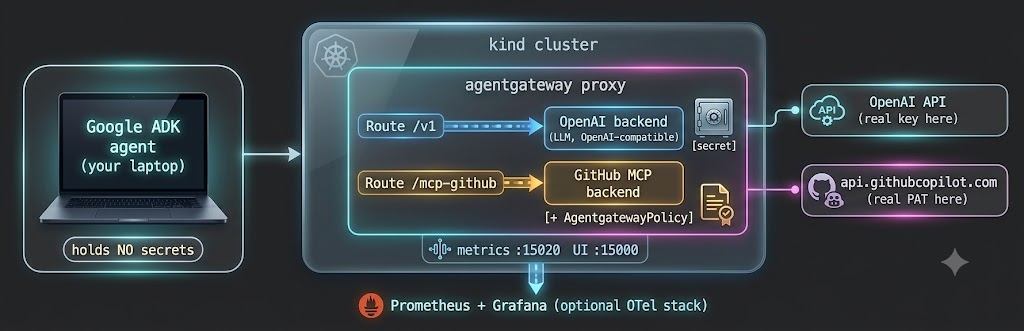
Everything runs on one kind cluster. The agent runs on your laptop and reaches the gateway through a port-forward. The gateway is the only component that holds real secrets.
Let's build it.
How to Spin Up a kind Cluster #
If you don't already have a cluster, kind gives you a real Kubernetes API in a Docker container in about thirty seconds:
kind create cluster --name agentgateway-demoConfirm it's up:
kubectl cluster-info --context kind-agentgateway-demoHow to Install agentgateway #
agentgateway on Kubernetes has two parts: a control plane (it watches Gateway API and agentgateway custom resources and translates them into proxy config) and the data plane proxies it spins up for you.
Step 1: Install the Kubernetes Gateway API CRDs. We install the experimental channel because it enables a few features (like CORS filters) that make local verification with the MCP Inspector easier.
kubectl apply --server-side --force-conflicts \
-f https://github.com/kubernetes-sigs/gateway-api/releases/download/v1.5.0/experimental-install.yamlStep 2: Install the agentgateway CRDs with Helm.
helm upgrade -i agentgateway-crds oci://cr.agentgateway.dev/charts/agentgateway-crds \
  --create-namespace --namespace agentgateway-system \
  --version v1.2.1 \
--set controller.image.pullPolicy=AlwaysStep 3: Install the agentgateway control plane. The experimental feature gate matches the experimental CRDs from Step 1.
helm upgrade -i agentgateway oci://cr.agentgateway.dev/charts/agentgateway \
  --namespace agentgateway-system \
  --version v1.2.1 \
  --set controller.image.pullPolicy=Always \
  --set controller.extraEnv.KGW_ENABLE_GATEWAY_API_EXPERIMENTAL_FEATURES=true \
--waitVerify the control plane is running:
kubectl get pods -n agentgateway-systemNAME READY STATUS RESTARTS AGE
agentgateway-5495d98459-46dpk 1/1 Running 0 19sStep 4: Create the gateway proxy. This Gateway uses the agentgateway GatewayClass; the control plane sees it and deploys an actual proxy for you.
kubectl apply -f- <<EOF
apiVersion: gateway.networking.k8s.io/v1
kind: Gateway
metadata:
  name: agentgateway-proxy
  namespace: agentgateway-system
spec:
  gatewayClassName: agentgateway
  listeners:
  - protocol: HTTP
    port: 80
    name: http
    allowedRoutes:
      namespaces:
        from: All
EOFConfirm the proxy deployment came up:
kubectl get deployment agentgateway-proxy -n agentgateway-systemStep 5: Port-forward the proxy so your laptop can reach it on localhost:8080. Leave this running in its own terminal, because every request from the agent and from curl goes here.
kubectl port-forward deployment/agentgateway-proxy -n agentgateway-system 8080:80You now have a working agent-native data plane. It just doesn't route anything yet.
How to Route LLM Traffic Through the Gateway #
We'll give the gateway your LLM provider key once, and never put it anywhere near the agent.
Step 1: Store the provider key as a Secret. We create it imperatively rather than from a file, so your key never lands in a YAML you might commit.
export OPENAI_API_KEY='<your-openai-api-key>'

kubectl create secret generic openai-secret \
  -n agentgateway-system \
--from-literal=Authorization="$OPENAI_API_KEY"Step 2: Define the LLM backend. The AgentgatewayBackend describes the provider and points at the secret for auth.
kubectl apply -f- <<EOF
apiVersion: agentgateway.dev/v1alpha1
kind: AgentgatewayBackend
metadata:
  name: openai
  namespace: agentgateway-system
spec:
  ai:
    provider:
      openai:
        model: gpt-4o-mini
  policies:
    auth:
      secretRef:
        name: openai-secret
EOFWant Anthropic instead? Swap
provider.openaiforprovider.anthropicand use an Anthropic key in the secret. The agent code does not change at all, because the agent only ever speaks the OpenAI-compatible API to the gateway.
Step 3: Route /v1 to the LLM backend. We use the /v1 path prefix so the standard OpenAI path /v1/chat/completions lands here, and so it never collides with the /mcp-github route we add next.
kubectl apply -f- <<EOF
apiVersion: gateway.networking.k8s.io/v1
kind: HTTPRoute
metadata:
  name: openai
  namespace: agentgateway-system
spec:
  parentRefs:
    - name: agentgateway-proxy
      namespace: agentgateway-system
  rules:
    - matches:
        - path:
            type: PathPrefix
            value: /v1
      backendRefs:
        - name: openai
          namespace: agentgateway-system
          group: agentgateway.dev
          kind: AgentgatewayBackend
EOFStep 4: Prove it works. Notice there is no Authorization header in this curl. The gateway adds it.
curl -sS localhost:8080/v1/chat/completions -H content-type:application/json \
-d '{"model":"gpt-4o-mini","messages":[{"role":"user","content":"hi"}]}' | jq ".choices[0].message.content"If you get a sentence back, your gateway is now a credential-free LLM endpoint.
How to Connect an MCP Tool Server Through the Gateway #
For tools, we'll front the remote GitHub MCP server. It's a great choice for this demo because it exposes many tools (get_me, search_repositories, list_issues, and more), which lets us allow one and block another in the next section.
Step 1: Store your GitHub token in your shell. The heredoc below expands it into the manifest, so it is injected at apply time rather than committed anywhere.
export GH_PAT='<your-github-personal-access-token>'Step 2: Define the MCP backend. This is a static target pointing at GitHub's MCP endpoint over HTTPS.
kubectl apply -f- <<EOF
apiVersion: agentgateway.dev/v1alpha1
kind: AgentgatewayBackend
metadata:
  name: github-mcp-backend
  namespace: agentgateway-system
spec:
  mcp:
    targets:
    - name: mcp-target
      static:
        host: api.githubcopilot.com
        port: 443
        path: /mcp/
        policies:
          tls:
            sni: api.githubcopilot.com
EOFStep 3: Route /mcp-github to it, and inject the GitHub token. The RequestHeaderModifier filter is where the gateway attaches your PAT, so the agent never sees it. The CORS filter lets the browser-based MCP Inspector connect during verification. The ${GH_PAT} is expanded from your shell by the heredoc.
kubectl apply -f- <<EOF
apiVersion: gateway.networking.k8s.io/v1
kind: HTTPRoute
metadata:
  name: mcp-github
  namespace: agentgateway-system
spec:
  parentRefs:
    - name: agentgateway-proxy
      namespace: agentgateway-system
  rules:
    - matches:
        - path:
            type: PathPrefix
            value: /mcp-github
      filters:
        - type: CORS
          cors:
            allowHeaders: ["*"]
            allowMethods: ["*"]
            allowOrigins: ["http://localhost:8080"]
        - type: RequestHeaderModifier
          requestHeaderModifier:
            set:
              - name: Authorization
                value: "Bearer ${GH_PAT}"
      backendRefs:
        - name: github-mcp-backend
          group: agentgateway.dev
          kind: AgentgatewayBackend
EOFStep 4: Verify with the MCP Inspector. This confirms the tool path works before we put an agent on top of it.
npx @modelcontextprotocol/inspector@0.21.2 \
  --cli http://localhost:8080/mcp-github \
  --transport http \
  --method tools/call \
--tool-name get_meYou should get back a JSON blob describing your GitHub profile. The gateway is now a credential-free tool endpoint, too.
How to Build the Agent with Google ADK #
Now the fun part. We'll build a small agent with Google's Agent Development Kit that points both its model and its tools at the gateway.
Step 1: Set up a clean Python environment. Use a virtualenv on Python 3.10+ so that adk and python resolve to the same interpreter, and install the mcp SDK explicitly. ADK needs mcp for MCP tools but does not install it by default, and a stray system Python without it is the most common reason adk run later fails with an import error.
python3 -m venv .venv
source .venv/bin/activate
pip install -U pip
pip install google-adk litellm mcpConfirm the venv's adk is the one on your PATH and that the MCP import resolves before going further:
which adk    # expect .../.venv/bin/adk   (if not, run: hash -r)
python -c "from google.adk.tools.mcp_tool import McpToolset; print('imports OK')"Step 2: Create the agent. Make a folder github_agent/ with two files.
github_agent/__init__.py:
from . import agentgithub_agent/agent.py:
from google.adk.agents.llm_agent import Agent
from google.adk.models.lite_llm import LiteLlm
from google.adk.tools.mcp_tool import McpToolset
from google.adk.tools.mcp_tool.mcp_session_manager import StreamableHTTPConnectionParams

root_agent = Agent(
    name="github_agent",
    # The model is reached THROUGH agentgateway's OpenAI-compatible endpoint.
    # The api_key is intentionally fake. The gateway holds the real one.
    model=LiteLlm(
        model="openai/gpt-4o-mini",
        api_base="http://localhost:8080/v1",
        api_key="sk-not-a-real-key",
    ),
    instruction=(
        "You are a helpful GitHub assistant. Use the available tools to answer "
        "questions about the user's GitHub account and to search repositories. "
        "If a tool call fails because it is not authorized, say so plainly."
    ),
    # The tools are reached THROUGH agentgateway's MCP endpoint.
    # No GitHub token here either. The gateway injects it.
    tools=[
        McpToolset(
            connection_params=StreamableHTTPConnectionParams(
                url="http://localhost:8080/mcp-github",
            )
        )
    ],
)Look at what this agent does not contain: a real model key, and a GitHub token. Both live in the gateway. That is the entire developer-experience and security story.
Step 3: Run it. From the directory above github_agent/:
adk run github_agentAsk it two things:
- "What's my GitHub username and profile?" → it calls the
get_metool and answers. - "Search GitHub for popular kubernetes repositories." → it calls the
search_repositoriestool and answers.
Both work right now, because we haven't restricted anything yet. That's exactly the problem we're about to fix.
How a single turn flows through the gateway #
Now that it works, here is what actually happens on the wire. The agent is the orchestrator. It makes a series of separate calls, and every one passes through agentgateway, which injects the right credential and applies the tool policy on each hop.
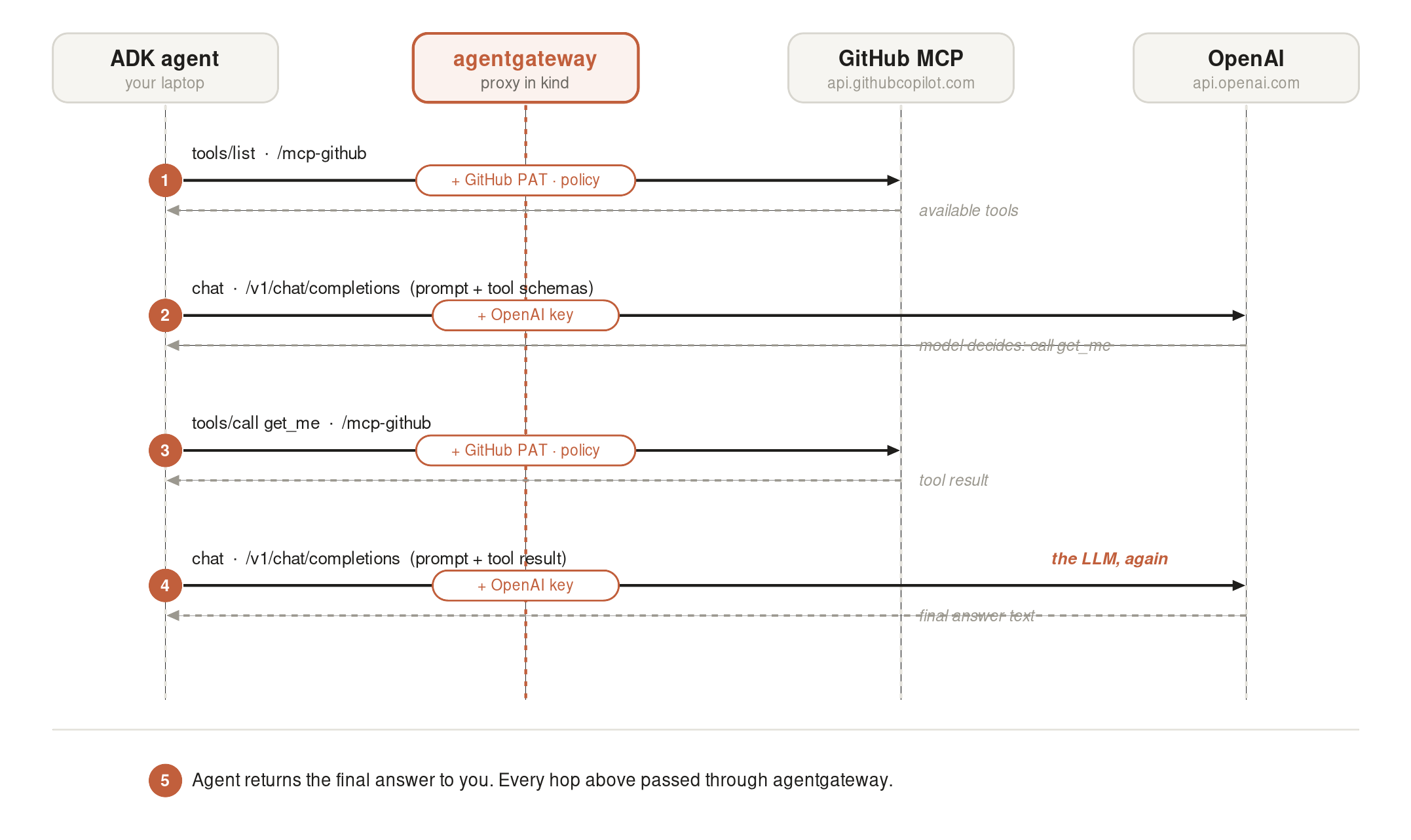
Walk through a question like "what is my GitHub username":
- Tool Discovery
- Agent asks: "What GitHub tools do I have?" via /mcp-github.
- Gateway injects: The GitHub PAT token.
- Gateway filters: Strips out any banned tools based on the AgentgatewayPolicy before handing the list back to your laptop.
- First Model Call
- Agent asks: Sends the user prompt + allowed tool schemas to /v1.
- Gateway injects: The OpenAI API key.
- Model decides: The LLM doesn't know GitHub exists; it just sees the schemas and responds with a request to run a specific tool (e.g., get_me).
- Tool Execution
- Agent executes: Calls /mcp-github to run get_me.
- Gateway checks: Re-verifies policy, applies the PAT, and fetches the real data from GitHub to give back to the agent.
- Second Model Call
- Agent finishes: Sends the raw tool data back to /v1.
- Model answers: The LLM translates the raw data into a clean, human-readable answer for your screen.
Both LLM and Github hops are credential-injected by the gateway, the OpenAI key on /v1 and the GitHub PAT on /mcp-github, so the agent holds neither secret. And every step above is a line in the proxy logs, which is why those few log entries tell the whole story of a turn.
How to Control Which MCP Tools the Agent Can Use #
This is the centerpiece. We're going to tell the gateway that this backend may only use the get_me tool, and that everything else is denied. Then we'll watch search_repositories, which worked a moment ago, get rejected.
The mechanism is an AgentgatewayPolicy attached to the MCP backend. Its authorization rules are CEL expressions; rules are OR-ed together, and if a tool matches none of them, it is denied. Critically, the agent isn't asked to behave. The gateway refuses to forward the call.
Step 1: Apply the allow-list policy.
kubectl apply -f- <<EOF
apiVersion: agentgateway.dev/v1alpha1
kind: AgentgatewayPolicy
metadata:
  name: github-tool-rbac
  namespace: agentgateway-system
spec:
  targetRefs:
    - group: agentgateway.dev
      kind: AgentgatewayBackend
      name: github-mcp-backend
  backend:
    mcp:
      authorization:
        action: Allow
        policy:
          matchExpressions:
            # Only the get_me tool is allowed. Everything else is denied.
            - 'mcp.tool.name == "get_me"'
EOFStep 2: Watch the blocked call. Run the Inspector CLI again, this time against the now-forbidden search_repositories tool:
npx @modelcontextprotocol/inspector@0.21.2 \
  --cli http://localhost:8080/mcp-github \
  --transport http \
  --method tools/call \
  --tool-name search_repositories \
--tool-arg query="kubernetes"The gateway does not just deny the call, it behaves as if the tool does not exist, because the allow-list filtered search_repositories out of this caller's view:
Failed to call tool search_repositories: Streamable HTTP error: Error POSTing to endpoint: {"jsonrpc":"2.0","id":2,"error":{"code":-32602,"message":"Unknown tool: search_repositories"}}Now confirm the allowed tool still works:
npx @modelcontextprotocol/inspector@0.21.2 \
  --cli http://localhost:8080/mcp-github \
  --transport http \
  --method tools/call \
--tool-name get_meThat one returns your profile as before. One tool allowed, one tool blocked, enforced entirely at the gateway.
Step 3: See it from the agent's side. Re-run the agent:
adk run github_agent- "What's my GitHub username?" → still works (
get_meis allowed). - "Search GitHub for popular kubernetes repositories." →
search_repositoriesis no longer in the agent's tool list at all, so the model cannot pick it. If it does try a cached name, the gateway returnsUnknown tool, and the agent tells you plainly that it cannot search.
There's a subtle, important detail here. When the gateway lists tools for a caller, it filters out the ones they can't use. So a well-behaved agent won't even be tempted to call a blocked tool, because it never sees it in the first place, and a misbehaving one that calls the name anyway gets the Unknown tool rejection above. That's defense in depth, where the tool is both hidden and refused.
If you want different tools per agent instead of one blanket allow-list, you give each agent an identity and key the CEL on it. Two ways: route each agent to its own backend and attach a different allow-list to each, or turn on MCP authentication and write rules against JWT claims, for example 'jwt.sub == "search-agent" && mcp.tool.name == "search_repositories"'. The variables available include mcp.tool.name, mcp.tool.target, and any JWT claim via jwt.<claim>.
The Security Properties Compared #
Here's the before-and-after for the security side, the way your security and platform teams will evaluate it:
| Property | Agents wired directly | Agents behind agentgateway |
|---|---|---|
| LLM provider key location | Copied into every agent | One secret in the gateway; agents hold a fake key |
| Tool credential location | Copied into every agent | Injected by the gateway; agents hold none |
| Tool permissions | Agent can call any tool the server exposes | Allow-listed per backend (and per identity) with CEL RBAC |
| Blocking a dangerous tool | Hope the prompt says "don't" | Tool hidden by policy; calling it returns Unknown tool |
| Switching LLM providers | Code change in every agent | One backend change; zero agent changes |
Common Issues and How to Solve Them #
| Symptom | Likely cause | Fix |
|---|---|---|
404 on /v1/chat/completions | LLM HTTPRoute path prefix doesn't match, or the port-forward is down | Confirm the route uses PathPrefix: /v1 and that kubectl port-forward ...8080:80 is live |
| Agent's tool calls hang or fail to connect | MCP route or backend misconfigured, or wrong transport | Verify with the MCP Inspector CLI first; ensure the agent uses StreamableHTTPConnectionParams against /mcp-github |
Every tool returns Unknown tool | An AgentgatewayPolicy allow-list matched nothing, so every tool is hidden | Widen the CEL rule or delete the policy to reset |
| Gateway has no address for a while | The control plane is still reconciling | Give it a minute; on kind you'll use the port-forward, not an external IP |
helm install fails on the OCI chart | Older Helm without OCI support | Use Helm v3.8+; OCI registries are enabled by default there |
| CORS filter rejected by the API server | Standard Gateway API CRDs installed, not experimental | Re-apply the experimental-install.yaml CRDs and the experimental feature-gate Helm flag |
| LiteLLM error about a missing/invalid key | LiteLLM still wants a key even though the gateway supplies the real one | Keep the placeholder api_key="sk-not-a-real-key"; it just needs to be non-empty |
curl: Failed writing body (zsh on macOS) | You piped an error response into a jq path that doesn't exist, so jq closes the pipe early | Read the raw body with bare jq or curl -i; it shows the real error |
LLM call returns 429 insufficient_quota | The OpenAI API account has no credit. A ChatGPT subscription does not fund the API | Add credit at platform.openai.com under Billing, or point the backend at another provider |
adk run fails with No module named 'mcp' or cannot import name 'McpToolset' | The mcp SDK is missing, or adk runs under a different Python than your venv | In an activated venv on Python 3.10+, run pip install google-adk litellm mcp, then verify which adk points into .venv |
Conclusion #
You took the problem every team hits the moment their second agent ships, secrets scattered across agents and no control over which tools they can call, and put a single, agent-native data plane in front of it.
Here's what you accomplished in Part 1:
- Understood why a traditional API gateway can't govern MCP traffic, and what agentgateway does instead.
- Stood up agentgateway on a
kindcluster with Helm and the Kubernetes Gateway API. - Routed LLM traffic through the gateway's OpenAI-compatible endpoint, with the provider key held only by the gateway.
- Fronted a multi-tool MCP server through the gateway, with the tool credential injected by the gateway.
- Built a Google ADK agent whose model and tools both flow through the gateway, while the agent itself holds no real secrets.
- Enforced tool-level access control with an
AgentgatewayPolicy, and watched the gateway hide a forbidden tool so the call returnsUnknown tool.
That is the governance half. You can now answer "which agents can call which tool," and you can prove it. The question you still can't answer is "what is all of this costing me," and that is Part 2: we add Prometheus and Grafana to the same cluster, scrape the gateway, and build a live dashboard of token throughput, per-tool usage, and an estimated dollar figure, with an alert when spend crosses a budget.
If this was useful, the agentgateway project lives at agentgateway.dev and on GitHub.
Building Hybrid K8s Platforms @trivago | Tech Author & Speaker (freeCodeCamp, SREDays) | vCluster Ambassador | RHCA & GCP DevOps Professional
Get new posts in your inbox.
Spotted a typo or want to improve this post? Edit on GitHub →