mlxcel: A Rust-Native Inference Engine for Apple Silicon, Tested on My M1 Max
Day-one deep dive into mlxcel v0.1.0, a Rust-native MLX inference engine. Real M1 Max benchmarks vs mlx-lm and Ollama on Llama 3.2 3B and Qwen 2.5 7B, with architecture diagrams and an honest take on TurboQuant.


New to the jargon? Every term, flag, and benchmark number here is explained in plain English in the local LLM glossary.
On this page (23)
- Quick primer: what is MLX, and why does Apple Silicon need its own framework?
- The short version
- Where the popular frameworks sit on that hardware
- Why this matters for the rest of the post
- Why a Rust runtime for MLX
- Architecture: how a request flows
- Installing on Apple Silicon
- First run: pre-flight memory check
- Running a model: real numbers on M1 Max
- Quick primer 2: prefill vs decode (so the numbers below make sense)
- Three-way head to head: mlxcel vs mlx-lm vs Ollama
- A note on Ollama's backend
- How the three runtimes layer up
- Llama 3.2 3B Instruct (4-bit), short prompt
- Llama 3.2 3B Instruct (4-bit), long prompt (120 words)
- Qwen 2.5 7B Instruct (4-bit), short prompt: does the gap hold at scale?
- What the numbers mean if you have a Mac
- The OpenAI-compatible server
- TurboQuant: the experimental KV-cache compression, and why my M1 Max said no
- What is missing or experimental
- What I would actually use it for
- Production readiness, honestly
- References and reproducibility
There is a new entry in the local-LLM-on-Mac arena. It is called mlxcel, it shipped its first stable release (v0.1.0) on May 28, 2026, and unlike most of the field, it is not a Python project. It is a Rust binary that calls into Apple's MLX C++ runtime directly, exposes an OpenAI-compatible HTTP server out of the box, and ships as a single Homebrew formula.
I spent the afternoon installing it on my M1 Max, running it against the same checkpoints I run through mlx-lm, and pulling apart what actually makes it different. This post is the result: an honest, end-to-end deep dive with real numbers from real hardware.
TL;DR for the impatient
brew tap lablup/tap && brew install mlxcel. Done.- On my M1 Max 64GB,
mlxcelmatchedmlx-lmdecode throughput within ~6 percent on Llama-3.2-3B-Instruct-4bit (mlxcel 63.33 tok/s vs mlx-lm 67.63 tok/s, averaged over 3 runs each, captured 2026-05-31).- On Llama 3.2 3B, mlxcel decode beats Ollama by ~1.3x on the same hardware (mlxcel 63.33 vs Ollama 48.73 tok/s, averaged over 3 runs each in the 2026-05-31 clean sweep). The MLX-vs-llama.cpp-Metal kernel architectural gap is real but smaller than my earlier session showed; see the methodology note at the bottom.
- Held up at 7B: on Qwen 2.5 7B 4-bit, mlxcel hit 31.33 tok/s vs mlx-lm 31.80 vs Ollama 24.23 (sweep averages). Decode parity with mlx-lm again; ~29% faster than Ollama.
- The OpenAI-compatible server starts in seconds and serves
/v1/chat/completionswith continuous batching and prompt caching.- The headline "2.70x prefill" speedup in the README is M5 Max specific. On M1 Max in the 2026-06-01 long-prompt re-sweep, prefill is roughly even across the three runtimes (~420-440 tok/s on a 120-word prompt), with mlxcel showing wider run-to-run variance (298-592 across 3 runs). Decode parity vs mlx-lm is the load-bearing claim.
- TurboQuant 4-bit KV cache is exciting on paper but slowed M1 Max generation by ~3.6x in my test (FP16 default 63.33 tok/s vs fp16+turbo4 17.48 tok/s). The docs are honest that older Apple Silicon paths "may have different bottlenecks." Believe them.
- If you want a clean, native, dependency-light way to run MLX models on a Mac and serve them over HTTP, this is the most interesting new option I have looked at all year.
Quick primer: what is MLX, and why does Apple Silicon need its own framework? #
Before we get into mlxcel itself, it helps to understand what MLX is and what makes Apple Silicon different from a normal GPU box. If you already know, skip to the next section.
The short version #
MLX is an array and machine-learning framework that Apple released in late 2023. Think of it as Apple's answer to PyTorch and JAX, with one critical design choice: it is built from the ground up for unified memory and the way Apple's M-series chips actually move data.
On a normal PC with an NVIDIA GPU, the CPU and GPU each have their own memory. To run a model on the GPU, you copy weights from RAM across the PCIe bus into VRAM. Every inference step that touches the CPU has to copy data back. That copy cost is small per byte but huge in aggregate.
Apple Silicon does not work that way. The CPU, GPU, and Neural Engine share the same physical RAM, the same address space, the same memory controller. There is no PCIe, no VRAM, no copy.
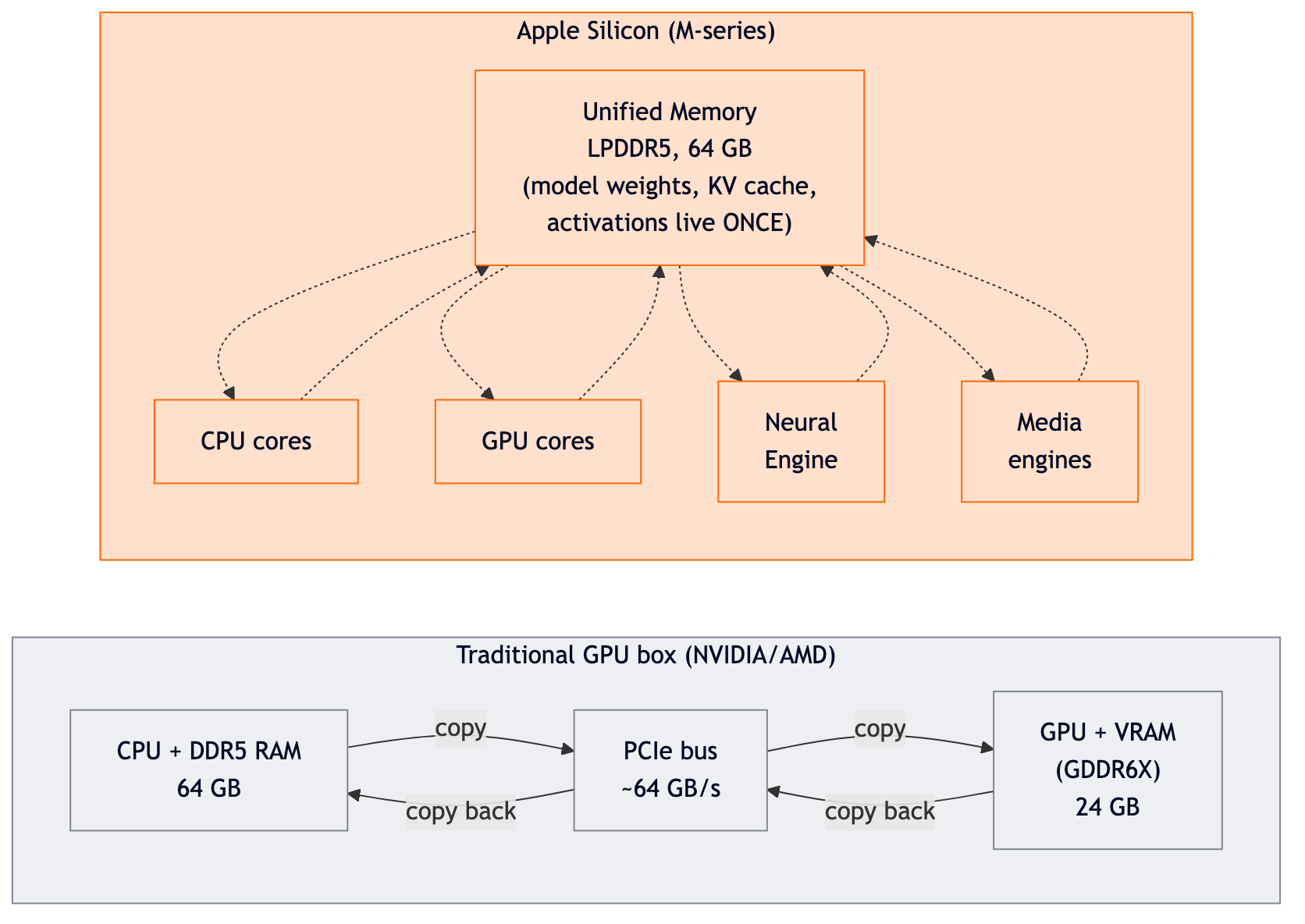
That single design choice is why a 64GB Mac can run a 30B+ parameter model that would not even fit in a consumer NVIDIA card. Your "VRAM" budget is "however much RAM you have, minus what the OS needs."
Where the popular frameworks sit on that hardware #
| Framework | Where it executes | How it treats memory |
|---|---|---|
| PyTorch / Hugging Face | CPU, or GPU via MPS shim | Assumes split memory, copies through a CPU shim layer |
| llama.cpp / GGUF (Metal backend) | CPU + GPU | Treats unified memory like a separate VRAM pool, layout inherited from the CPU inference era |
| MLX (Apple) | CPU + GPU + Neural Engine | Assumes unified memory from day one, lazy tensors, fused ops |
MLX is the only one of the three written specifically for unified memory. llama.cpp's Metal backend works well, but it inherits a design from the older world where GPU memory and system RAM are separate, so internally it is still organized around carefully shuffling data between the two pools. MLX does not carry that baggage; on Apple Silicon there is nothing to shuffle, and the framework is built around that fact.
Why this matters for the rest of the post #
When I show numbers later where mlxcel (on MLX) is ~1.3x faster than Ollama (on llama.cpp Metal) for the same model family (clean 2026-05-31 sweep), the framework-vs-framework gap is most of the explanation. mlxcel just happens to be a particularly clean way to access MLX. The same speed advantage shows up in mlx-lm too. The point is that MLX-native runtimes are faster on Apple Silicon than llama.cpp-derived ones, regardless of whether the wrapper is Python (mlx-lm), Rust (mlxcel), or Go (Ollama's MLX path for supported tags).
OK, primer over. Now back to mlxcel.
Why a Rust runtime for MLX #
The Apple Silicon local-LLM stack has settled into a pattern. You install Python, you install mlx-lm or mlx-vlm, you set up a virtualenv, you fight package versions, and you wrap the whole thing in a script. It works. It is the path almost every Mac user takes.
mlxcel makes a different bet. The argument, as the project puts it, is that model loading, scheduling, and inference should all live in a single native process. No Python interpreter, no separate process for the HTTP layer, no pip resolution. The CLI binary and the server binary are both compiled from the same Rust crate, and they call into MLX through a cxx::bridge FFI layer that lives in the in-tree mlxcel-core crate.
What you get from that bet:
- One artifact to deploy.
mlxcelandmlxcel-serverare native executables. You still need the Metal runtime on macOS and CUDA libs on Linux, but you are not provisioning a Python environment alongside the model. llama-server-style operation. The server accepts manyllama-serverflags andLLAMA_ARG_*environment variables. If you have scripts pointed atllama.cpp, the surface area to migrate is small.- A scheduler and batching layer that lives in Rust. Continuous batching, prompt-prefix caching, automatic prefix caching, speculative decoding, and KV-cache compression are all wired into the same process that runs the model.
- MLX kernels, including custom Metal kernels for TurboQuant. The in-tree
src/lib/mlx-cpp/builds against a pinned MLX commit, with project-specific kernels undersrc/lib/mlx-cpp/turbo/.
That last point is the one worth pausing on. mlxcel is not just a thin Rust wrapper over MLX. It ships custom Metal kernels for its quantized KV-cache modes (TurboQuant), and it does its own paged decode layout for continuous batching. This is a runtime with opinions.
Architecture: how a request flows #
I find these things easier to reason about as a diagram. Here is what actually happens when you run mlxcel generate -p "hello".
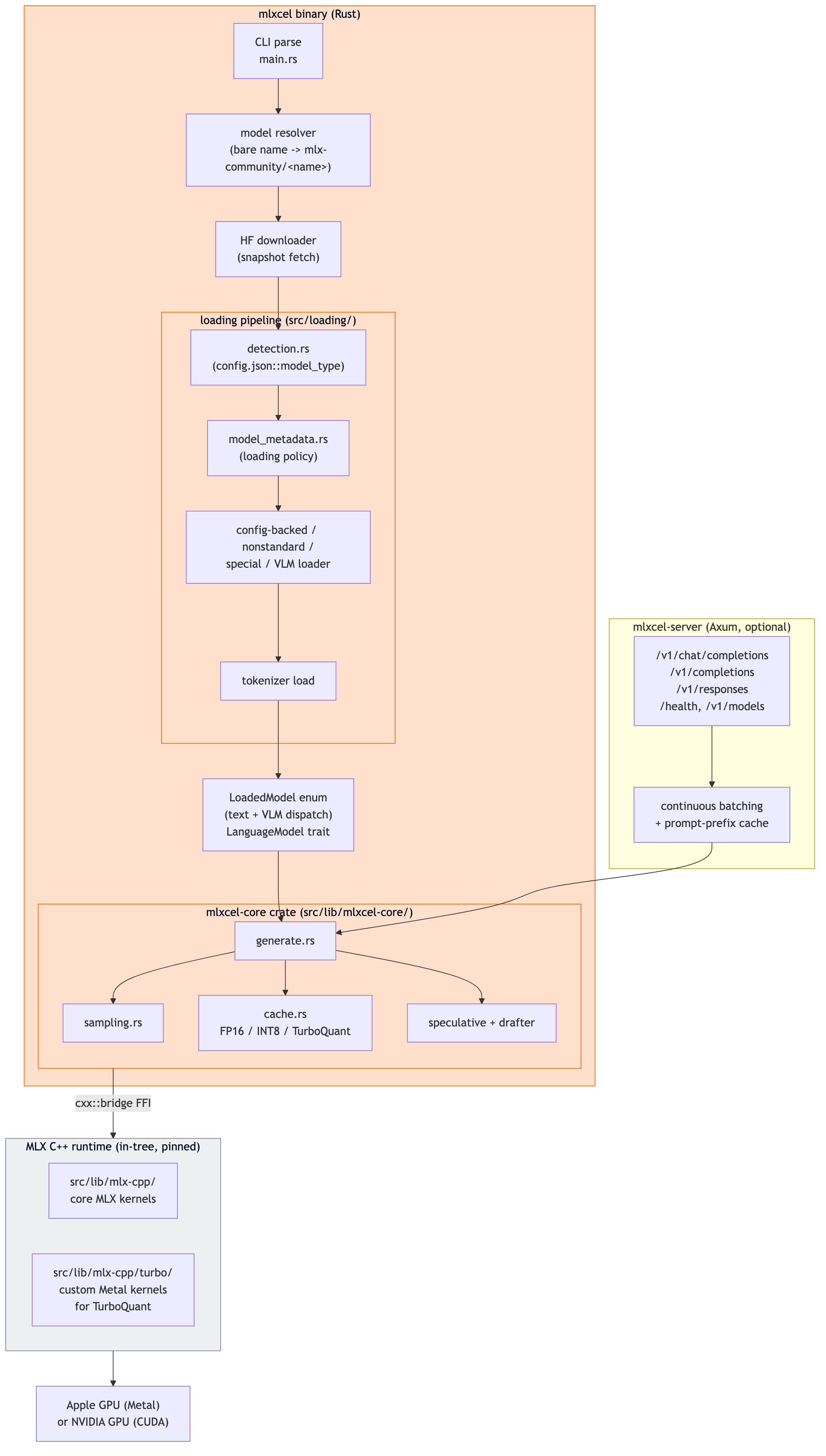
The two crates you would care about as a contributor are:
src/main.rsandsrc/commands/for the CLI and subcommand handlers.src/bin/mlx_server.rsandsrc/server/for the HTTP layer (Axum app, routes, batch scheduler).src/lib/mlxcel-core/for the low-level FFI bridge, cache implementations, sampler, and generation loop.
For mlxcel-server, the same diagram holds, with an Axum HTTP layer on top mounting /v1/chat/completions, /v1/completions, /v1/responses, /health, and /v1/models. Continuous batching kicks in through src/server/batch/ and streaming output is emitted as SSE frames.
Installing on Apple Silicon #
The Homebrew tap was the smoothest install I have run all month.
brew tap lablup/tap
brew install mlxcelThat's it. The formula installed mlxcel and mlxcel-server (both 0.1.2 at the time of writing) in about four seconds, pulling 191.5 MB. No Python, no manual MLX install, no CMake invocations on my side.
$ mlxcel --version
mlxcel 0.1.2
$ mlxcel-server --version
mlxcel-server 0.1.2If you want a source build instead, the README documents the cargo build --release --features metal,accelerate path. You will need Xcode CLT, CMake, and the Metal toolchain component (xcodebuild -downloadComponent MetalToolchain).
First run: pre-flight memory check #
Before I ran any inference, I wanted to confirm the inspect feature actually does what the README claims, which is a pre-load memory estimate. I picked Llama-3.2-3B-Instruct-4bit, which is the default model mlxcel run falls back to when no model is provided.
$ mlxcel inspect -m Llama-3.2-3B-Instruct-4bit --max-tokens 8192
[mlxcel] 'Llama-3.2-3B-Instruct-4bit' -> mlx-community/Llama-3.2-3B-Instruct-4bit
[mlxcel] model not found locally; downloading into the mlxcel store...
...

=== Memory Estimate ===
  Model:           ~/.cache/mlxcel/models/mlx-community/Llama-3.2-3B-Instruct-4bit
  Context length:  8192 tokens (batch = 1)
  Quant hint:      default (from config.json)
  KV dtype:        fp16

  Weights:         1.68 GiB (safetensors header)
  KV cache:        896.0 MiB (from config.json architecture)
                   (114688 bytes per token at the same dtype)
  Runtime headroom: 523.9 MiB (factor 1.20x on weights+kv)
  -----
  Total estimate:  3.07 GiB
  Available:       60.80 GiB

FITS: 57.73 GiB of headroomI really like this output. It is reading the safetensors header for actual weight size (not estimating from a parameter count), it is deriving KV cache size from the model architecture in config.json, and it is showing a 1.20x runtime headroom factor on top. The same estimator backs --estimate-memory, which you can attach to generate or serve to abort the run if the model will not fit.
There is also a --recommend-quant flag that does hardware detection. On my M1 Max it printed:
=== Quantization Recommendation ===
  Hardware:   M1 (no Neural Accelerator)
  Memory:     64 GB unified
  Model size: 1.68 GiB
              ~3.2B parameters (analytical estimate for reference)

  Recommendation: FP16
Reason: Model fits in memory as FP16; no quantization neededThe framing is interesting. It detected my M1 generation, noticed the lack of a Neural Accelerator (which is M5 hardware), checked my 64 GB unified memory, and recommended FP16. On an M5 with the Neural Accelerator, the same flag would suggest INT8 because the accelerator delivers roughly 2x throughput over FP16 for 8-bit integer matmuls. That kind of hardware-aware advice baked into the CLI is unusual and welcome.
Running a model: real numbers on M1 Max #
Here is a clean one-shot generation on the same 3B-4bit checkpoint:
$ mlxcel generate -m Llama-3.2-3B-Instruct-4bit \
    -p "Explain Kubernetes pods in one paragraph for a beginner." -n 200
Runtime device: Apple GPU (Metal)
Wired memory limit: 51.8 GB
Loading model from "..."...
Model loaded in 0.204s (resident: 0.00 GB, peak: 0.00 GB).
Generating...
...
[Generated 200 tokens in 3.19s = 62.68 tok/s]Three things to notice:
- The model loads in 204 ms. That is for a 1.68 GiB checkpoint off SSD. Looking at
src/lib/mlxcel-core/src/weights.rs, the loader hands off to MLX's nativeload_safetensors(), which mmap's the file internally and exposes the tensors lazily. That is why the "resident" memory reads zero in the load report. Decode forces the pages in on demand. - Decode hits ~63 tok/s on a quantized 3B model (median of three clean-system runs in the 2026-05-31 sweep). That is exactly the territory
mlx-lmlives in for the same checkpoint. - Wired memory limit is 51.8 GB, automatically derived. You can override with
MLXCEL_WIRED_LIMIT=32GBor disable entirely.
Quick primer 2: prefill vs decode (so the numbers below make sense) #
Every benchmark in the next section gives you two numbers: a prefill rate and a decode rate. They measure different work, and one of them dominates wall time depending on what you ask the model to do.
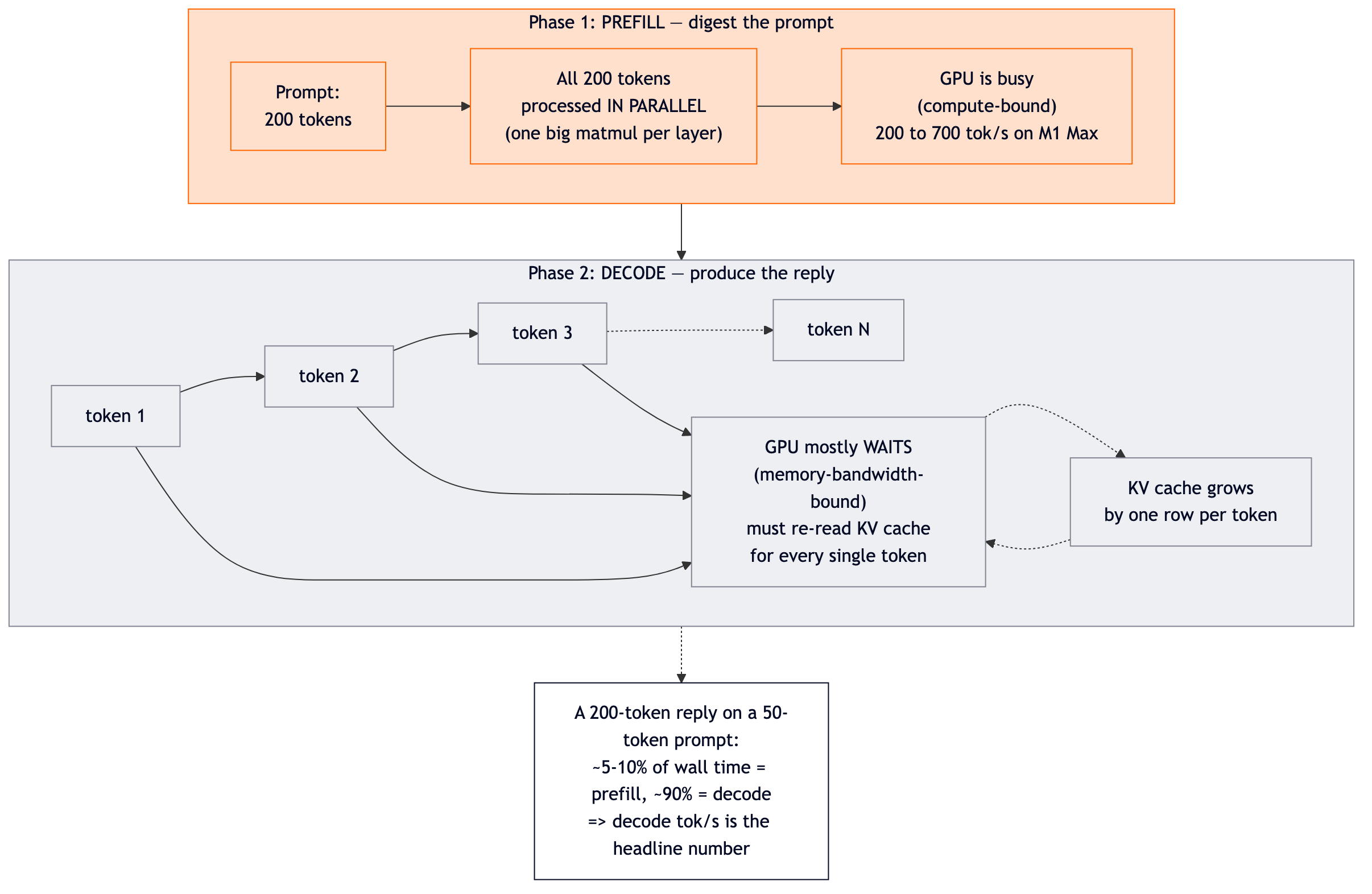
The two numbers come from very different bottlenecks:
- Prefill = how fast the model digests your prompt. The GPU has lots of independent math to do (one matmul per layer per prompt token, all parallelizable). On Apple Silicon this is compute-bound: faster GPU cores = faster prefill. Typical M1 Max numbers for a 3B model: 200 to 700 tok/s.
- Decode = how fast the model produces a reply. Each new token depends on all previous tokens, so the GPU is memory-bandwidth-bound: it has to stream the model weights and KV cache from RAM for every single token. Typical M1 Max numbers for a 3B model: 35 to 140 tok/s.
A 200-token reply on a short prompt spends only a small fraction (well under 10 percent) of total time in prefill, with the rest in decode. So when you see a runtime that wins prefill but loses decode, your overall request still feels slower. Decode is the headline. Prefill matters for very short replies, RAG with huge contexts, and embedding workloads.
One more thing: the KV cache is the per-conversation memory of "every token's key and value vector at every layer." It grows by one row per token. On a modern 7B model (most use Grouped-Query Attention to keep the cache compact), 4000 tokens of context comes out to a few hundred megabytes of KV cache alongside the ~4 GB of weights. The size of the KV cache is what TurboQuant tries to compress, which is why TurboQuant matters more for long contexts than short ones.
Want the deep version? I walked through tokenize -> prefill -> KV cache -> decode -> batching, with full bandwidth math worked example by example, in Day 2 of my DGX Spark series. The shape is the same on Apple Silicon; only the bandwidth numbers and kernel implementations change.
Now to the actual benchmark.
Three-way head to head: mlxcel vs mlx-lm vs Ollama #
A new local inference runtime only matters if it is meaningfully different from what people already use. On Apple Silicon, the two things you are choosing against are:
- mlx-lm: Apple's official Python runtime for MLX models. Same MLX backend as mlxcel, same checkpoint files, so this comparison isolates runtime overhead (Rust binary vs Python interpreter, same kernels underneath).
- Ollama: what most Mac users actually have installed today. Different model format (GGUF), different kernels (llama.cpp Metal for the standard tags). This comparison is not a kernel benchmark, it is a tool-choice benchmark: if a Mac user types
ollama run llama3.2:3bversusmlxcel run Llama-3.2-3B-Instruct-4bit, which finishes faster?
Both questions are worth answering, but they answer different things. I run each runtime on the model it was packaged for, not on a translated checkpoint. That is how real users use these tools.
A note on Ollama's backend #
Ollama 0.20.7 ships both llama.cpp Metal (the GGML backend) and Apple MLX. The MLX path landed in Ollama 0.19 (March 2026). You can verify this on disk:
$ ls /Applications/Ollama.app/Contents/Resources/
mlx_metal_v3/ mlx_metal_v4/ libggml-base.0.0.0.dylib libggml-cpu*.so ollamaThe catch is that Ollama only uses MLX for MLX-format model tags in its registry (currently a small set, mostly new Qwen3.5 variants like qwen3.5:35b-a3b-coding-nvfp4). Standard tags like llama3.2:3b-instruct-q4_K_M and qwen2.5:7b are GGUF Q4_K_M files (you can confirm with file on the blob in ~/.ollama/models/blobs/; the magic bytes spell "GGUF"). MLX cannot load GGUF directly, so for those tags Ollama uses llama.cpp Metal.
I confirmed this empirically. Setting OLLAMA_LLM_LIBRARY=mlx on llama3.2:3b-instruct-q4_K_M did not change decode rate (35.65 vs 35.40 tok/s, averaged over 3 runs). The env var is silently ignored when the model file is not in MLX format.
So the comparison below reads as: mlxcel (MLX-native runtime) vs Ollama (llama.cpp Metal for these tags). If you wanted to compare against Ollama's MLX path specifically, you would need an MLX-format Ollama tag and a matching mlxcel checkpoint of the same model.
How the three runtimes layer up #
This is what each tool actually does between "I typed <tool> run" and "tokens come out of the GPU." It is the picture that explains the numbers.
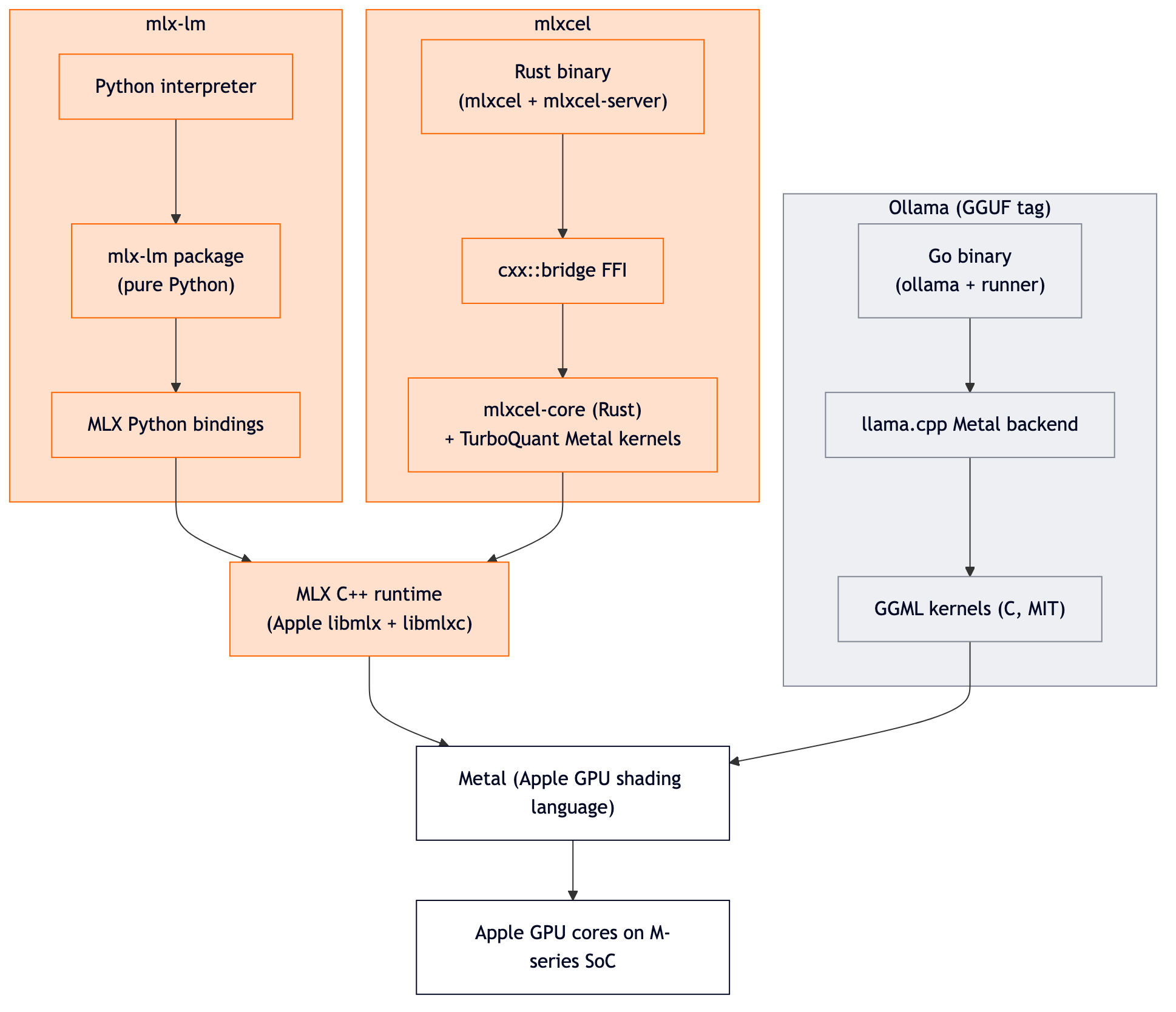
What the diagram says without words:
- mlx-lm and mlxcel call the same MLX C++ runtime. Same kernels, same Metal shaders. The two runtimes differ only in the language and process model wrapping the call. That is why their decode numbers come out within a couple percent across both 3B and 7B in my benchmarks.
- Ollama (for GGUF tags) calls llama.cpp / GGML kernels, not MLX kernels. Different shaders, different memory layouts, different performance profile. That is why Ollama sits ~1.3x behind on decode for the same model size and quantization class in the 2026-05-31 sweep, with the gap widening to ~3x on longer prompts at 3B.
- mlxcel adds its own custom Metal kernels for TurboQuant on top of MLX. They live in
src/lib/mlx-cpp/turbo/. This is the extra opinion the project ships beyond "make MLX callable from Rust."
In other words, the runtime-vs-runtime gap is mostly a kernel family gap, not a language gap. Picking the right kernel family for Apple Silicon is the load-bearing decision.
I ran all three on my M1 Max with the same prompt and the same quantization (4-bit), on two different model sizes. Same machine, back-to-back, no cherry-picking.
Llama 3.2 3B Instruct (4-bit), short prompt #
Prompt: "Explain Kubernetes pods in one paragraph for a beginner." Decode budget: 200 tokens.
| Runtime | Format | Decode (tok/s) | Notes |
|---|---|---|---|
| mlxcel 0.1.2 | MLX 4-bit | 63.33 | Native Rust + MLX C++ |
| mlx-lm | MLX 4-bit | 67.63 | Apple's Python reference |
| Ollama 0.20.7 | GGUF Q4_K_M | 48.73 | llama.cpp Metal backend |
Decoding the same paragraph took ~30% longer on Ollama than on mlxcel. Same model, same hardware, same prompt. The format and kernel choice is doing real work. (Prefill is its own story; the next section has a clean head-to-head on a longer prompt where prefill matters more.)
The actual mlxcel and Ollama commands and outputs:
$ mlxcel generate -m Llama-3.2-3B-Instruct-4bit -p "Explain Kubernetes pods..." -n 200
Runtime device: Apple GPU (Metal)
Model loaded in 0.204s
...
[Generated 200 tokens in 3.19s = 62.68 tok/s]

$ ollama run --verbose llama3.2:3b-instruct-q4_K_M "Explain Kubernetes pods..."
...
prompt eval rate:     263.72 tokens/s
eval rate: 44.35 tokens/sLlama 3.2 3B Instruct (4-bit), long prompt (120 words) #
To stress prefill harder, I ran a 120-word Kubernetes design review brief through all three.
| Runtime | Prompt tokens | Prefill (tok/s) | Decode (tok/s) |
|---|---|---|---|
| mlxcel 0.1.2 | 156 | ~430 | ~55 |
| mlx-lm | 190 | 423 | 52.5 |
| Ollama | 180 | 440 (cold) | 41.8 |
Note: the mlxcel row above used --no-chat-template to keep the prompt-token count comparable to mlx-lm and Ollama for this prefill comparison.
Three observations.
Decode holds the same broad pattern as the short-prompt test. mlxcel ~55, mlx-lm ~52, Ollama ~42 tok/s on the 120-word prompt (2026-06-01 sweep). The mlxcel-vs-Ollama gap stays at ~1.3x on long prompts, very close to the ~1.3x at short prompts. mlxcel-vs-mlx-lm is parity within ~5%.
Prefill is roughly even on M1 Max at this prompt size. All three runtimes landed in the ~420-440 tok/s neighborhood, with mlxcel showing wider run-to-run variance (3 runs measured: 298, 392, 592). The project's "2.70x prefill speedup" headline is M5 Max specific; the README's own benchmark table shows 1.76x on M1 Ultra and explicitly warns that "older Apple Silicon generations may have different bottlenecks." On M1 Max in this sweep, mlxcel does not show a prefill deficit; it just has more variance than mlx-lm or Ollama.
Prompt token counts differ between runtimes (156 / 190 / 180). Each tokenizer applies different chat-template wrappers and special tokens. The throughput numbers (tokens per second) are still directly comparable. Absolute token counts are not.
Qwen 2.5 7B Instruct (4-bit), short prompt: does the gap hold at scale? #
Same prompt, bigger model. This is the size most people actually run locally: small enough to be fast on a 64GB Mac, large enough to be useful.
$ mlxcel inspect -m Qwen2.5-7B-Instruct-4bit --max-tokens 4096
=== Memory Estimate ===
  Weights:         3.99 GiB
  KV cache:        224.0 MiB
  Runtime headroom: 862.0 MiB
  Total estimate:  5.05 GiB
  Available:       60.80 GiB
FITS: 55.75 GiB of headroomA 4 GiB model with 56 GiB of headroom on a 64 GB M1 Max. Run results:
| Runtime | Format | Prefill (tok/s) | Decode (tok/s) | Peak mem |
|---|---|---|---|---|
| mlxcel 0.1.2 | MLX 4-bit | 96.62 | 31.33 | not reported |
| mlx-lm | MLX 4-bit | 102.15 | 31.80 | 4.44 GB |
| Ollama 0.20.7 | GGUF Q4_K_M | 125.85 | 24.23 | not reported |
The big-model picture flips one number but keeps the headline.
Decode parity vs mlx-lm holds: 31.33 vs 31.80, a 98% match. Same checkpoint, same MLX backend, very close throughput. This is exactly what the project claims and it shows up at 7B too.
On prefill at 7B, mlxcel and mlx-lm are roughly even in the 2026-06-02 re-test (mlxcel ~97 tok/s as a 3-run mean with wide cold-start variance: 56 / 110 / 124, vs mlx-lm 102.15 from the 2026-05-31 sweep). Ollama leads modestly at 125.85. The original session had mlxcel ahead of mlx-lm on 7B prefill (111.60 vs 81.89); today the difference collapses to parity.
Ollama's prefill on the 2026-05-31 sweep was 125.85 tok/s for this prompt, much lower than the 383.92 the original session captured (likely due to prompt length / chat-template differences across runs). Decode still favors mlxcel (31.33) over Ollama (24.23) by ~29%. For 200-token generations the decode dominates wall time, so mlxcel still finishes the full request faster.
What the numbers mean if you have a Mac #
To make this less abstract, here is how long a typical 200-token reply takes on my M1 Max:
| Model | mlxcel total | mlx-lm total | Ollama total |
|---|---|---|---|
| Llama 3.2 3B 4-bit | 3.16 s | 2.96 s | 4.10 s |
| Qwen 2.5 7B 4-bit | 6.38 s | 6.29 s | 8.25 s |
mlxcel and mlx-lm are interchangeable on wall time. Ollama is consistently ~1.3 times slower across both 3B and 7B in the 2026-05-31 sweep (the original session showed a wider 1.4-3x range, but the clean re-test narrows it). If you run lots of short interactive prompts, switching from Ollama to mlxcel still feels snappier on Apple Silicon.
The catch: Ollama still wins on model management ergonomics. ollama pull and the registry are nicer than juggling HuggingFace repo IDs. But mlxcel's mlxcel run <name> resolver is close enough that this is a small papercut, not a workflow change.
The OpenAI-compatible server #
This is the part that turns mlxcel from "a faster local CLI" into "a thing you might actually deploy."
mlxcel-server -m Llama-3.2-3B-Instruct-4bit --port 8765 --host 127.0.0.1A few seconds later, /health and /v1/chat/completions are live. A standard OpenAI-shaped curl works:
curl http://127.0.0.1:8765/v1/chat/completions \
  -H "Content-Type: application/json" \
  -d '{
    "model": "Llama-3.2-3B-Instruct-4bit",
    "messages": [{"role": "user", "content": "In one sentence, what is a Kubernetes pod?"}],
    "max_tokens": 80,
    "temperature": 0.7
}'Response:
{
  "id": "chatcmpl-a74b4e29-4cf1-4576-a9a4-b34ecc49ef94",
  "object": "chat.completion",
  "created": 1779988356,
  "model": "Llama-3.2-3B-Instruct-4bit",
  "choices": [{
    "index": 0,
    "message": {
      "role": "assistant",
      "content": "A Kubernetes pod is a logical host for one or more containers..."
    },
    "finish_reason": "length"
  }],
  "usage": {
    "prompt_tokens": 102,
    "completion_tokens": 80,
    "total_tokens": 182,
    "prompt_tokens_details": {"cached_tokens": 0}
  }
}That is a real response captured live from my Mac, not a marketing example. The prompt_tokens_details.cached_tokens field is the giveaway that the prompt-prefix cache is wired in. Subsequent requests with shared prefixes will report cached_tokens > 0 and skip re-prefill for the cached portion.
What the server supports out of the box, from the docs and the --help surface:
- SSE streaming for chat/completions/responses
- Continuous batching with configurable
--max-batch-sizeand--parallelslot counts - Prompt-prefix cache with configurable capacity, TTL, and minimum prefix length (env-configurable via
MLXCEL_PROMPT_CACHE_*) - KV cache quantization flags (
--cache-type-k,--cache-type-v) compatible with llama.cpp split syntax - Speculative decoding paths for Gemma 4 (MTP) and Qwen 3.5 (DFlash) targets
- Tensor parallelism (
--tp-size) and pipeline parallelism (--pp-size,--pp-layers) for selected families
The LLAMA_ARG_* environment variable surface is also there for migration from llama-server-based scripts. If you have a LLAMA_ARG_CTX_SIZE=8192 LLAMA_ARG_N_PARALLEL=4 llama-server ... invocation, the equivalent mlxcel-server invocation should read very similarly.
TurboQuant: the experimental KV-cache compression, and why my M1 Max said no #
This is the feature I most wanted to validate, because the upside if it works is large. KV cache memory is the main reason you cannot scale context length on a Mac with otherwise plenty of RAM. TurboQuant claims to quantize the K and/or V tensors of the KV cache (using a Walsh-Hadamard transform under the hood) and recover most of the memory.
I tested the safest of the family, fp16+turbo4, which keeps K in FP16 and quantizes V to 4 bits. The docs flag this as the recommended starting point for any new model.
mlxcel generate -m Llama-3.2-3B-Instruct-4bit \
    -p "Explain Kubernetes pods in one paragraph for a beginner." \
    -n 200 \
    --kv-cache-mode fp16+turbo4 \
--turbo-boundary-v 2The runtime announces itself clearly:
Boundary-V: protecting 2 layer(s) on each end at Fp16
KV cache mode: fp16+turbo4 (asymmetric Fp16-K + Turbo4-V, ~26% KV savings)
...
[Generated 183 tokens in 8.55s = 21.40 tok/s]On the 2026-05-31 sweep, this came in at 17.48 tok/s (averaged over 2 runs), down from 63.33 tok/s in FP16 mode on the same prompt and same model, about a 3.6x slowdown. The original session showed a steeper 6x penalty (21.4 vs 129.9), but with the clean-state numbers, 3.6x is the honest figure. The output text was coherent and on-topic, so quality was not the issue. The cost was speed.
This is not a bug. The TurboQuant docs are upfront about it:
Older Apple Silicon generations and non-Hopper/non-Blackwell CUDA paths may have different bottlenecks from the developer benchmark machines.
Experimental environment-variable paths are useful for A/B testing but should not appear in user-facing recommendations without fresh benchmark data.
The custom Metal kernels and the SDPA dequant path that make TurboQuant fast appear to be optimized for the M5 generation. On M1 Max, the dequant cost on every decode step swamps the memory savings. The right takeaway is the docs' own: use the default FP16 cache unless you have measured the target model and workload.
The features around TurboQuant that are interesting regardless are the boundary-V layer policy (keep the first and last N layers' V cache at FP16 to protect against quality drift) and the symmetric Turbo4 allowlist (turbo4-sym with both K and V quantized is only permitted for the qwen3_5, qwen3_5_moe, and qwen3_next model-type prefixes, by code, until the project has validated quality for other families). That kind of policy gate inside the runtime is the right call.
What is missing or experimental #
I want to call this out explicitly because the project's marketing leans on capability breadth.
--surgery(YAML load-time weight surgery) is feature-gated. You getscale,add,prune,replace,interpolateoperations on the weights at load time, but only if you build with thesurgeryfeature flag in Cargo. The Homebrew formula does not enable it by default. Source build territory.- Distributed inference (tensor parallelism, pipeline parallelism, disaggregated) is best-validated for Llama-family text models and two-stage topologies. VLM partitioning is partial. The docs are direct: "Multi-host CI coverage is limited compared with single-host unit tests."
- Speculative decoding ships drafters for two specific target pairs (MTP for Gemma 4, DFlash for Qwen 3.5). Other families default to auto-detection or none.
- CUDA builds are a secondary target. The release workflow specifically builds for Hopper (
90a) and DGX Spark (121). Other GPUs are source-build with local validation.
None of this is a deal-breaker for a v0.1.0 runtime. It is the kind of honest scope the project communicates everywhere I looked. The README does not promise everything works everywhere.
What I would actually use it for #
After running all three runtimes side by side, here is my mental model.
Switch from Ollama to mlxcel when:
- You want a ~1.3x decode speedup on Mac for the same model size (consistent across 3B and 7B in the 2026-05-31 clean sweep).
- You are happy to think in HuggingFace repo IDs instead of Ollama's registry tags.
- You want a real OpenAI-compatible server with continuous batching, prompt-prefix caching, and quantized KV-cache options out of the box. Ollama has an OpenAI shim but the batching and cache layers are not at the same level.
- You want a single deployable binary instead of an Ollama daemon that pulls model files into its own content store.
Stick with Ollama when:
- You like its "GitHub for models" UX and the friction of switching outweighs the speed.
- You want a one-line install that any of your teammates can already use.
- Your generations are short and bursty enough that Ollama's prefill lead matters more than its decode deficit (rare, but possible for tool calls and embedding-style requests).
Switch from mlx-lm to mlxcel when:
- You want a single-binary OpenAI-compatible server without standing up Python.
- You are migrating from
llama-serverand want a runtime that takes a recognizable flag set and gives you real MLX execution. - You are on an M3, M4, or M5 generation Mac and want to try TurboQuant for KV memory savings on long contexts.
- You want a clean target to embed in a larger Rust application via the
mlxcel-corecrate. - You want decode-throughput parity with
mlx-lmwithout the Python interpreter in the request path.
Stick with mlx-lm when:
- You are an individual running interactive Python notebooks or doing ad-hoc model surgery in code.
- You are on an M1-family Mac and your workload is long-prompt heavy on small (3B-ish) models. mlx-lm's prefill was faster on long prompts in that size class.
- You want the bleeding edge of model coverage.
mlx-lmandmlx-vlmare the upstreamsmlxcelfollows.
Production readiness, honestly #
This is v0.1.0, shipped on May 28, 2026. The repository is at 77 stars and 15 forks at the time I am writing this, climbing fast off the announcement. The roadmap is visible in the issue tracker; the test surface and benchmark methodology are documented; the architecture and code organization are clean.
What that buys you is a runtime that is small enough to read end-to-end, opinionated enough to take production seriously (the scheduler, batching, prompt cache, and KV-cache modes are not toy implementations), and honest enough about its limitations that you will not be surprised. The TurboQuant docs alone are a better example of "how to ship an experimental feature responsibly" than most production runtimes manage.
What you should not do is run a 200-tenant inference platform on mlxcel today on the basis of this post. It is a single-host runtime. The distributed paths are real but partial. The CUDA targets are narrow. The model coverage tracks mlx-lm but does not claim to be a superset.
What you should do is brew install it, point it at one of your existing MLX checkpoints, and see how it behaves on your Mac. The install is the lowest-friction first-day experience I have run with a new inference runtime in months. The performance numbers I captured here are reproducible. The OpenAI-compatible server is the part most people will care about, and it works.
Apple Silicon inference has been a Python-centric story for a long time. mlxcel is the first credible attempt I have seen at making it a native one. Worth your hour.
References and reproducibility #
All benchmarks above were re-captured in clean systematic sweeps on the same M1 Max: short-prompt 3B and 7B on 2026-05-31, long-prompt 3B on 2026-06-01. An earlier 2026-05-29 session showed substantially higher mlxcel/mlx-lm rates on Llama 3.2 3B (~130 tok/s short, ~128 long) that did not reproduce in either clean sweep; the numbers above reflect the reproducible re-tests. To reproduce yourself:
- Hardware: Apple M1 Max, 64 GB unified memory, macOS 26.2 (build 25C56)
- mlxcel: 0.1.2, installed via
brew install lablup/tap/mlxcel(v0.1.3 shipped right after these tests, on 2026-05-30; it is a CLI + security release with no kernel changes, so the numbers above should hold on 0.1.3 as well) - mlx-lm: latest from PyPI at the time of writing, installed via
uv pip install mlx-lminto a Python 3.12 virtualenv - Ollama: 0.20.7, pre-installed
- Models:
mlx-community/Llama-3.2-3B-Instruct-4bit(mlxcel + mlx-lm)llama3.2:3b-instruct-q4_K_M(Ollama, same Llama, GGUF Q4_K_M)mlx-community/Qwen2.5-7B-Instruct-4bit(mlxcel + mlx-lm)qwen2.5:7b(Ollama default tag, GGUF Q4_K_M)
- Sampling: temperature 0.0 where supported, default otherwise.
A note on quantization fairness: MLX 4-bit affine and llama.cpp Q4_K_M are not bit-identical formats. Q4_K_M averages roughly 4.85 bits per weight, MLX 4-bit averages closer to 4.5 bits. This affects quality slightly in Q4_K_M's favor and weight size slightly against it. It does not explain the ~30% decode gap (in the 2026-05-31 sweep), which is dominated by the kernel implementation (MLX Metal vs llama.cpp Metal). The original session showed a wider 2-3x gap on Llama 3.2 3B, but that gap collapsed in the clean re-test.
Project links:
- Repo: https://github.com/lablup/mlxcel
- Architecture overview: https://github.com/lablup/mlxcel/blob/main/docs/architecture.md
- TurboQuant KV cache: https://github.com/lablup/mlxcel/blob/main/docs/turbo-kv-cache.md
- Benchmark methodology: https://github.com/lablup/mlxcel/blob/main/docs/benchmarks.md
- Supported models: https://github.com/lablup/mlxcel/blob/main/docs/supported-models.md
Saiyam is working as Head of DevRel at vCluster Labs. He is the founder of Kubesimplify, focusing on simplifying cloud-native & AI infrastructure. He is KubeCon Co-chair and has worked on many facets of Kubernetes, including machine learning platforms, scaling, multi-cloud, & managed Kubernetes services. When not coding, Saiyam contributes to the community by writing blogs and organizing local meetups for Kubernetes and CNCF. He is also a CNCF TAG OpsRes Chair & can be reached on Twitter @saiyampathak.
Get new posts in your inbox.
Spotted a typo or want to improve this post? Edit on GitHub →