Day 4: Quantization Demystified. BF16, FP8, NVFP4, MXFP4, INT4, GGUF, and Why It All Matters
A practical, beginner-friendly guide to BF16, FP8, NVFP4, MXFP4, INT4, and GGUF Q4_K_M on NVIDIA DGX Spark. Bytes per parameter, quality vs size, and which format to pick when.

New to the jargon? Every term, flag, and benchmark number here is explained in plain English in the local LLM glossary.
On this page (22)
- What training actually changes
- What inference reads
- What a floating-point number actually is
- Why two 16-bit formats exist
- Why two FP8 formats exist
- Why 4-bit is hard
- Microscaling: how 4 bits can keep quality
- Did the model train differently?
- Where Nemotron fits in this story
- The 4-bit format zoo, in human terms
- 1. INT4: AutoRound, GPTQ, AWQ
- 2. MXFP4: microscaling FP4
- 3. NVFP4: NVIDIA's Blackwell-focused FP4
- 4. GGUF Q4KM and friends
- 5. IQ3XXS, IQ3S, IQ2M, IQ1M
- Quality vs bytes per parameter
- What this looks like on Spark, with real numbers
- The training paradox: NVFP4 can lose to BF16 for training
- Are the algorithms different?
- Specific cases: when each format wins
- The simple mental model
- What is coming in Day 5
Day 4 of "7 Days of Local LLM". A field guide to running serious LLMs on a $4,699 box on your desk.
In Day 3 we opened up the Spark and saw the hardware story: GB10, unified memory, sm_121, and Blackwell tensor cores. Now we need the software-number story.
That story is quantization.
Before we talk about BF16, FP8, NVFP4, or GGUF, we need to separate two things that are easy to mix up:
Tokens are the text pieces moving through the model.
Weights are the learned numbers stored inside the model.
They are not the same thing.
When you type:
What's the capital of France?
the tokenizer turns that text into token IDs. In a Llama-family tokenizer, it might look roughly like:
| Text piece | Meaning |
|---|---|
What | token |
's | token |
the | token |
capital | token |
of | token |
France | token |
? | token |
Those tokens are the input pieces. Later, the model outputs more tokens, maybe:
Paris
So tokens are the chunks of text going in and out.
Weights are different. Weights are the internal learned numbers the model uses while processing those tokens. They live inside huge tables called matrices. A single weight might be a number like:
-0.037
That number is not a word. It is not a token. It is more like a tiny dial in a giant mixing board.
Here is the most beginner-friendly way I can say it:
A weight decides how strongly one signal should influence another signal.
Imagine the model has built up internal signals like:
- this prompt is asking a question
- this question is about geography
- the country being discussed is France
- the answer should probably be a city
The model does not store those sentences in English. It stores and moves around numbers. The weights control how those number-signals get mixed at each layer. Some weights help boost the score for Paris. Some weights suppress bad next-token choices. Some weights help grammar. Some help code structure. Some help style. A single weight is meaningless by itself, but billions of them together create the model's behavior.
That is what a parameter is: a learned internal number. Most parameters in an LLM are weights. So when people say:
Llama 3.3 70B
they mean:
about 70 billion learned internal numbers.
Not 70 billion tokens. Not a 70 GB file. Not 70 billion words.
What training actually changes #
During training from scratch, the model starts with mostly random weights. It sees a huge amount of text that has already been tokenized. Then it plays the same game again and again:
- Look at some tokens.
- Predict the next token.
- Compare the prediction with the real next token from the training text.
- Measure how wrong it was. That error is called the loss.
- Nudge the weights so the correct next token becomes more likely next time.
For example, the training text might contain:
The capital of France is Paris
The model sees:
The capital of France is ___
At the beginning of training, the model's next-token scores may be bad:
| Candidate next token | Early model score |
|---|---|
Paris | low |
banana | weirdly possible |
the | possible |
London | possible |
The correct next token is Paris, so training pushes the model to give Paris a higher score in similar contexts. This does not happen by writing "France = Paris" into one place. It happens by tiny updates across many weight matrices.
After enough examples, the model learns patterns:
- "capital of France" usually points toward
Paris - "Kubernetes is a container" often points toward
orchestration - "write a Python function" often points toward code-shaped tokens
- "explain this simply" pushes toward teacher-style language
Training changes the weights. The tokens are the examples. The weights are what get learned.
What inference reads #
During inference, the weights are usually fixed. Your prompt becomes tokens. The model runs those tokens through layer after layer, using the weights at every step. At the end it produces scores for possible next tokens.
Then one token is chosen, appended to the text, and the process repeats.
That is why weights matter for next-token prediction:
Weights shape the probability scores for the next token.
And that is why weights matter for performance:
During decode, the inference engine keeps reading the model's weights from memory to produce tokens.
Now quantization becomes easier to understand. Quantization does not change the text tokens. It changes how the learned internal numbers are stored.
If a weight like 0.037 gets stored as 0.04, that may be fine. If millions of important weights get rounded too aggressively, the next-token scores can shift and quality can drop. On the speed side, smaller weight storage means fewer bytes moving through memory.
This is also where the famous 70B memory math needs careful wording.
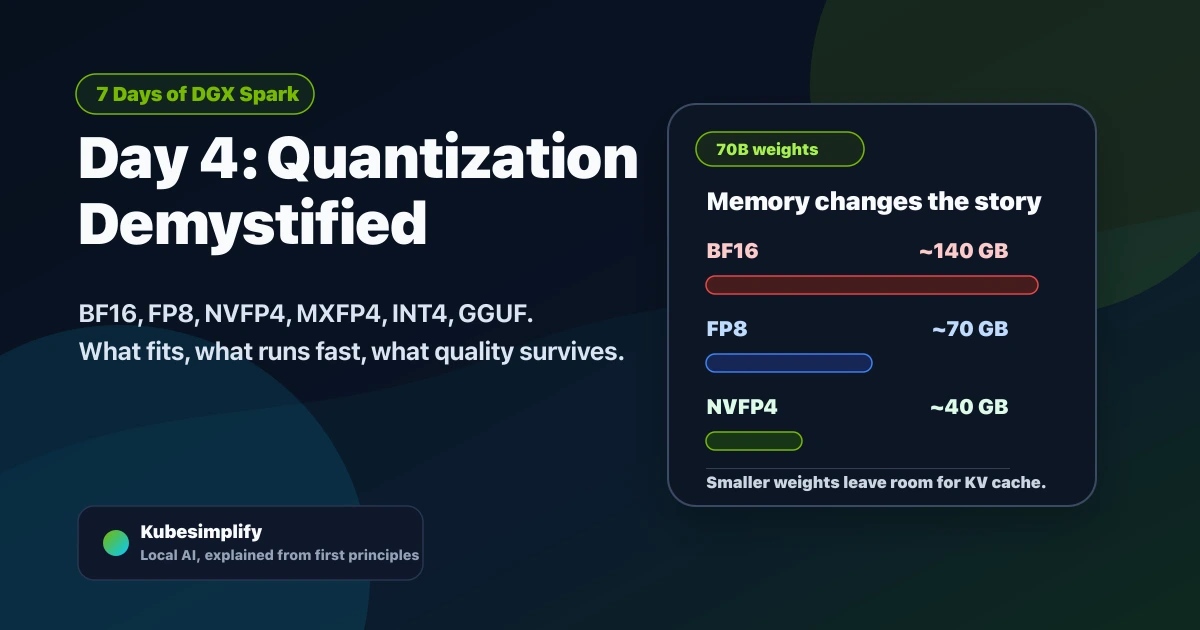
If a 70-billion-parameter model is stored in BF16, each parameter takes 2 bytes:
70B parameters x 2 bytes = ~140 GB
So the statement "a 70B model needs 140 GB" is true only for the BF16/unquantized-style version of that model's weights. It is not saying every 70B model file is always 140 GB.
This is why you can run a 70B model on a Mac: you are almost certainly running a quantized version, usually GGUF Q4/Q5 or something similar.
| 70B storage format | Rough weight storage | What that means |
|---|---|---|
| BF16 | ~140 GB | full 16-bit weights, usually too big for local consumer setups |
| FP8 | ~70 GB | one byte per parameter before overhead |
| 4-bit raw | ~35 GB | half a byte per parameter before overhead |
| practical Q4 / NVFP4-style | ~40-45 GB | scales, metadata, and some higher-precision pieces add overhead |
That difference is the whole game. Same broad model architecture, same token flow, but a much smaller way to store the learned numbers.
Memory fit animation
Same 70B model, different number formats
Quantization is mostly a memory story: fewer bytes per weight means the model is smaller, leaves room for KV cache, and reads less data for every generated token.
This post explains the beginner version first, then the Spark version:
- Why tokens and weights are different
- What sign, exponent, and mantissa mean
- Why FP32, BF16, FP16, FP8, and FP4 are not just random names
- Why 4-bit does not automatically destroy quality
- How INT4, MXFP4, NVFP4, GGUF Q4_K_M, and IQ3_XXS differ
- Which format I would pick on Spark for serving, local chat, fine-tuning, and training
One sentence to carry through the whole post:
Quantization does not usually change the model architecture. It changes how the model's numbers are stored and how the inference engine reads them.
What a floating-point number actually is #
Now that tokens and weights are separate in our head, let's zoom into one weight.
A weight is just a number stored inside the model. A tiny example might look like this:
-0.037
The computer has to store that number somehow. For AI models, a common style is called floating point. "Floating" means the decimal point can move, a bit like scientific notation:
-0.037 = -3.7 x 10^-2
A floating-point number has three parts:
| Part | Plain English meaning | Everyday example |
|---|---|---|
| Sign | Positive or negative | Is the bank balance plus or minus? |
| Exponent | The scale or zoom level | Are we measuring millimeters, meters, or kilometers? |
| Mantissa | The detailed digits | Is it 3.7, 3.71, or 3.71492? |
So if a weight is stored as -3.7 x 10^-2:
- The sign says negative.
- The exponent says "move the decimal point two places."
- The mantissa carries the useful digits, like
3.7.
For binary computers, the base is 2 instead of 10, but the idea is the same. The exponent decides the range. The mantissa decides the detail.
That is why number formats are tradeoffs. If you give more bits to the exponent, the number can cover a wider range. If you give more bits to the mantissa, the number can store finer detail.
| Format | Total bits | Sign | Exponent | Mantissa | Simple explanation |
|---|---|---|---|---|---|
| FP32 | 32 | 1 | 8 | 23 | Big and accurate. Great for reference math, expensive for serving. |
| FP16 | 16 | 1 | 5 | 10 | More detail than BF16, but less range. Can overflow more easily. |
| BF16 | 16 | 1 | 8 | 7 | Same range as FP32, less detail. Very common for training. |
| FP8 E4M3 | 8 | 1 | 4 | 3 | Small and fast, often used for inference weights/activations. |
| FP8 E5M2 | 8 | 1 | 5 | 2 | More range, less detail. Useful where values can swing more. |
| FP4 E2M1 | 4 | 1 | 2 | 1 | Tiny. Needs scaling tricks to be useful for LLMs. |
Think of it like image compression:
- FP32 is the original RAW photo.
- BF16 is still high quality, but smaller.
- FP8 is a good web image: much smaller, usually still looks right.
- FP4 is tiny. It only works if you add smart context around it.
Here is the same table in even plainer English:
FP32 is the "do the math carefully" format. It has lots of mantissa bits, so it can keep fine detail. It is great for reference calculations, but too large for most LLM serving.
FP16 is like writing the number with fewer digits but still keeping more detail than BF16. The catch is range: very large or very small values can overflow or underflow more easily.
BF16 keeps FP32's exponent size, so it can represent roughly the same huge and tiny value ranges. It stores fewer detail bits, but that range makes it a comfortable default for training and fine-tuning.
FP8 E4M3 means 1 sign bit, 4 exponent bits, and 3 mantissa bits. It is a compact one-byte format with more detail than E5M2, often useful when the engine and hardware support it.
FP8 E5M2 gives one extra bit to the exponent and one fewer bit to detail. That makes it better when values can swing across a wider range.
FP4 E2M1 is extremely small: only 16 possible codes. By itself that is very rough, so useful 4-bit formats add local scaling tricks around it.
That "smart context" is the next section.

Why two 16-bit formats exist #
This confused me early on, so let's make it simple.
Both FP16 and BF16 use 16 bits. But they spend those bits differently.
FP16 spends more bits on the mantissa. That means it can store more detail, but its exponent is smaller, so the safe number range is narrower.
BF16 keeps the same 8 exponent bits as FP32. That means it can cover roughly the same range as FP32, but with fewer detail bits. For neural network training, that range matters a lot. Gradients can become very small or very large. If your format cannot represent them, training can become unstable.
That is why modern training often defaults to BF16. It is not because BF16 is always "more accurate" than FP16. It is because BF16 is usually easier to train with safely.
Why two FP8 formats exist #
FP8 has the same tradeoff, just more extreme.
E4M3 means 4 exponent bits and 3 mantissa bits. More detail, less range. This is often useful for inference and forward-pass values.
E5M2 means 5 exponent bits and 2 mantissa bits. More range, less detail. This can be useful for values that swing around more, such as gradients in some training recipes.
The names look scary, but they are just labels for how the bits are split.
Why 4-bit is hard #
With 4 bits, you only have 16 possible codes.
That does not mean the whole model has only 16 values. It means each individual 4-bit stored value can choose from only 16 possible labels before scaling expands it back into a useful number.
Imagine trying to rate every restaurant in a city with only 16 possible scores. You can still do it, but you lose nuance. Many restaurants that are slightly different will get the same score.
For model weights, that rounding error is the danger. If too many important weights get rounded badly, the model starts losing quality.
Here is a simple mental example. Suppose three learned weights are:
0.031, 0.037, 0.044
In a higher-precision format, the model can keep those values separate. In a very rough 4-bit format, they may all collapse into nearly the same stored value. If those weights contributed to the signals that separate Paris, Lyon, and London, the final next-token scores can become less sharp.
The solution is not "4-bit is magically enough." The solution is scaling.
Microscaling: how 4 bits can keep quality #
The trick is to not use one giant ruler for the whole model.
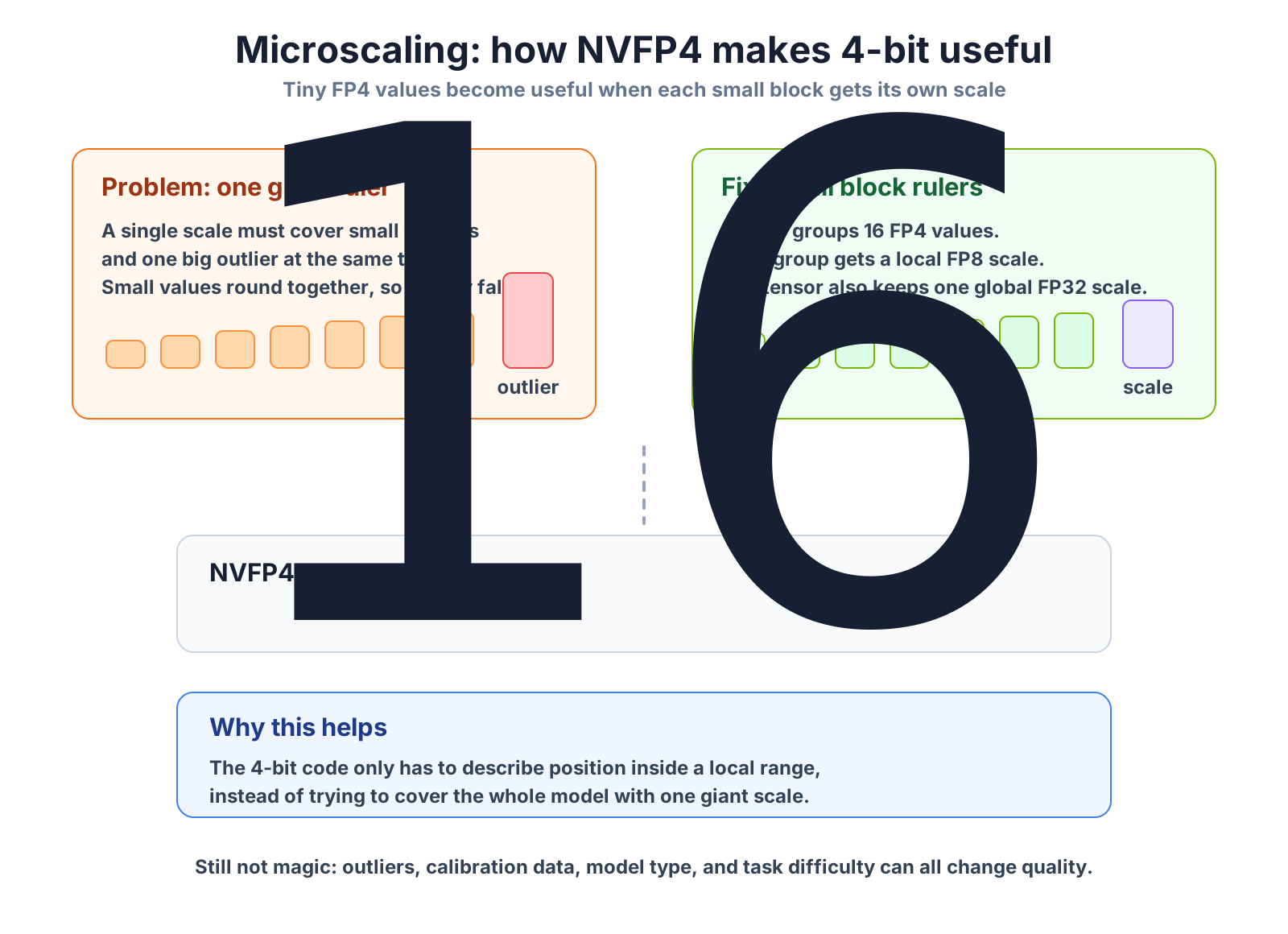
Instead, you split weights into small groups. For each group, you store:
- the small 4-bit values
- one scale factor that says how big that group's local ruler is
Then the real value is reconstructed like this:
real value = small 4-bit code x shared scale
For NVFP4, the actual structure is:
- 16 values per micro-block
- each value is FP4 E2M1
- one FP8 E4M3 scale per 16-value block
- one higher-level FP32 scale per tensor
That is the important correction: NVFP4 does not use one FP32 scale for every group of 16. It uses an FP8 block scale, plus a global FP32 tensor scale.
Microscaling animation
Why one outlier can hurt plain 4-bit
A shared scale is like choosing the ruler for a group of numbers. If the group is too large, one big value can make the small values hard to measure.
Plain INT4-style block
A wider block can be forced to pick one large scale because of the outlier. The tiny values then round together.
NVFP4 micro-block
NVFP4 uses smaller 16-value groups, an FP8 E4M3 scale per group, and a global FP32 tensor scale.
This is why 4-bit inference can work. If a layer has wildly different values, smaller local blocks reduce the damage. Outliers can still hurt. Calibration still matters. But the local scale gives the 4-bit codes a better chance to represent the important differences.
Did the model train differently? #
Usually, the architecture is the same.
A Llama model is still a Llama model. A Gemma model is still a Gemma model. A Nemotron MoE is still an MoE. Quantization usually changes the stored number format, not the transformer blocks, attention layers, tokenizer, or routing design.
But the algorithm around the model can differ.
There are three common paths:
| Path | What happens | Beginner translation |
|---|---|---|
| Post-training quantization (PTQ) | Train in a higher precision, then compress later | Finish the book, then make a smaller copy |
| Quantization-aware training (QAT) | Train while simulating low precision | Teach the model while showing it the compression rules |
| Native low-precision recipes | Parts of training actually use lower precision | Build the model with the smaller number system in mind |
Most downloadable 4-bit models you see are not brand-new architectures. They are usually higher-precision trained models converted into a smaller format with calibration data.
Calibration data matters because the quantizer needs examples of real activations and weight ranges. If the calibration set is weak, the compressed model can look good on easy chat and then fail on math, code, JSON, or tool use.
So when you see AWQ, GPTQ, GGUF, MXFP4, or NVFP4, read it as:
same general model idea, different compression method, different kernels, different quality-speed tradeoff.
One more beginner distinction:
Training from scratch means the model starts from random parameters and learns language patterns from a huge corpus. This is where the model learns broad things like grammar, facts, code patterns, reasoning habits, and tool-like behavior.
Fine-tuning means you start with an already trained model and adjust it for a narrower purpose. For example, you might fine-tune a base model to follow instructions, answer in a company style, write Kubernetes YAML better, or behave well in a support chatbot.
In both cases, the training loop is still about reducing prediction error. The difference is the starting point. Scratch training starts from random knobs. Fine-tuning starts from useful knobs and makes smaller targeted adjustments.
Where Nemotron fits in this story #
Day 3 used Nemotron 3 Super because it is the cleanest Spark example of why NVFP4 matters: a 120B-total, roughly 12B-active MoE that becomes practical on one desk machine when the artifact and engine are built for the format.
There is one important nuance. Most 4-bit models start in higher precision and get compressed later. Nemotron 3 Super is more ambitious than that. NVIDIA says the majority of floating-point multiply-accumulate work during Super pretraining ran in NVFP4, and their training docs still keep selected layers in BF16 or MXFP8 for stability. So the beginner answer is:
Nemotron 3 Super was pretrained with an NVFP4-aware recipe, then it still went through later supervised fine-tuning and reinforcement-learning/post-training stages.
That does not mean every tensor in every stage is pure NVFP4. It means NVIDIA designed the training recipe and Blackwell hardware path together instead of treating NVFP4 only as an after-the-fact compression step.
There is also a June 2026 update that makes this story even more interesting. NVIDIA's MaxText/JAX NVFP4 recipe shows that NVFP4 is not only an inference format. On GB200 and GB300 datacenter Blackwell systems, NVIDIA reports 1.31x to 1.73x training throughput speedups versus an FP8 baseline for their Llama 3 8B and Llama 3.1 405B configurations, with no measurable accuracy loss in the runs they published.
But the recipe details matter:
- NVFP4 is applied to the MLP GEMMs, not blindly to every operation.
- Attention stays in higher precision because softmax and
QK^Tscores are more sensitive to quantization noise. - The outputs of those low-precision GEMMs are BF16.
- The optimizer still keeps a higher-precision master weight path.
- The recipe uses extra tricks like 16-value micro-blocks, 2D weight scaling, Random Hadamard Transform on the weight-gradient path, and stochastic rounding.
So the beginner takeaway is not "4-bit training is always safe now." The takeaway is:
NVFP4 training can work extremely well when the model, hardware, kernels, and recipe are designed together.
For a single DGX Spark, I would still start training and fine-tuning in BF16 unless the exact project gives you a tested NVFP4 recipe.
The 4-bit format zoo, in human terms #
These are the formats you will actually meet.
Before the details, here is the plain-English map:
| If you see this | Think this | Beginner reaction |
|---|---|---|
| INT4 / AWQ / GPTQ | Integer 4-bit compression | Use it when the model ships that way and the engine supports it |
| MXFP4 | Open microscaling FP4 | Good if the artifact and serving stack are built for it |
| NVFP4 | NVIDIA Blackwell-native FP4 | The most important Spark format for supported large-model serving |
| GGUF Q4_K_M | Practical local 4-bit-ish model file | Best default for easy Ollama/llama.cpp-style local chat |
| IQ3 / IQ2 | Very small GGUF-style compression | Useful for experiments, risky for quality |
Another way to say it: all of them try to make the model smaller, but they do not all use the same math or the same engine path. A GGUF file in Ollama and an NVFP4 artifact in vLLM/NIM can both be "small," but Spark runs them through very different software paths.
1. INT4: AutoRound, GPTQ, AWQ #
INT4 stores weights as 4-bit integers. A common signed range is -8 to 7, but the exact layout depends on the method. Some schemes are symmetric. Some are asymmetric and store a zero-point offset.
The simple picture: INT4 is like packing each weight into a tiny numbered bucket, then storing a scale that explains what those bucket numbers mean. It is not floating point. It is integer compression plus scales.
On GPUs, many INT4 kernels dequantize on the fly before doing the math. That does not always mean a separate memory round trip, but it does mean extra conversion work and a different kernel path from Blackwell's native FP4 tensor cores.
When to use it:
- the model only ships as AWQ/GPTQ
- you already have a serving stack built around it
- you accept that quality and speed are calibration-dependent
2. MXFP4: microscaling FP4 #
MXFP4 comes from the OCP Microscaling format family. It uses:
- FP4 E2M1 values
- block size 32
- E8M0 scale
E8M0 sounds strange, but the simple version is: the scale is exponent-only, so it behaves like a power-of-two scale. That makes it simple and hardware-friendly, but less flexible than NVFP4's FP8 E4M3 scale.
Think of MXFP4 as the cross-vendor microscaling route. It is trying to make 4-bit floating point useful by giving small groups of values their own ruler.
When to use it:
- the model ships in MXFP4
- the engine supports it well
- you want a cross-vendor microscaling format
3. NVFP4: NVIDIA's Blackwell-focused FP4 #
NVFP4 is NVIDIA's FP4 format for Blackwell. It uses:
- FP4 E2M1 values
- block size 16
- FP8 E4M3 scale per block
- FP32 scale per tensor
Compared with MXFP4, NVFP4 uses smaller groups and a finer scale. In NVIDIA's published DeepSeek-R1-0528 example, NVFP4 stayed within about 1% of FP8 on several listed evals, but do not treat that as a universal law. Quality depends on the model, the quantization recipe, and the workload.
Think of NVFP4 as the Blackwell-native route. It matters for Spark because the GB10 GPU speaks this family of formats directly through the Blackwell tensor-core path.
When to use it:
- the model has a good NVFP4 artifact
- you are using a Blackwell-aware engine such as vLLM, TensorRT-LLM, or NIM
- you want large-model serving on Spark
This is the format Spark is clearly designed to make interesting.
4. GGUF Q4_K_M and friends #
GGUF is the llama.cpp model file ecosystem. Ollama, Docker Model Runner, LM Studio, and llama.cpp workflows commonly use GGUF-style artifacts.
Q4_K_M is one of the most popular practical defaults: small enough to fit, usually good enough for chat, and widely available.
Important nuance: Q4_K_M is not an FP-class format like NVFP4 or MXFP4. It is part of llama.cpp's K-quant family. It can be excellent in practice, but it is a different storage format and a different inference engine path.
Think of GGUF Q4_K_M as the practical local route. It is popular because the model catalog is huge and the setup is friendly, not because it is the same thing as Blackwell-native NVFP4.
When to use it:
- you want the easiest local setup
- you want the broadest model availability
- you are using Ollama, llama.cpp, Docker Model Runner, or LM Studio
5. IQ3_XXS, IQ3_S, IQ2_M, IQ1_M #
These are extreme GGUF-style quantizations. They use importance weighting to squeeze models below normal 4-bit sizes.
The tradeoff is quality. They can be useful for simple chat, summaries, and experiments, but I would be careful using them for coding, math, long tool chains, or anything where exact behavior matters.
Think of these as the "fit at almost any cost" route. They are fun and useful, but not the first place I would go when correctness matters.
When to use them:
- you want to fit a larger model into a tighter memory budget
- you want maximum tok/s
- you can accept visible quality loss
Quality vs bytes per parameter #
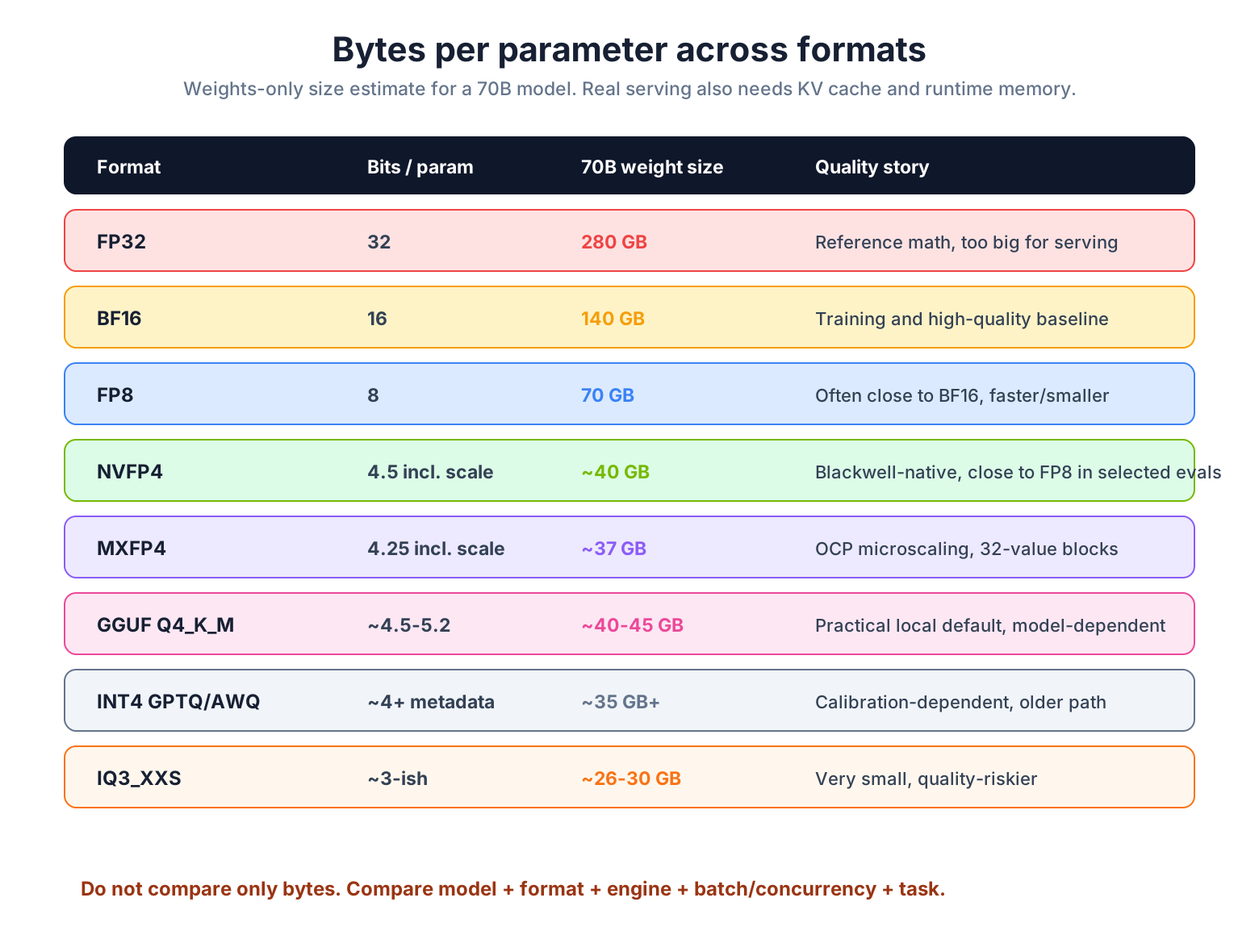
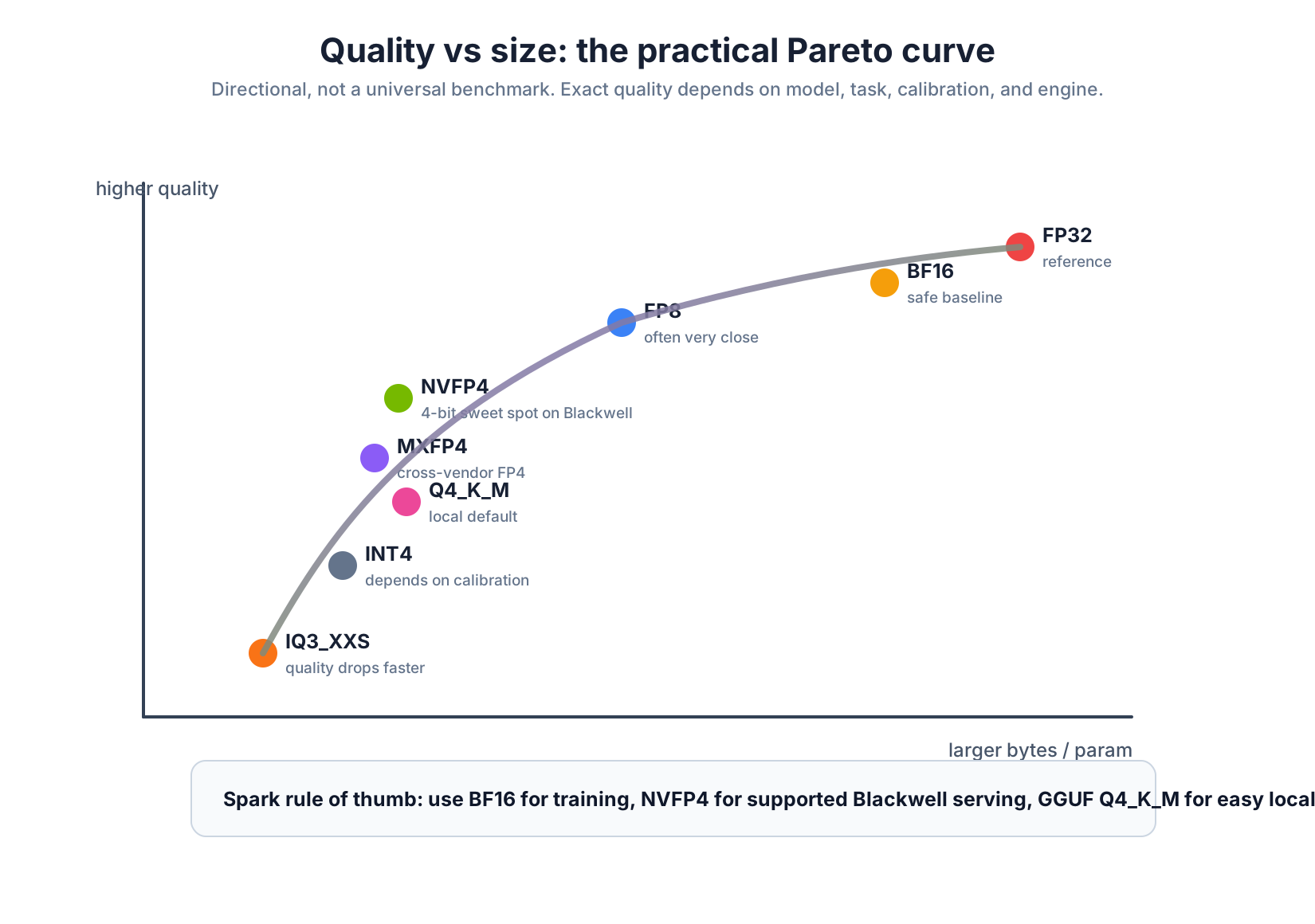
Here is the practical cheat sheet. Treat the quality column as directional, not as a benchmark promise.
| Format | Practical bytes per param | Quality story | Notes |
|---|---|---|---|
| FP32 | 4.0 | reference | too large for normal LLM serving |
| BF16 | 2.0 | training and high-quality baseline | Spark training default |
| FP8 E4M3 | 1.0 | often very close to BF16/FP16 | strong speed-memory tradeoff |
| NVFP4 | ~0.56 | close to FP8 in NVIDIA-published examples, workload-dependent | Blackwell native, 16-value blocks |
| MXFP4 | ~0.53 | useful 4-bit microscaling, usually less flexible than NVFP4 | OCP MX format, 32-value blocks |
| GGUF Q4_K_M | ~0.55 to ~0.65 | strong local-chat default, varies by model | llama.cpp ecosystem |
| INT4 GPTQ/AWQ | ~0.5 plus metadata | calibration-dependent | older/common 4-bit path |
| GGUF IQ3_XXS | ~0.35 to ~0.4 | quality drops faster | extreme compression |
The curve gets steep below 4 bits. Going from 4-bit-ish to 3-bit-ish can save memory, but the model usually becomes more fragile on hard tasks.
These bytes-per-param numbers are storage mental models, not exact file promises. Real files include scales, metadata, tokenizer files, special layers that stay higher precision, and engine-specific packing. That is why NVFP4 is not exactly 0.5 bytes/param in practice, and why two GGUF files with the same headline quant can still differ a bit.
My Spark recommendation:
- Training or fine-tuning base: BF16
- Large-model serving with a supported artifact: NVFP4
- Easy local chat and model variety: GGUF Q4_K_M
- When the model ships that way: FP8 or MXFP4
- Only if that is all you have: AWQ/GPTQ INT4
What this looks like on Spark, with real numbers #
The hardware story from Day 2 and Day 3 still applies:
Decode is often memory-bandwidth-bound.
During decode, the model repeatedly reads weights to produce the next token. If the weights are smaller, less data has to move. That is why quantization can improve tok/s.
But do not compare every number blindly. A benchmark changes when you change:
- the model
- the quantization format
- the engine
- the batch size or concurrency
- the prompt and output length
A community Spark Arena snapshot for Gemma 4 26B-A4B-it showed the expected pattern across formats:
| Format | Approx bytes per param | Batched tok/s snapshot | Read this as |
|---|---|---|---|
| BF16 | 2.0 | ~12 | high-quality baseline |
| FP8 | 1.0 | ~22 | smaller and faster |
| NVFP4 | ~0.56 | ~52 | much smaller, strong aggregate serving path |
That table is useful as a pattern, not as a law. Always check the exact artifact and engine.
Now the Qwen3.6-28B-REAP point.
The Qwen3.6-28B-REAP GGUF page lists many quantized file sizes. The important correction is:
- Around 13-15 GB is more like Q3_K_M / Q3_K_L / aggressive GGUF territory.
- Q4_K_M is closer to 17-18 GB.
So if I say "roughly 14 GB", I should not call that Q4_K_M. It is an aggressive GGUF quant. The rough concurrency math is still useful:
273 GB/s / ~14 GB = ~19.5 tok/s per idealized stream
With batching/concurrency, an engine can raise aggregate throughput because multiple requests share the same model reads more efficiently. That is how a result around 150 tok/s aggregate can make sense. It is not a single-user decode prediction, and it is not magic. It is batching plus smaller weights.
Here are the numbers from this series that I am using in this post:
| Number | Source | What it means |
|---|---|---|
gemma4:26b at 58.02 tok/s | My Spark, Ollama format sweep, 2026-05-21 | Local single-stream decode through Ollama/GGUF-style artifact |
nemotron-3-super:latest at 17.71 tok/s | My Spark, Ollama format sweep, 2026-05-21 | Day 4 canonical sweep number for the GGUF/Ollama artifact |
| Nemotron 3 Super at 19.5 tok/s | My Spark, separate Day 3 local run | Same broad model story, but a different run from the Day 4 sweep |
| Qwen2.5-3B BF16 at 26.14 -> 1462.30 tok/s aggregate | My Spark, vLLM concurrency sweep, 2026-05-21 | Concurrency 1 to 64, max_tokens=512 |
| Gemma 4 31B IT NVFP4 at 6.15 -> 166.36 tok/s aggregate | My Spark, vLLM concurrency sweep, 2026-05-21 | Concurrency 1 to 32, max_tokens=512 |
| Nemotron 3 Super NVFP4 around ~38 tok/s | NVIDIA-published Spark/NIM/TensorRT-LLM path | Published NVFP4 artifact/engine path, not my Ollama GGUF run |

The training paradox: NVFP4 can lose to BF16 for training #
This is the part that feels backwards at first.
For inference, NVFP4 can be excellent because you mainly read weights and run the forward pass.
For training, you also need:
- forward pass
- loss computation
- backward pass
- gradients
- optimizer updates
Gradients are sensitive. If they lose too much detail, training can become noisy or unstable. That is why many practical training recipes still use BF16 or FP8, even when inference wants 4-bit.
This section exists because Nemotron can make the story look confusing. If NVIDIA can pretrain Nemotron with an NVFP4-aware recipe, why not always train everything in NVFP4 on Spark? The answer is that a large NVIDIA pretraining recipe on Blackwell datacenter GPUs and a small local Spark training run are not the same workload. Recipes, kernels, optimizer states, and stability choices matter.
Raphael Amorim posted single-DGX-Spark nanochat pretraining measurements on the NVIDIA developer forums:
| Format | Training throughput | Wall-clock for 560M model |
|---|---|---|
| BF16 | ~17,500 tok/s | ~11 days |
| NVFP4 | ~13,000 tok/s | ~14 days |
So for that training recipe on Spark, BF16 was faster. I would not frame this as "NVFP4 is bad." I would frame it as:
NVFP4 training is recipe-specific. On datacenter Blackwell systems, NVIDIA is already showing strong NVFP4 training recipes. On a single Spark, BF16 is still the safe default unless your exact stack has a tested NVFP4 training path.
This can change as kernels and recipes mature. But for this series, the practical recommendation is simple:
If you are training or fine-tuning on Spark, start with BF16 unless the recipe explicitly says otherwise.
Are the algorithms different? #
The high-level model algorithm is usually the same: take tokens in, run transformer math, predict the next token.
The low-level serving algorithm can be very different.
Here is the beginner version:
| Layer | What changes with quantization? |
|---|---|
| Model architecture | Usually no. Same transformer/MoE shape. |
| Stored weights | Yes. BF16, FP8, NVFP4, GGUF, INT4 store numbers differently. |
| Kernel math | Yes. The GPU code path can be completely different. |
| Calibration | Yes. Some formats need calibration data to compress safely. |
| Quality | Yes. The same model can behave differently after compression. |
| Speed | Yes. Smaller weights can be faster, but engine support matters. |
This is why you can run "the same model" in two formats and get different tok/s or slightly different answers.
Specific cases: when each format wins #
You want the safest quality. Use BF16 or FP8 if it fits and the speed is acceptable.
You want large-model serving on Spark. Use NVFP4 if the model has a well-supported NVFP4 release and your engine supports it.
You want the easiest local experience. Use GGUF Q4_K_M through Ollama, llama.cpp, Docker Model Runner, or LM Studio.
You want the widest model catalog. Use GGUF. Almost every popular model gets a GGUF release somewhere.
You want to fine-tune. Use BF16 base weights plus LoRA adapters unless the project gives you a tested low-precision recipe.
You want to pretrain from scratch. Use BF16 on Spark. That is the sane default.
You see AWQ or GPTQ in a model name. That is an INT4-style quantized artifact. It can work, but it is not the same as NVFP4.
You see MXFP4. Think "OCP microscaling FP4." Good if the model ships that way and your engine supports it.
You see IQ3_XXS. Think "very small, quality-risky." Great for experiments, not my first pick for serious reasoning.

The simple mental model #
If this post felt like a lot, keep only this:
FP32/BF16/FP8/NVFP4 are different ways of writing down the model's numbers.
The model is still doing matrix math. The transformer architecture usually does not change. But the number format decides:
- how much memory the model needs
- how much data Spark reads per token
- which GPU kernels can run
- how much quality you might lose
- whether the format is good for inference, training, or both
On Spark, format choice is not a footnote. It is the difference between "doesn't fit", "fits but slow", and "actually usable."
What is coming in Day 5 #
In Day 5 we cover the inference engines: Ollama, llama.cpp, vLLM, SGLang, Docker Model Runner, LM Studio, and NVIDIA NIM containers.
Same hardware, same model family, different engine - and suddenly the numbers move. That is the next layer of the story.
See you in Day 5.
References for this post: my own canonical captures (Ollama format sweep, Gemma 4 31B IT NVFP4 vLLM concurrency sweep, and Qwen2.5-3B BF16 vLLM concurrency sweep on this Spark, 2026-05-21), NVIDIA NVFP4 technical blog, NVIDIA MaxText/JAX NVFP4 training blog, NVIDIA Transformer Engine NVFP4 docs, NVIDIA Nemotron 3 Super technical blog, NVIDIA Nemotron 3 Super docs, Spark Arena leaderboard (community, dated snapshots), Pre-training Nanochat on DGX Spark forum thread, Qwen3.6-35B-A3B-FP8 vLLM benchmarks on Spark, Qwen3.6-28B-REAP GGUF, and OCP Microscaling specification.
Saiyam is working as Head of DevRel at vCluster Labs. He is the founder of Kubesimplify, focusing on simplifying cloud-native & AI infrastructure. He is KubeCon Co-chair and has worked on many facets of Kubernetes, including machine learning platforms, scaling, multi-cloud, & managed Kubernetes services. When not coding, Saiyam contributes to the community by writing blogs and organizing local meetups for Kubernetes and CNCF. He is also a CNCF TAG OpsRes Chair & can be reached on Twitter @saiyampathak.
Get new posts in your inbox.
Spotted a typo or want to improve this post? Edit on GitHub →