Wandler: Local OpenAI-Compatible Inference With Transformers.js and WebGPU
A practical Wandler deep dive with a local M1 Max WebGPU demo, real latency numbers, architecture diagrams, and getting-started commands.
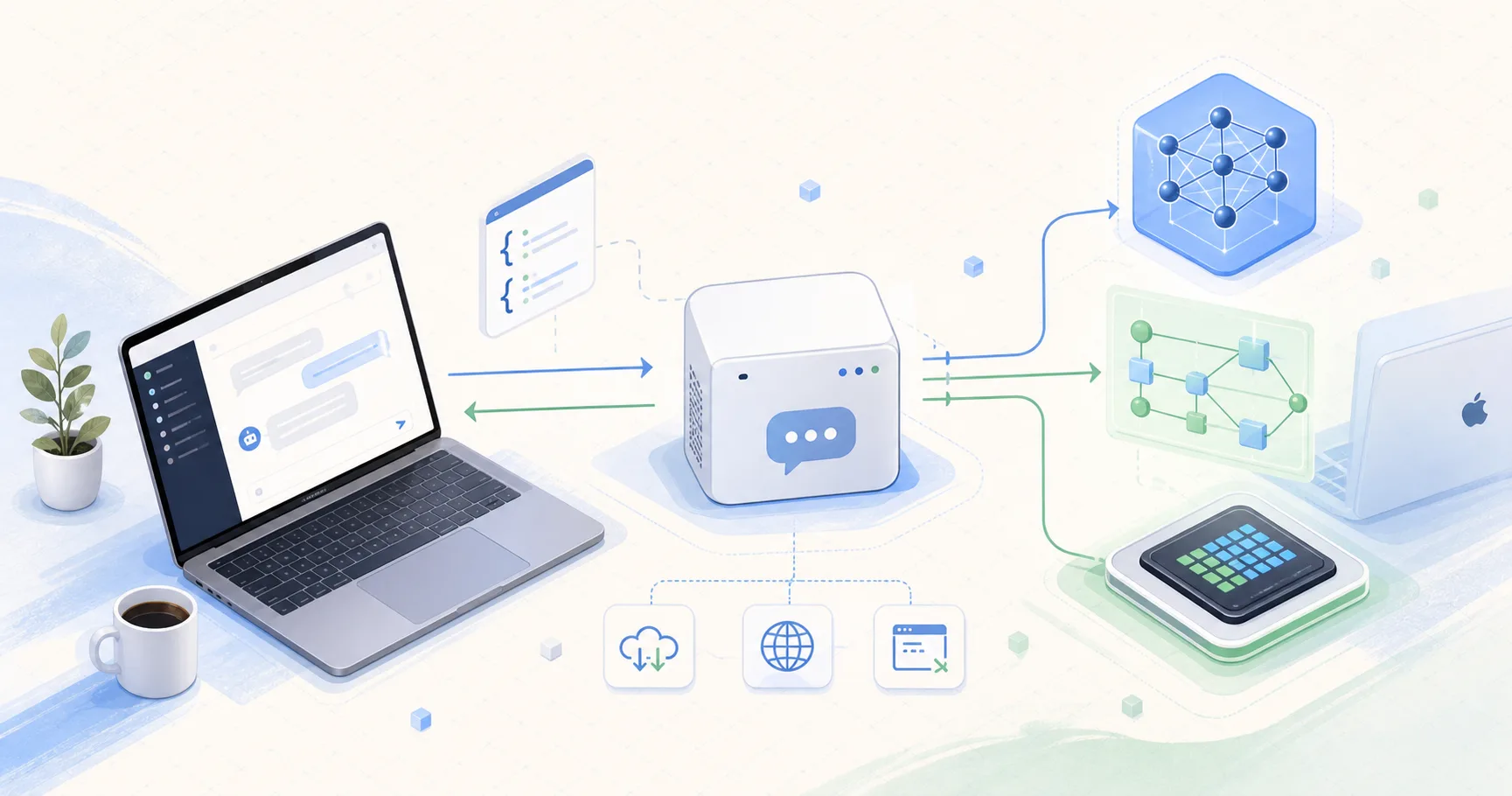
New to the jargon? Every term, flag, and benchmark number here is explained in plain English in the local LLM glossary.
On this page (15)
- Quick Take
- What Wandler Is
- Why Transformers.js And ONNX Matter
- How A Chat Request Works
- The WebGPU Question
- Getting Started
- My End-To-End Demo On M1 Max
- Local Benchmark Results
- Bonus: Running Gemma 4 E4B On The Same Mac
- Adding Embeddings And Speech-To-Text
- Useful Flags
- Where Wandler Fits
- Caveats I Noticed
- Final Thoughts
- Sources
Wandler is a small but very interesting project from Runpod Labs: it runs open-weight ONNX models locally and exposes them through an OpenAI-compatible HTTP API. In plain English, it tries to give you the local-model experience of tools like llama.cpp, but in a TypeScript and Transformers.js stack.
That means you can point an OpenAI SDK, an agent framework, a curl command, or a small app at http://127.0.0.1:8000/v1 and talk to a model running on your own machine. No Python environment. No CUDA requirement. No special OpenAI-specific client code.
I researched the repo, read through the server implementation, and ran it end to end on my local Apple M1 Max with 64 GB unified memory. The short version: explicit --device webgpu worked here. Wandler loaded a 350M parameter LFM model through Transformers.js and ONNX Runtime, created a WebGPU context on Apple hardware, and served real /v1/chat/completions traffic. I also ran the larger Gemma 4 E4B ONNX q4 entry with the Wandler backend and captured the actual request output below.
Quick Take #
Wandler is useful if you want:
- A local server that feels like an OpenAI-compatible API.
- A TypeScript-native inference stack instead of a Python server.
- A way to run Transformers.js-compatible ONNX models on
webgpu,cpu, orwasm. - A quick local endpoint for agents, prototypes, RAG experiments, and SDK demos.
- Basic observability through
/healthand/admin/metrics.
The tradeoff is that model compatibility depends on Transformers.js-compatible ONNX exports. This is not the same model universe as GGUF/llama.cpp. If your favorite model only ships as GGUF, Wandler is probably not the first tool you reach for. If it ships as an ONNX export that Transformers.js understands, Wandler becomes very convenient.
What Wandler Is #
The Wandler README describes it as an "OpenAI-compatible inference server powered by transformers.js" that can run ONNX models locally with WebGPU acceleration or CPU, with no Python or CUDA required. The repo quickstart is as simple as:
npx wandler --llm onnx-community/gemma-4-E4B-it-ONNX:q4The public site says the server binds to http://127.0.0.1:8000 by default and exposes an OpenAI-compatible API. The same page lists auto, webgpu, cpu, and wasm as the main device options, and the GitHub README includes a wider CLI surface in the current source, including cuda, coreml, and dml as recognized device names.
At a high level, Wandler is made of four layers:
- A CLI that parses model, device, dtype, cache, auth, and server flags.
- A Hono HTTP server that exposes OpenAI-style routes.
- A model manager that loads tokenizers, processors, ONNX models, embeddings, and STT pipelines.
- A backend layer that calls Transformers.js directly or uses Wandler's extra generation path.
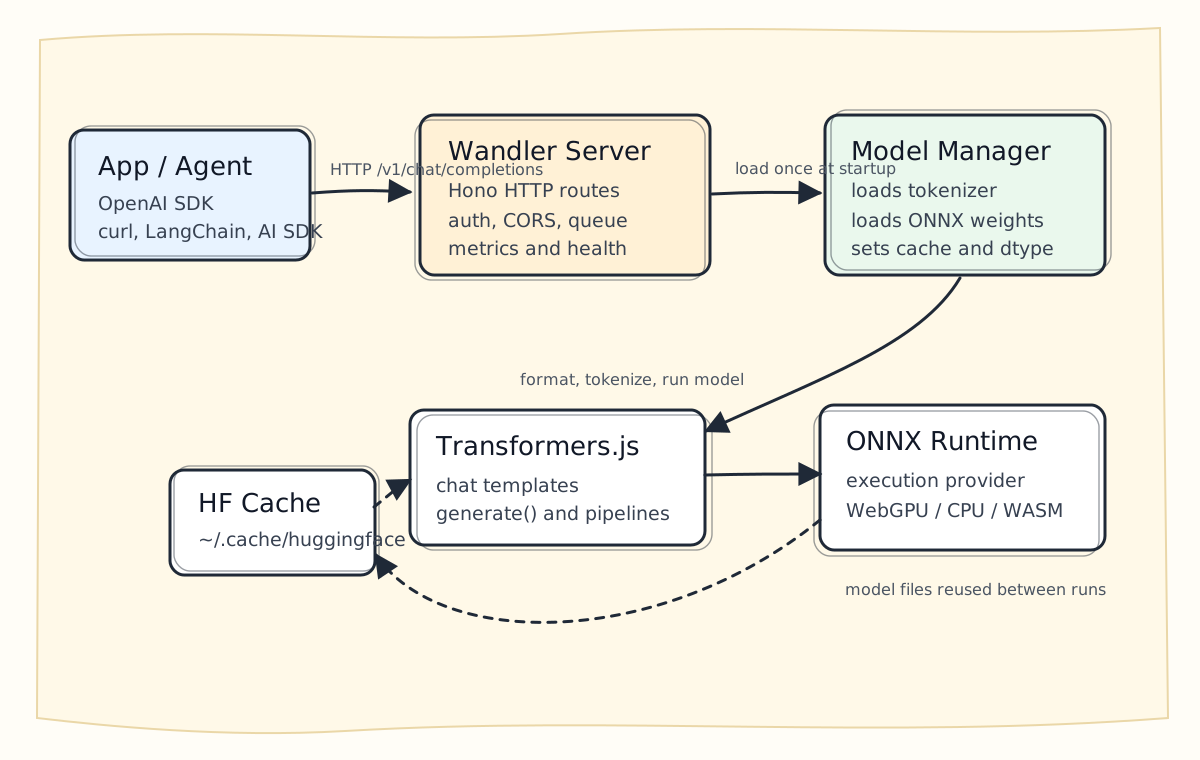
The most important design decision is compatibility. Wandler does not ask client apps to learn a new protocol. It implements familiar routes like:
POST /v1/chat/completionsPOST /v1/responsesPOST /v1/completionsPOST /v1/embeddingsPOST /v1/audio/transcriptionsGET /v1/modelsGET /healthGET /admin/metrics
That gives you a local endpoint you can swap into the OpenAI SDK:
import OpenAI from "openai";

const client = new OpenAI({
  baseURL: "http://127.0.0.1:8000/v1",
  apiKey: "-",
});

const stream = await client.chat.completions.create({
  model: "LiquidAI/LFM2.5-350M-ONNX",
  messages: [{ role: "user", content: "Hello from my laptop." }],
  stream: true,
});

for await (const chunk of stream) {
  process.stdout.write(chunk.choices[0]?.delta?.content ?? "");
}For app developers, that is the magic: your client code can look almost exactly like hosted inference, while the model is running locally.
Why Transformers.js And ONNX Matter #
Transformers.js is Hugging Face's JavaScript inference library. It can run models in the browser and in Node.js, and it supports ONNX-backed execution. The WebGPU guide from Hugging Face explains the basic idea: enabling WebGPU acceleration can be as simple as setting device: "webgpu" when loading a model.
Wandler builds on that idea and turns it into a server.
Instead of writing this yourself:
const model = await AutoModelForCausalLM.from_pretrained(modelId, {
  dtype: "q4",
  device: "webgpu",
});you run:
npx wandler --llm LiquidAI/LFM2.5-350M-ONNX:q4 --device webgpuThen Wandler handles:
- Loading the tokenizer.
- Loading the ONNX model.
- Choosing the dtype.
- Configuring the Hugging Face cache directory.
- Setting up the HTTP server.
- Translating OpenAI-style request parameters into Transformers.js generation options.
- Tracking request metrics.
- Streaming chunks back over SSE when requested.
This is the practical gap Wandler fills. Transformers.js gives you the inference engine. Wandler gives you a local OpenAI-shaped server around it.
How A Chat Request Works #
The server path is easy to understand once you trace a single request.
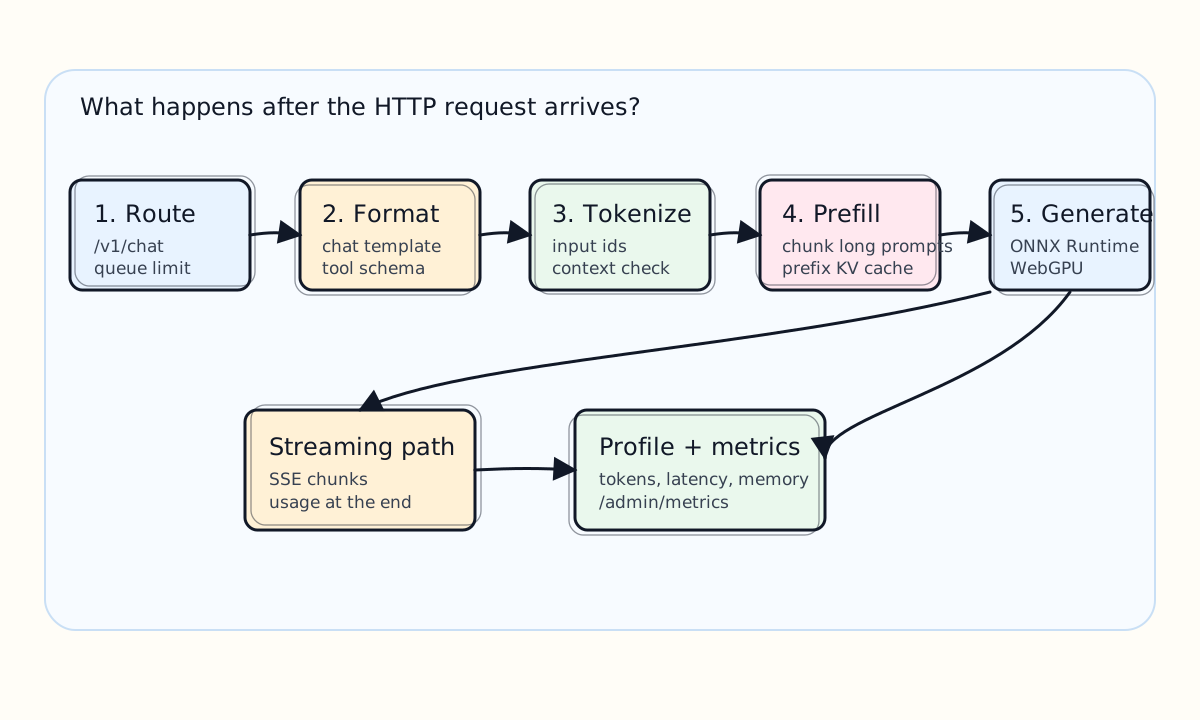
First, the request hits a Hono route like /v1/chat/completions. Wandler injects the loaded config, model references, and backend into the request context. If --api-key or WANDLER_API_KEY is set, it applies bearer auth to /v1/*, /admin/*, /tokenize, and /detokenize.
Next, a request limiter controls concurrency. The default is --max-concurrent 1, which is conservative and sensible for local generation. If too many requests pile up, Wandler can return a server-overloaded response instead of letting the machine spiral.
Then Wandler formats the messages into the model's chat template. This matters because models do not all use the same chat framing. Some have a tokenizer-provided template. Some repos expose a chat_template.jinja. Wandler tries to use the right template so the final prompt looks like the model expects.
After formatting, it tokenizes the prompt and checks context length. If the loaded model exposes max_position_embeddings, Wandler uses that as the default ceiling unless the operator sets --max-tokens.
Then generation starts. This is where Wandler has two backend modes:
--backend transformersjscalls the direct Transformers.jsgenerate()path.--backend wandleruses Wandler's serving layer, including prefill chunking, prefix-cache behavior, generation profiling, and tool-call parsing.
For the demos below, I used --backend wandler explicitly. It is also the default backend in Wandler 2.6.4, but spelling it out makes the command easier to reproduce and avoids confusion when comparing against --backend transformersjs.
In the Wandler backend, long prompts can be chunked during prefill. This exists because large prompts can create big attention-score tensors, especially on GPU paths. Wandler's default --prefill-chunk-size auto uses a GPU attention budget, and the public site describes this as a 640 MB default. You can tune it with auto:<mb> or turn it off with 0 or off.
Wandler also has a prefix KV cache. For agent-like traffic, many requests reuse a long system prompt, instruction block, or tool schema. Caching that prefix can avoid recomputing the same prompt prefix every turn. The defaults are:
--prefix-cache true
--prefix-cache-entries 2
--prefix-cache-min-tokens 512Finally, Wandler returns either a normal JSON response or streaming SSE chunks. It records prompt tokens, completion tokens, latency, memory snapshots, and a generation profile that appears in /admin/metrics.
The WebGPU Question #
The question I had going in was the right one: can we actually test WebGPU on a Mac?
For this project, WebGPU is not just "a browser thing." Wandler is running in Node.js. Transformers.js and ONNX Runtime provide the model execution path. When you pass:
--device webgpuWandler asks Transformers.js to load the model using WebGPU. On my M1 Max, explicit webgpu worked.
I verified this in two ways:
- The
/healthendpoint reported"device":"webgpu". - With
--log-level debug, ONNX Runtime logged Apple hardware discovery and WebGPU execution-provider context creation.
The debug run also showed a normal-looking caveat: some nodes were assigned to CPU. ONNX Runtime printed a warning that some nodes were not assigned to the preferred provider and mentioned shape-related ops as an example. That is not automatically a failure. It means the graph can be split, with heavy operations using WebGPU and helper or shape operations running on CPU.
The important local result: this was not a silent CPU-only fallback. Explicit --device webgpu loaded and served requests.
Getting Started #
You need Node.js 20 or newer. I tested with Node v22.5.1.
Install globally:
npm install -g wandlerOr use npx:
npx wandler --versionMy result:
2.6.4List the verified model catalog:
npx wandler model lsMy catalog output looked like this:
type      | size  | prec | capabilities             | repo:precision                                   | name
------------------------------------------------------------------------------------------------------------------------
embedding | 22M   | q8   | embedding                | Xenova/all-MiniLM-L6-v2:q8                       | all-MiniLM-L6-v2
embedding | 33M   | q8   | embedding                | Xenova/bge-small-en-v1.5:q8                      | BGE Small EN v1.5
llm       | 2B    | q4   | chat, tool-calling, vision | onnx-community/gemma-4-E2B-it-ONNX:q4            | Gemma 4 E2B
llm       | 2B    | q4   | chat, tool-calling, vision | onnx-community/gemma-4-E4B-it-ONNX:q4            | Gemma 4 E4B
llm       | 1.2B  | q4   | chat, tool-calling       | LiquidAI/LFM2.5-1.2B-Instruct-ONNX:q4            | LFM 2.5 1.2B
llm       | 350M  | q4   | chat, tool-calling       | LiquidAI/LFM2.5-350M-ONNX:q4                     | LFM 2.5 350M
embedding | 137M  | q8   | embedding                | nomic-ai/nomic-embed-text-v1.5:q8                | Nomic Embed Text v1.5
llm       | 0.8B  | q4   | chat, tool-calling       | onnx-community/Qwen3.5-0.8B-Text-ONNX:q4         | Qwen 3.5 0.8B
llm       | 1.7B  | q4   | chat                     | HuggingFaceTB/SmolLM2-1.7B-Instruct:q4           | SmolLM2 1.7B
stt       | 74M   | q4   | transcription            | onnx-community/whisper-base:q4                   | Whisper Base
stt       | 244M  | q4   | transcription            | onnx-community/whisper-small:q4                  | Whisper Small
stt       | 39M   | q4   | transcription            | onnx-community/whisper-tiny:q4                   | Whisper Tiny

12 model(s) found. Use the repo:precision value with --llm, --embedding, or --stt.For a first local run, I recommend the 350M model:
npx --yes wandler@latest \
  --llm LiquidAI/LFM2.5-350M-ONNX:q4 \
  --device webgpu \
  --backend wandler \
  --host 127.0.0.1 \
  --port 8123 \
  --max-tokens 128 \
  --log-level info \
  --warmup-tokens 64 \
--warmup-max-new-tokens 8Use --device cpu if WebGPU does not work on your machine:
npx --yes wandler@latest \
  --llm LiquidAI/LFM2.5-350M-ONNX:q4 \
  --device cpu \
--backend wandlerUse --device auto if you want Wandler to try its fallback path:
npx --yes wandler@latest \
  --llm LiquidAI/LFM2.5-350M-ONNX:q4 \
  --device auto \
--backend wandlerMy End-To-End Demo On M1 Max #
Here is the exact environment I used on June 3, 2026:
| Item | Value |
|---|---|
| Machine | Apple M1 Max |
| Memory | 64 GB unified memory |
| Architecture | arm64 |
| macOS | 26.2 |
| Node | v22.5.1 |
| npm | 10.8.2 |
| Wandler | 2.6.4 |
| Model | LiquidAI/LFM2.5-350M-ONNX:q4 |
| Backend | wandler |
| Device | webgpu |
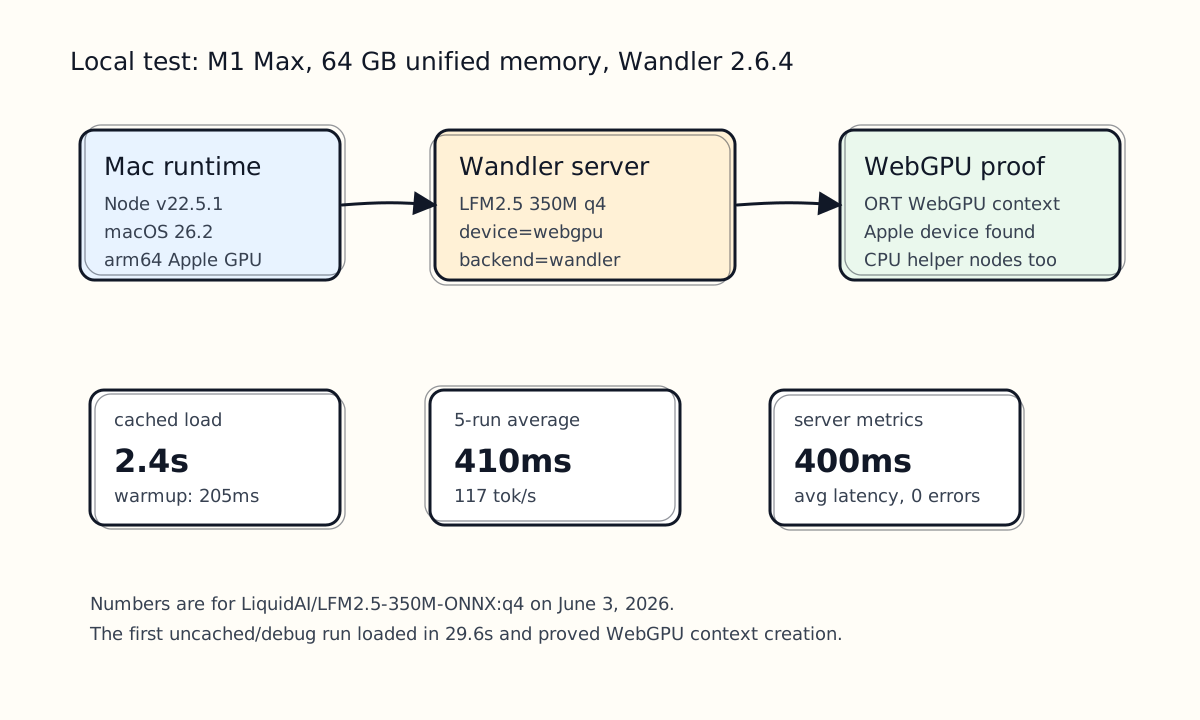
The first debug run was useful for proof:
[wandler] Loading LLM: LiquidAI/LFM2.5-350M-ONNX (q4, device=webgpu)
[wandler] Model context: 128000 tokens
[wandler] Model vocab: 65536 tokens
[wandler] Model attention heads: 16
[wandler] num_logits_to_keep input detected; patched sessions: model
[wandler] LLM ready in 29.6s
[wandler] Warmup completed in 2150ms (139 prompt tokens)
[wandler] http://127.0.0.1:8123That first run included package startup, cache/model work, and debug logging. After the model was cached, the normal info run was much cleaner:
[wandler] LLM ready in 2.4s
[wandler] Warmup completed in 205ms (139 prompt tokens)
[wandler] http://127.0.0.1:8123
[wandler] LLM: LiquidAI/LFM2.5-350M-ONNX (q4, webgpu)
[wandler] Cache: /Users/saiyam/.cache/huggingfaceHealth check:
curl -sS http://127.0.0.1:8123/healthResponse:
{
  "status": "ok",
  "engine": "transformers.js",
  "backend": "wandler",
  "device": "webgpu",
  "models": {
    "llm": "LiquidAI/LFM2.5-350M-ONNX"
  }
}A non-streaming chat request:
curl -sS http://127.0.0.1:8123/v1/chat/completions \
  -H 'Content-Type: application/json' \
  -d '{
    "model": "LiquidAI/LFM2.5-350M-ONNX",
    "messages": [
      {
        "role": "user",
        "content": "Given these facts: Wandler is a TypeScript server; it runs ONNX models through Transformers.js; it exposes OpenAI-compatible HTTP endpoints. Rewrite the facts as three short bullets. Do not add new claims."
      }
    ],
    "temperature": 0,
    "max_tokens": 80,
    "stream": false
}'Representative response:
{
  "model": "LiquidAI/LFM2.5-350M-ONNX",
  "choices": [
    {
      "message": {
        "role": "assistant",
        "content": "- Wandler is a TypeScript server for ONNX models via Transformers.js\n- Wandler exposes OpenAI-compatible HTTP endpoints\n- Wandler uses Transformers.js to enable ONNX model integration"
      },
      "finish_reason": "stop"
    }
  ],
  "usage": {
    "prompt_tokens": 58,
    "completion_tokens": 45,
    "total_tokens": 103
  }
}A streaming request:
curl -N -sS http://127.0.0.1:8123/v1/chat/completions \
  -H 'Content-Type: application/json' \
  -d '{
    "model": "LiquidAI/LFM2.5-350M-ONNX",
    "messages": [
      {
        "role": "user",
        "content": "Write one sentence about why local inference is useful for prototyping."
      }
    ],
    "temperature": 0.2,
    "max_tokens": 48,
    "stream": true,
    "stream_options": { "include_usage": true }
}'The stream emitted OpenAI-style SSE chunks:
data: {"choices":[{"delta":{"role":"assistant"},"finish_reason":null}]}
data: {"choices":[{"delta":{"content":"Local "},"finish_reason":null}]}
data: {"choices":[{"delta":{"content":"inference "},"finish_reason":null}]}
...
data: {"choices":[{"delta":{},"finish_reason":"stop"}],"usage":{"prompt_tokens":23,"completion_tokens":18,"total_tokens":41}}
data: [DONE]The streaming request completed in 0.459354s from curl's point of view. Wandler's own metrics recorded 455ms server total time.
Local Benchmark Results #
For a small repeated test, I ran the same non-streaming request five times against the already-warm server.
| Run | Total ms | Completion tokens | Approx tok/s |
|---|---|---|---|
| 1 | 590 | 45 | 76.3 |
| 2 | 305 | 45 | 147.5 |
| 3 | 315 | 45 | 142.9 |
| 4 | 367 | 45 | 122.6 |
| 5 | 471 | 45 | 95.5 |
Average:
| Metric | Value |
|---|---|
| Average total latency | 410 ms |
| Average decode throughput | 117 tok/s |
| Server metrics average latency after test | 400 ms |
| RSS memory after test | 738 MB |
| Total errors | 0 |
This is not a universal benchmark. It is one small model, one prompt shape, one local machine, and one execution mode. But it is enough to prove the full loop:
OpenAI-shaped client request
-> Wandler HTTP server
-> Transformers.js
-> ONNX Runtime WebGPU
-> local Apple GPU
-> OpenAI-shaped responseThe 350M model is also not the model you choose for final answer quality. It is a great first demo model because it loads fast, uses modest memory, and makes it easy to validate the stack. For better answers, try the 1.2B LFM model or one of the verified Qwen/Gemma entries.
Bonus: Running Gemma 4 E4B On The Same Mac #
After validating the lightweight path, I also ran the Gemma entry from the verified model catalog:
npx --yes wandler@latest \
  --llm onnx-community/gemma-4-E4B-it-ONNX:q4 \
  --device webgpu \
  --host 127.0.0.1 \
  --port 8124 \
  --max-tokens 128 \
  --log-level info \
--backend wandlerThis command is also the download command. On first run, Wandler pulls the model files into the Hugging Face cache. On my machine the Gemma cache path was:
/Users/saiyam/.cache/huggingface/onnx-community/gemma-4-E4B-it-ONNXThe main q4 model files in that folder included:
onnx/audio_encoder_q4.onnx
onnx/audio_encoder_q4.onnx_data
onnx/decoder_model_merged_q4.onnx
onnx/decoder_model_merged_q4.onnx_data
onnx/decoder_model_merged_q4.onnx_data_1
onnx/embed_tokens_q4.onnx
onnx/embed_tokens_q4.onnx_data
onnx/embed_tokens_q4.onnx_data_1
onnx/vision_encoder_q4.onnx
onnx/vision_encoder_q4.onnx_data
tokenizer.json
config.jsonWith the model already downloaded, the server output looked like this:
[wandler] Loaded as vision model (device=webgpu)
[wandler] Model context: 131072 tokens
[wandler] Model vocab: 262144 tokens
[wandler] Model attention heads: 8
[wandler] num_logits_to_keep input detected; patched sessions: decoder_model_merged
[wandler] LLM ready in 40.3s
[wandler] http://127.0.0.1:8124
[wandler] LLM: onnx-community/gemma-4-E4B-it-ONNX (q4, webgpu)
[wandler] Cache: /Users/saiyam/.cache/huggingfaceHealth check:
curl -sS http://127.0.0.1:8124/healthResponse:
{
  "status": "ok",
  "engine": "transformers.js",
  "backend": "wandler",
  "device": "webgpu",
  "models": {
    "llm": "onnx-community/gemma-4-E4B-it-ONNX"
  }
}That answers the backend question directly: yes, this Gemma run was tested with the Wandler backend, and /health reported "backend":"wandler" and "device":"webgpu".
Here is the short request I used:
curl -sS -w '\n--- curl_total_s=%{time_total} ---\n' \
  http://127.0.0.1:8124/v1/chat/completions \
  -H 'Content-Type: application/json' \
  -d '{
    "model": "gemma-4-E4B-it-ONNX:q4",
    "messages": [
      {
        "role": "user",
        "content": "Given these facts: Wandler is a TypeScript server; it runs ONNX models through Transformers.js; it exposes OpenAI-compatible HTTP endpoints. Rewrite the facts as three short bullets. Do not add new claims."
      }
    ],
    "temperature": 0,
    "max_tokens": 80,
    "stream": false
}'Response:
{
  "id": "chatcmpl-wlm04yel1a8",
  "object": "chat.completion",
  "model": "onnx-community/gemma-4-E4B-it-ONNX",
  "choices": [
    {
      "index": 0,
      "message": {
        "role": "assistant",
        "content": "* TypeScript server.\n* Runs ONNX models via Transformers.js.\n* Exposes OpenAI-compatible HTTP endpoints."
      },
      "finish_reason": "stop"
    }
  ],
  "usage": {
    "prompt_tokens": 52,
    "completion_tokens": 26,
    "total_tokens": 78
  }
}
--- curl_total_s=3.367448 ---The server-side profile for that request was:
promptTokens=52 completionTokens=26 generateMs=3359 totalMs=3365 memAfterGenerate=rss=3189MBApproximate decode throughput for that short response:
26 completion tokens / 3.359 seconds = 7.7 tok/sFor a better token-per-second sample, increase max_tokens and use a prompt that is likely to keep generating. I used this:
curl -sS -w '\n--- curl_total_s=%{time_total} ---\n' \
  http://127.0.0.1:8124/v1/chat/completions \
  -H 'Content-Type: application/json' \
  -d '{
    "model": "gemma-4-E4B-it-ONNX:q4",
    "messages": [
      {
        "role": "user",
        "content": "Using only these facts, write a 12-item numbered checklist. Facts: Wandler runs as an npm/npx TypeScript server. It serves OpenAI-compatible HTTP routes. Use npx wandler model ls to list verified models. Start the Gemma model with --llm onnx-community/gemma-4-E4B-it-ONNX:q4. Use --device webgpu on this Mac. Use --backend wandler. The server URL in this demo is http://127.0.0.1:8124. Check readiness with /health. Send chat requests to /v1/chat/completions. Read profiles from /admin/metrics. Models are cached under /Users/saiyam/.cache/huggingface. Do not mention Python, pip, CUDA, or API keys."
      }
    ],
    "temperature": 0,
    "max_tokens": 256,
    "stream": false
}'That run produced 128 completion tokens and completed in 14.972033s from curl's point of view. Wandler's /admin/metrics recorded:
| Metric | Value |
|---|---|
| Prompt tokens | 184 |
| Completion tokens | 128 |
| Server total time | 14,964 ms |
| Generate time | 14,944 ms |
| Approx decode throughput | 8.6 tok/s |
| RSS after generate | 3319 MB |
Gemma is much heavier than the 350M LFM demo model. On this machine, the tradeoff was obvious: better model family and larger context, but much slower local generation.
Adding Embeddings And Speech-To-Text #
Wandler can load multiple model types in one server process:
npx --yes wandler@latest \
  --llm LiquidAI/LFM2.5-350M-ONNX:q4 \
  --embedding Xenova/all-MiniLM-L6-v2:q8 \
  --stt onnx-community/whisper-tiny:q4 \
  --device webgpu \
  --backend wandler \
--port 8123Then embeddings are available at:
curl -sS http://127.0.0.1:8123/v1/embeddings \
  -H 'Content-Type: application/json' \
  -d '{
    "model": "Xenova/all-MiniLM-L6-v2",
    "input": "Wandler makes local inference feel like an OpenAI endpoint."
}'Speech-to-text is exposed at:
curl -sS http://127.0.0.1:8123/v1/audio/transcriptions \
  -F model=onnx-community/whisper-tiny \
-F file=@sample.wavI also tested STT with a real WhatsApp voice note. I ran Whisper Tiny on a separate port:
npx --yes wandler@latest \
  --stt onnx-community/whisper-tiny:q4 \
  --host 127.0.0.1 \
  --port 8125 \
  --log-level info \
--backend wandlerStartup output:
[wandler] Loading STT: onnx-community/whisper-tiny (q4)
[wandler] STT ready in 4.1s
[wandler] http://127.0.0.1:8125
[wandler] STT: onnx-community/whisper-tiny (q4)
[wandler] Cache: /Users/saiyam/.cache/huggingfaceDirectly uploading the original WhatsApp .opus file did not work because the route expects float32 audio samples, not an Opus container:
{"error":{"message":"byte length of Float32Array should be a multiple of 4","type":"server_error","param":null,"code":null}}Converting to a WAV container made the byte length valid, but the transcription came back as a long string of exclamation marks. The version that worked was raw 16 kHz mono float32 PCM:
ffmpeg -y \
  -i '/Users/saiyam/Downloads/WhatsApp Audio 2026-06-04 at 07.09.08.opus' \
  -ar 16000 \
  -ac 1 \
  -f f32le \
/Users/saiyam/git/website/tmp/wandler-demo/whatsapp-audio-16000-f32.rawThen:
curl -sS -w '\n--- curl_total_s=%{time_total} ---\n' \
  http://127.0.0.1:8125/v1/audio/transcriptions \
  -F model=onnx-community/whisper-tiny \
-F file=@/Users/saiyam/git/website/tmp/wandler-demo/whatsapp-audio-16000-f32.rawResponse:
{"text":"Hello and welcome to one learn local open AI compatible inference with transformer.js and web GPU"}
--- curl_total_s=0.477190 ---So STT works locally too, but the input format matters. For this route, raw float32 PCM was the reliable path in my test.
Useful Flags #
These are the flags I would actually keep close:
| Flag | Why it matters |
|---|---|
--llm org/repo:precision | Loads the LLM model and dtype. Example: LiquidAI/LFM2.5-350M-ONNX:q4. |
--device webgpu | Forces WebGPU. Use this when you want proof instead of silent fallback. |
--device auto | Lets Wandler try supported devices and fall back. |
--backend wandler | Uses Wandler's serving layer. This is the default. |
--backend transformersjs | Uses the direct Transformers.js baseline. Useful for comparing behavior. |
--max-concurrent 1 | Keeps local generation serialized. Increase only if your model/device can handle it. |
--api-key local-key | Adds bearer auth to API routes. Useful if binding beyond localhost. |
--cache-dir <path> | Controls where Hugging Face model files are cached. |
--warmup-tokens <n> | Runs a startup warmup so the first user request is less surprising. |
--prefill-chunk-size auto | Lets Wandler avoid long-prompt GPU memory cliffs. |
--prefix-cache true | Reuses repeated long prefixes across agent-like requests. |
--log-level debug | Useful for WebGPU proof, but too noisy for normal serving. |
For local experimentation, I like this:
npx --yes wandler@latest \
  --llm LiquidAI/LFM2.5-350M-ONNX:q4 \
  --device webgpu \
  --backend wandler \
  --port 8123 \
  --max-tokens 128 \
  --warmup-tokens 64 \
--warmup-max-new-tokens 8For a slightly more capable model:
npx --yes wandler@latest \
  --llm LiquidAI/LFM2.5-1.2B-Instruct-ONNX:q4 \
  --device webgpu \
  --backend wandler \
--port 8123Where Wandler Fits #
Wandler is not trying to replace every local inference tool.
Use Ollama or llama.cpp when:
- Your models are GGUF.
- You want the mature llama.cpp ecosystem.
- You care about broad model availability over TypeScript-native integration.
Use vLLM when:
- You need high-throughput production serving.
- You have NVIDIA GPUs.
- You care about batching, paged attention, and production scheduler behavior.
Use Wandler when:
- You want a local OpenAI-compatible server in the JavaScript/TypeScript ecosystem.
- You want to run Transformers.js-compatible ONNX models.
- You want to prototype agents or apps locally without changing SDK code.
- You want WebGPU or CPU inference without a Python setup.
- You want a small server you can understand by reading the source.
The sweet spot is local app and agent development. You can build against OpenAI-compatible APIs, keep the dev loop local, and swap the base URL later if you need a hosted model.
Caveats I Noticed #
The model universe is ONNX/Transformers.js-centric. This is great for the web and JS world, but different from the GGUF ecosystem. Model choice matters.
Small models are good for validating the pipeline, not for deep reasoning. The 350M LFM model was fast and lightweight, but it can hallucinate if you ask it broad knowledge questions. In the demo, I gave it the facts to rewrite instead of asking it to know the Wandler project from memory.
Debug logging is very noisy. It was helpful for proving WebGPU context creation, but it generated a lot of ONNX Runtime output. Use info for normal runs.
The /tokenize route is worth watching. In my local test, the route reported the correct token count, but the returned tokens array looked like positional indexes rather than actual token IDs. The route is still useful for count checks, but I would verify raw token ID behavior before depending on it in tooling.
Final Thoughts #
Wandler is interesting because it makes local ONNX inference feel boring in the best way. You start a server, point an OpenAI-compatible client at it, and get responses from a local model.
The deeper idea is bigger than one CLI. WebGPU plus ONNX plus Transformers.js is becoming a real local inference path. Wandler packages that path as an API server developers already understand.
On my M1 Max, the full loop worked:
npx wandler@latest--device webgpu- local ONNX model load
- OpenAI-compatible chat completions
- SSE streaming
- Gemma 4 E4B q4 on
--backend wandler - Whisper Tiny speech-to-text with raw float32 PCM input
/health/admin/metrics- measured local latency
That is enough for a useful getting-started story. The next thing I would test is the 1.2B LFM model with tools enabled, then compare --backend wandler against --backend transformersjs on a longer agent-style prompt where prefix caching and prefill chunking have a better chance to matter.
Sources #
- Wandler GitHub repo: runpod-labs/wandler
- Wandler public docs/site: wandler.ai
- Hugging Face Transformers.js WebGPU guide: Running models on WebGPU
- Local demo data: demo-results.json
Saiyam is working as Head of DevRel at vCluster Labs. He is the founder of Kubesimplify, focusing on simplifying cloud-native & AI infrastructure. He is KubeCon Co-chair and has worked on many facets of Kubernetes, including machine learning platforms, scaling, multi-cloud, & managed Kubernetes services. When not coding, Saiyam contributes to the community by writing blogs and organizing local meetups for Kubernetes and CNCF. He is also a CNCF TAG OpsRes Chair & can be reached on Twitter @saiyampathak.
Get new posts in your inbox.
Spotted a typo or want to improve this post? Edit on GitHub →