Day 1: The Local LLM Revolution. Why Your Desk Just Became the New Datacenter
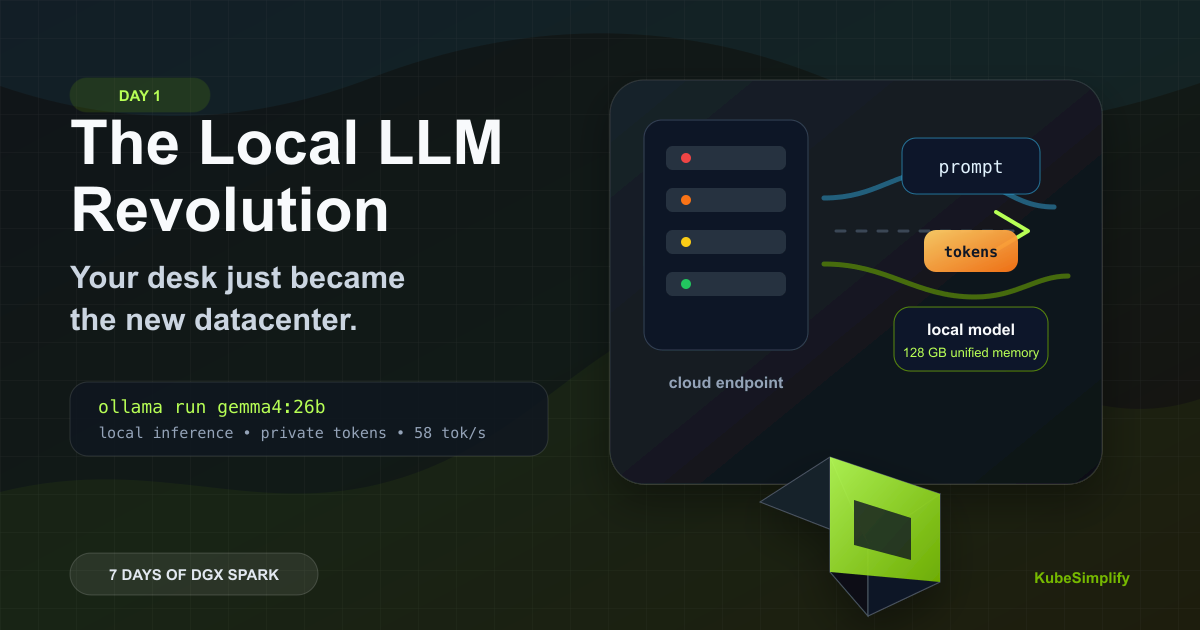
Why local LLMs are becoming practical in 2026, what changed across open weights, hardware, and inference software, and why DGX Spark makes the desk feel like a small AI lab.
New to the jargon? Every term, flag, and benchmark number here is explained in plain English in the local LLM glossary.
On this page (8)
Day 1 of "7 Days of Local LLM". A field guide to running serious LLMs on a $4,699 box on your desk. Real concepts, real demos, real numbers.
In 2019, training a model the size of GPT-2 cost about $43,000 and took a multi-GPU cluster nobody had at home. In 2024, running inference on a 70-billion-parameter model meant renting H100s by the hour. Today, in 2026, you can do both on a desk machine that fits next to your monitor.
That sentence has been waiting to be true for a long time. Let me show you why it is, what changed, and what your desk now does that used to need a datacenter.
This series, "7 Days of Local LLM," is going to walk you through the local LLM revolution from the ground up. Today is the why. Next, we look at what actually happens inside a single LLM request, then we open the Spark itself. By the end of the week you'll know enough to set up your own local AI lab, pick the right model for the right job, and tell the difference between marketing tok/s and real-world tok/s.
Quick refresher (skip if you already know this). A Large Language Model is a neural network trained on huge amounts of text. The model holds billions of learned numbers called parameters (or weights). When you give it a prompt, it produces output one token at a time (a token is a small chunk of text, roughly 3-4 characters). When people say "Llama 3.3 70B," the 70B means 70 billion parameters: bigger usually means smarter but slower and hungrier for memory. Running the model on your hardware is called inference, and the speed is measured in tokens per second (tok/s). We'll unpack request mechanics, number formats like BF16, and model sizing later in the series.
Quick refresher visual
What happens when you ask a local LLM a question?
Text becomes tokens, the inference engine reads model weights on the GPU, and the answer streams back one token at a time.
Prompt
"Explain DGX Spark"Tokenize
Inference loop
Read weights -> predict next token -> repeatAnswer stream
Let's start with what changed.
The three things that made local LLMs viable in 2025-26 #
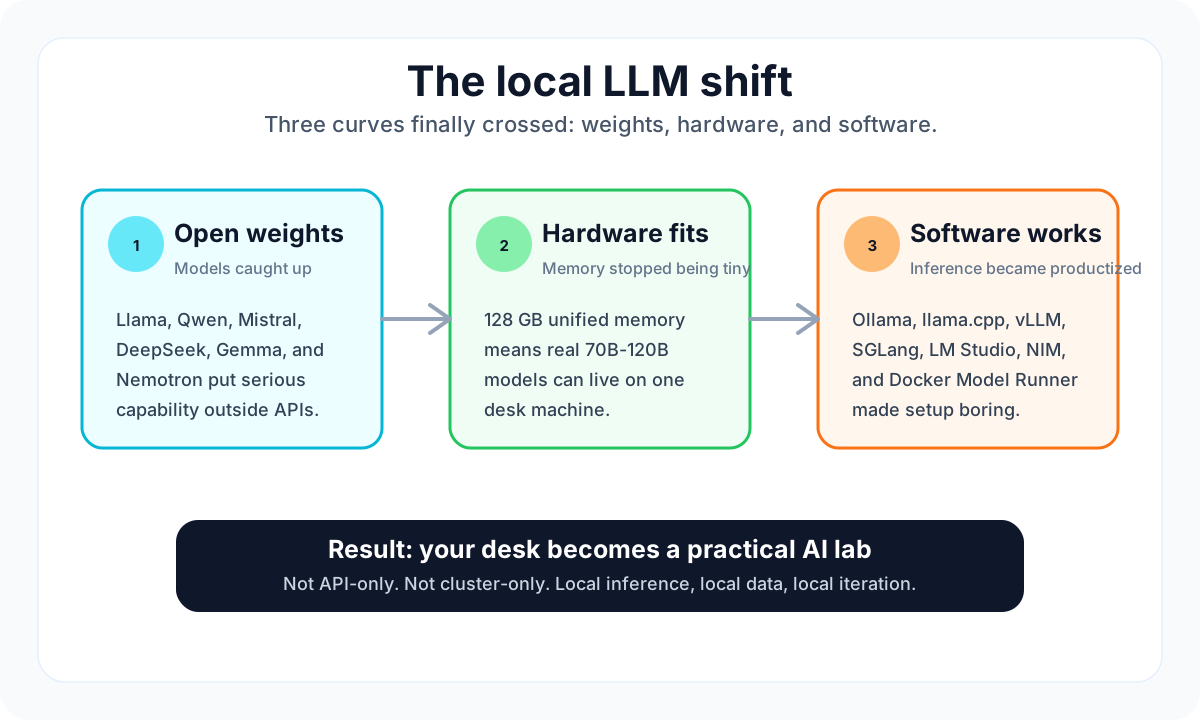
For most of the last decade, "running an LLM" meant calling someone else's API. There were three reasons why.
Reason 1: The models were closed. OpenAI, Anthropic, Google kept the weights. The open models that existed were three generations behind.
Reason 2: The hardware didn't fit. A 70-billion parameter model in BF16 needs 140 GB of memory. The most expensive consumer GPU in 2023 had 24 GB. You couldn't load the model, let alone run it.
Reason 3: The software couldn't catch up. Even when you had the weights and the silicon, the inference engines were research code. Setup was painful, performance was unpredictable, and nobody offered a real production path.
All three of those things changed at roughly the same time.
The open models caught up. Meta released Llama 3.3 70B and Llama 4 under an open-weight community license (not classic open-source, but free to download and use under stated terms). Alibaba released Qwen 3.5 and 3.6 in sizes from 0.6B to 397B-A17B under Apache 2.0. Mistral, DeepSeek, Google's Gemma 4 series (custom Gemma terms), NVIDIA's own Nemotron 3 family (NVIDIA Open Model License). The frontier of open weights is now within 6 months of the closed-weight leaders, and on some benchmarks it leads. Nemotron 3 Super, the 120B-A12B model NVIDIA released at the end of 2025, sits at #1 on DeepResearch Bench per NVIDIA's published evaluation, ahead of several proprietary frontier offerings.
The hardware caught up too. Two things had to happen.
First, the math units inside the GPU - called tensor cores - learned to handle a new, smaller number format that takes one-quarter the memory of what they used before. Less memory per number means a much bigger model fits in the same box. NVIDIA's name for the new format is NVFP4, and we'll unpack it properly later.
Second, a different chip design started showing up on the desktop: unified memory. In a normal computer the CPU and the GPU each have their own pool of memory, and moving data between the two pools is slow. With unified memory there's one shared pool and both chips can read from it directly - no copying. Apple Silicon kicked this door open with 128 GB Macs. NVIDIA followed with the GB10 chip inside the DGX Spark, which also shares 128 GB of memory between CPU and GPU.
The practical effect: a 70-billion-parameter model that used to need clever software tricks to fit across two memory regions now just sits in one pool, ready to use.
And the software finally got real. Ollama, llama.cpp, vLLM, SGLang, Docker Model Runner, LM Studio, NVIDIA's NIM containers, every one of them now offers a pull model, run model, hit the API experience that used to require a PhD in CUDA.
That's the perfect storm. Open-weight models (Apache 2.0, community, and custom licenses, see each model card), hardware with enough memory, software that's productized. Three years ago this didn't work. Today it does.
Why anyone bothers running models locally #
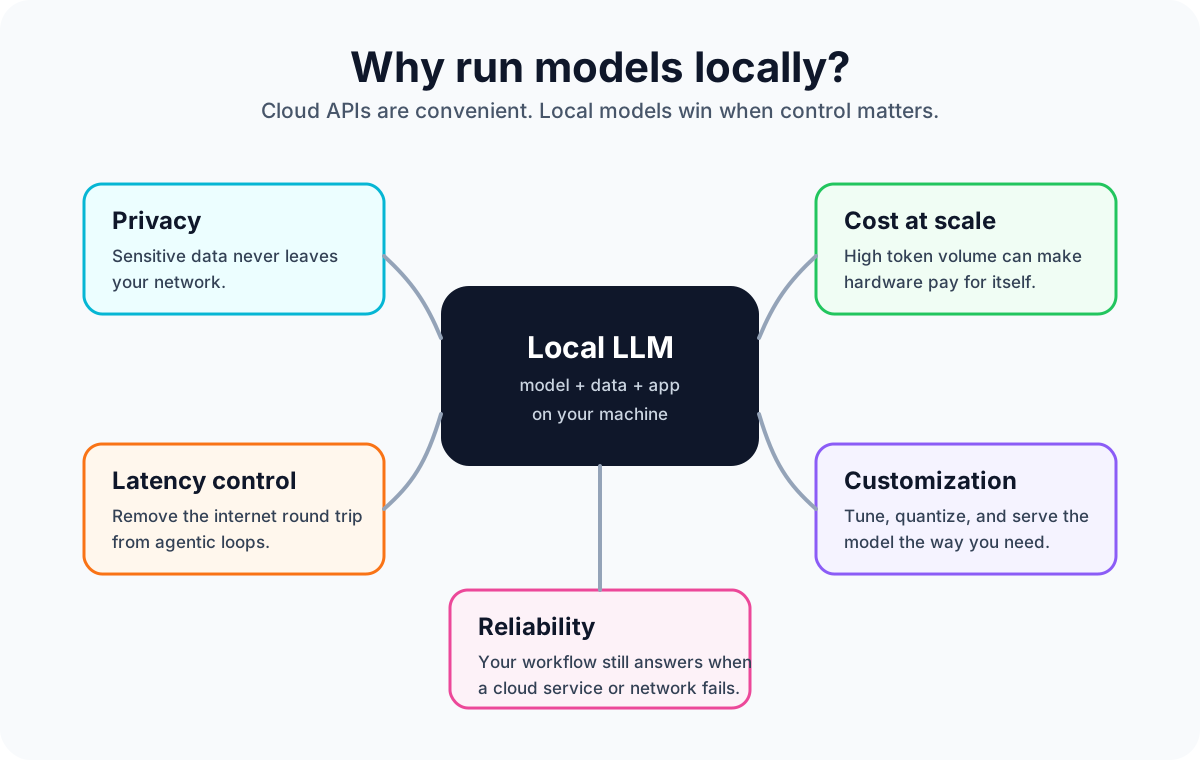
Cloud APIs are convenient. So why bother with a local setup at all?
Five real reasons. I'll go in rough order of how often I hear them.
Privacy and compliance. Your data never leaves your network. If you work in healthcare, finance, legal, government, defense, or any environment with regulatory constraints on where data lives, this is the only path. A local LLM on a local box is a local audit trail.
Cost per token at scale. A few prompts a day do not justify local hardware. Hundreds of millions of tokens a day can. At an illustrative $0.50 per million output tokens, 100M output tokens/day costs $50/day, which puts a $4,699 Spark near a three-month hardware break-even before electricity and ops.
Latency control. Even a fast cloud API call can add 200-800 ms of network and service overhead before the model's actual work begins. For agentic workflows where one user action triggers ten LLM calls, that overhead compounds quickly. A local model running beside your application removes the internet round-trip; the local network hop is usually single-digit milliseconds.
Customization. Fine-tuning, quantization, model surgery, all easier with weights you own. Want a model that always answers in your company's tone, refuses to discuss competitors, and knows your internal product names? Easy with local weights. Hard with an API.
Reliability. Cloud APIs go down. Network goes down. Your local setup answers as long as the box has power. The first time your dev workflow doesn't break because OpenAI is having an outage, you'll wonder why you ever depended on someone else's uptime.
There's a sixth I'll add quietly: it's fun. Watching a 120-billion parameter model load on your own GPU and start generating text is a different experience than typing into someone else's chat box. You feel the bytes. That matters more than I expected.
The local LLM stack, explained #
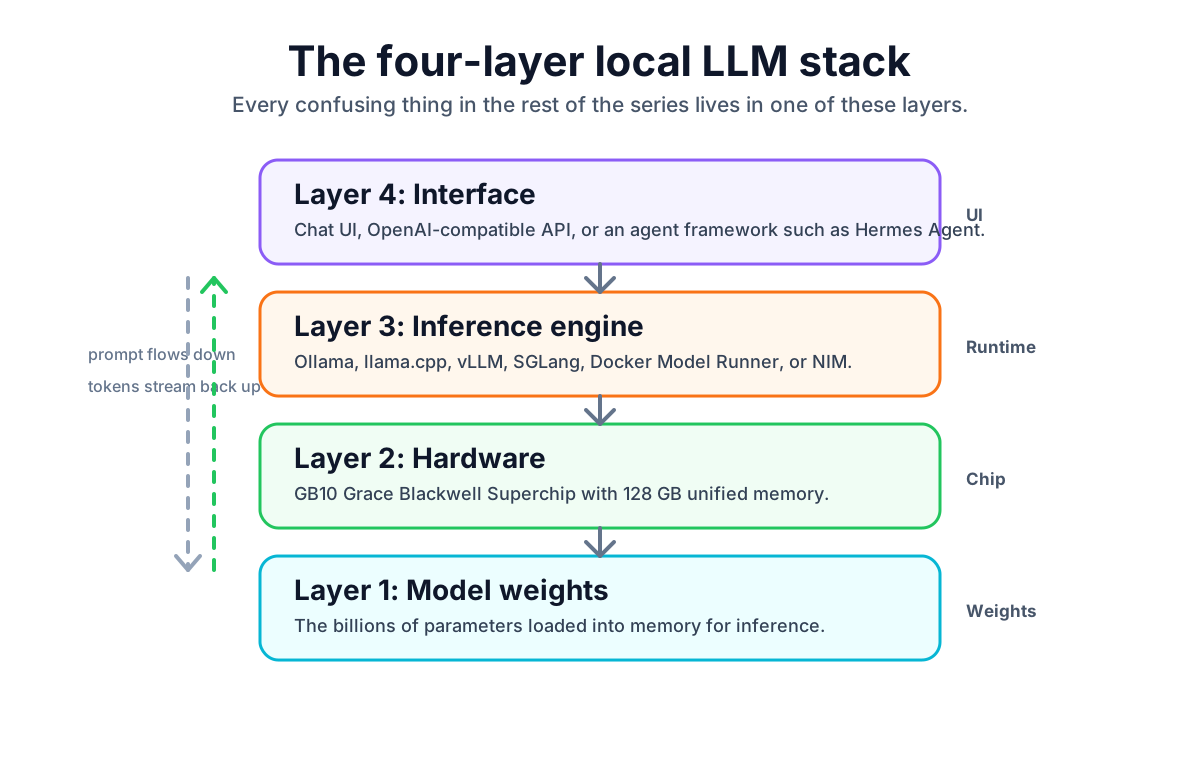
When you "run a local LLM," four pieces have to work together. Let me name them, because every confusing thing in the rest of this series is about one of these four layers.
Layer 1: The model. The weights, which are the billions of learned numbers (the parameters) that encode what the model knows. For a 70B BF16 model that's a ~140 GB file, usually split across multiple safetensors files on disk. When people say "I'm running Llama 3.3 70B," they mean those weights are loaded in memory.
Layer 2: The hardware. The chip that does the math. For our series, it's the DGX Spark, specifically the GB10 Grace Blackwell Superchip: a Grace ARM CPU and a Blackwell GPU sharing 128 GB of unified LPDDR5x memory. The hardware deep dive comes later in the series.
Layer 3: The inference engine. The software that takes a prompt and turns it into tokens by talking to the hardware. Ollama is the easiest wrapper. vLLM is the production-grade engine. llama.cpp is the C++ engine that sits under Ollama and several others. SGLang specializes in agentic workloads. We'll compare the tradeoffs later in the series.
Layer 4: The interface. What you actually type into. A chat UI like Open WebUI, an OpenAI-compatible HTTP API for your app to call, or an agent framework like Hermes Agent that NVIDIA recommends for DGX Spark, which lets a model autonomously call tools and improve itself. We'll touch this near the end of the series.
These four layers connect like this: your interface sends a prompt to the inference engine, the engine turns it into operations on the model weights using the hardware, the hardware returns tokens, the engine streams them back to your interface. Simple in shape, full of choices.
Meet the DGX Spark (one paragraph version) #
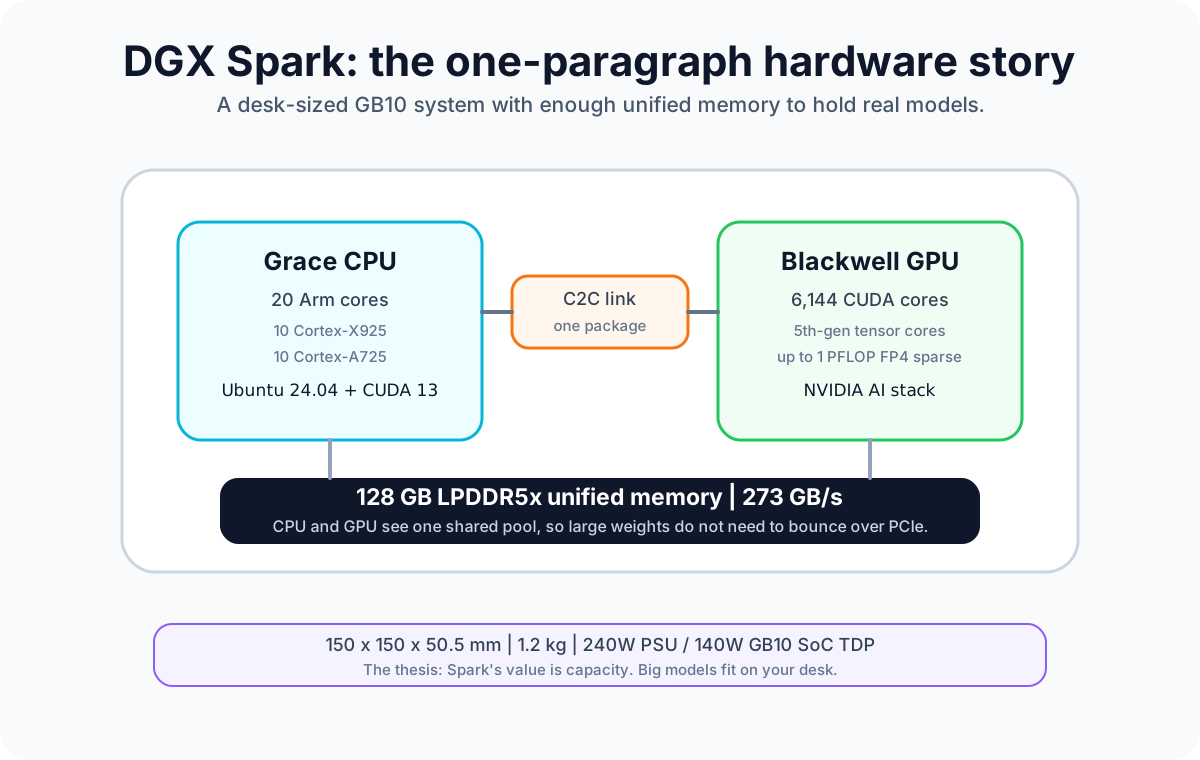
The DGX Spark is NVIDIA's answer to "what if we made a personal workstation specifically for serving and fine-tuning frontier-class LLMs." It's a small box, about 1.2 kg, fits under a monitor. Inside is the GB10 superchip: 20 Arm cores (10 Cortex-X925 plus 10 Cortex-A725), a Blackwell GPU with 6,144 CUDA cores and 5th-generation tensor cores, and 128 GB of unified LPDDR5x memory that both the CPU and GPU see as one pool. NVIDIA specifies a 240W external power supply and a 140W GB10 SoC TDP; in my own inference runs, the system stayed under 150W at the wall. It costs $4,699. DGX OS is based on Ubuntu 24.04 and includes CUDA 13.0, NVIDIA's AI stack, and NVIDIA Container Runtime for Docker. Ollama is one command away if it is not already installed.
That's the elevator pitch. We'll unpack the hardware properly in the coming days.
For today, the only thing you need to know about the hardware is this: it has enough memory to hold real models. A Llama 3.3 70B in 4-bit fits in 35 GB. A Gemma 4 26B-A4B in NVFP4 fits in 13 GB. Even NVIDIA's flagship Nemotron 3 Super, 120 billion total parameters with 12.7 billion active, sits at about 87 GB as Ollama's Q4_K_M GGUF (the artifact actually on my Spark; NVIDIA's own NVFP4 builds of the same weights would be smaller). All of that on one box, on your desk, with budget left over for KV cache and a generous context window.
That capability is the reason this series exists.
Your first 30 seconds with a local LLM #
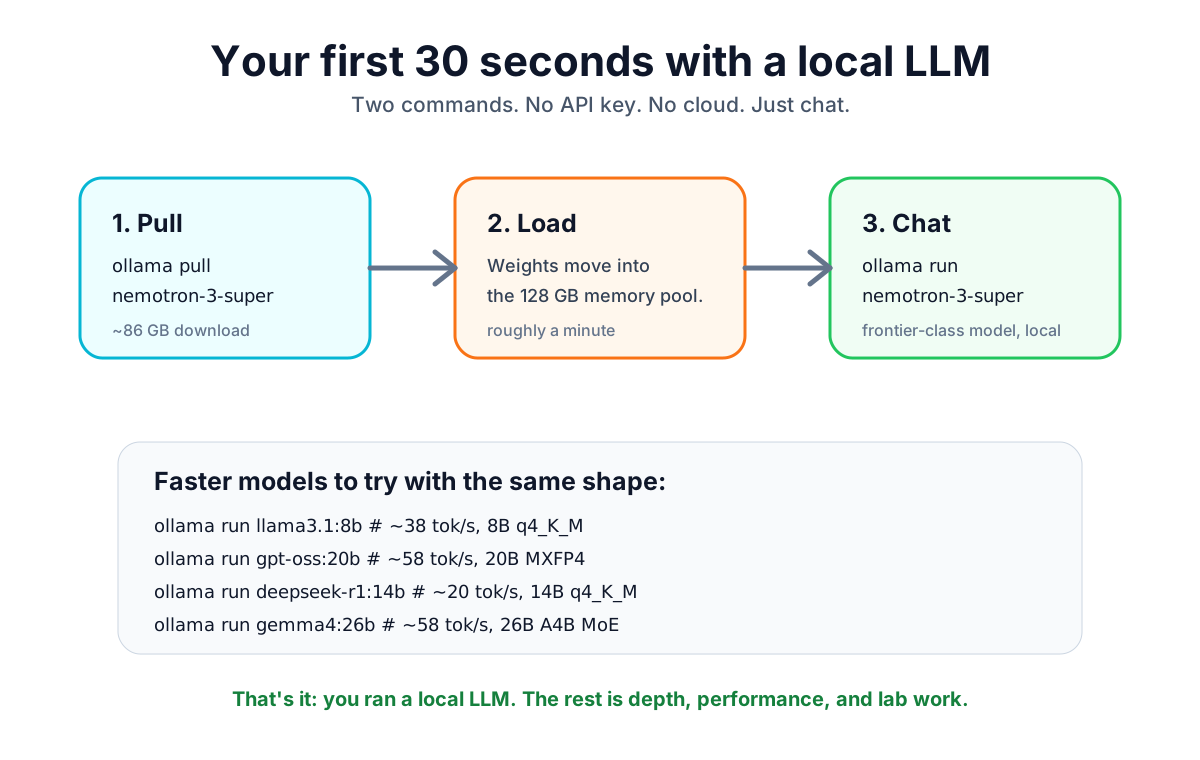
Before any deep dive, try the thing. If Ollama is not already installed, start here:
curl -fsSL https://ollama.com/install.sh | shThen run the model:
ollama pull nemotron-3-super
ollama run nemotron-3-superThat's it. The 87 GB download takes about 10 minutes on a fast connection. The model loads in roughly a minute. Then you're chatting with a frontier-class 120B model that lives entirely on your desk and never sees the internet.
For something faster but still impressive, here are a few useful reference points:
ollama run llama3.1:8b # ~38 tok/s, 8B q4_K_M
ollama run gpt-oss:20b # ~58 tok/s, 20B MXFP4
ollama run deepseek-r1:14b # ~20 tok/s, 14B q4_K_M
ollama run gemma4:26b # ~58 tok/s in my Spark test, 26B A4B MoEThe first three decode numbers are from Ollama's own DGX Spark benchmark page, using DGX Spark firmware 580.95.05 and Ollama v0.12.6 with caching disabled. The Gemma 4 number is a separate local result from my Spark logs: gemma4:26b at Q4_K_M, 58.02 tok/s decode, with ollama ps showing 100% GPU. In a separate Gemma 4 video correction, I also showed the upgrade lesson: an older Ollama build fell back to CPU, while a current build moved the same class of run back onto the GPU. Keep the tag explicit: gemma4 / gemma4:latest currently points at the smaller E4B default, while gemma4:26b is the 26B Mixture-of-Experts model.
Once you've chatted, you've technically done it. You ran a local LLM. The rest of this series is depth, performance, and what you do when "chat" isn't enough.
The series map #
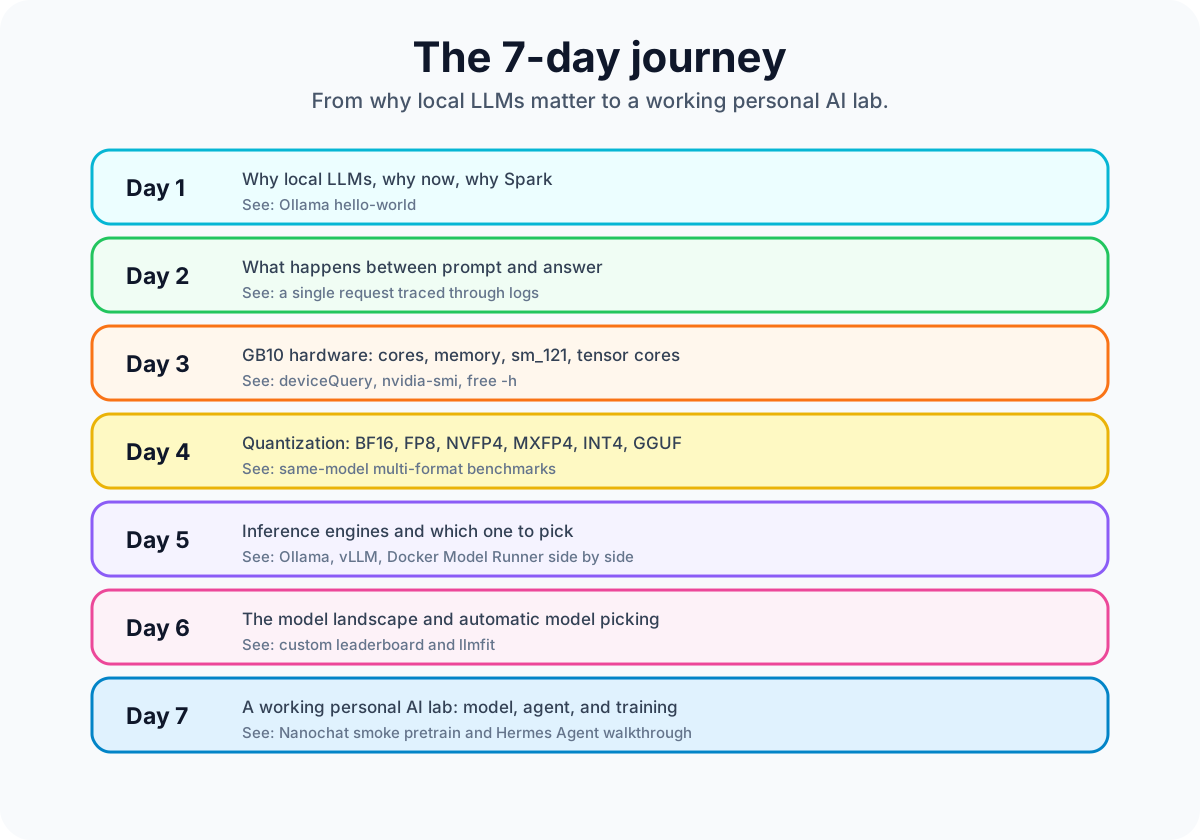
Each post tells one big story and shows it on a real Spark.
| Day | What you'll understand | What you'll see running |
|---|---|---|
| 1 (today) | Why local LLMs, why now, why Spark | Ollama hello-world |
| 2 | What actually happens between your prompt and the answer | A single request traced through vLLM logs |
| 3 | The GB10 hardware: cores, memory, sm_121, NVFP4 tensor cores | deviceQuery, nvidia-smi, free -h |
| 4 | Quantization: BF16, FP8, NVFP4, MXFP4, INT4, GGUF, microscaling | Same-model multi-format benchmarks |
| 5 | The inference engines you can use on Spark, and which to pick | Ollama, vLLM, and Docker Model Runner serving the same model class, side by side |
| 6 | The full model landscape: small to frontier, plus llmfit to pick automatically | A custom leaderboard, models you can run today |
| 7 | A working personal AI lab: model + agent + training | Nanochat smoke pretrain end-to-end, plus walkthroughs of the Hermes Agent and autoresearch workflows |
The honest reality check (the part most reviews skip) #
Before you click "buy" on a Spark, you should know the things this series will keep coming back to.
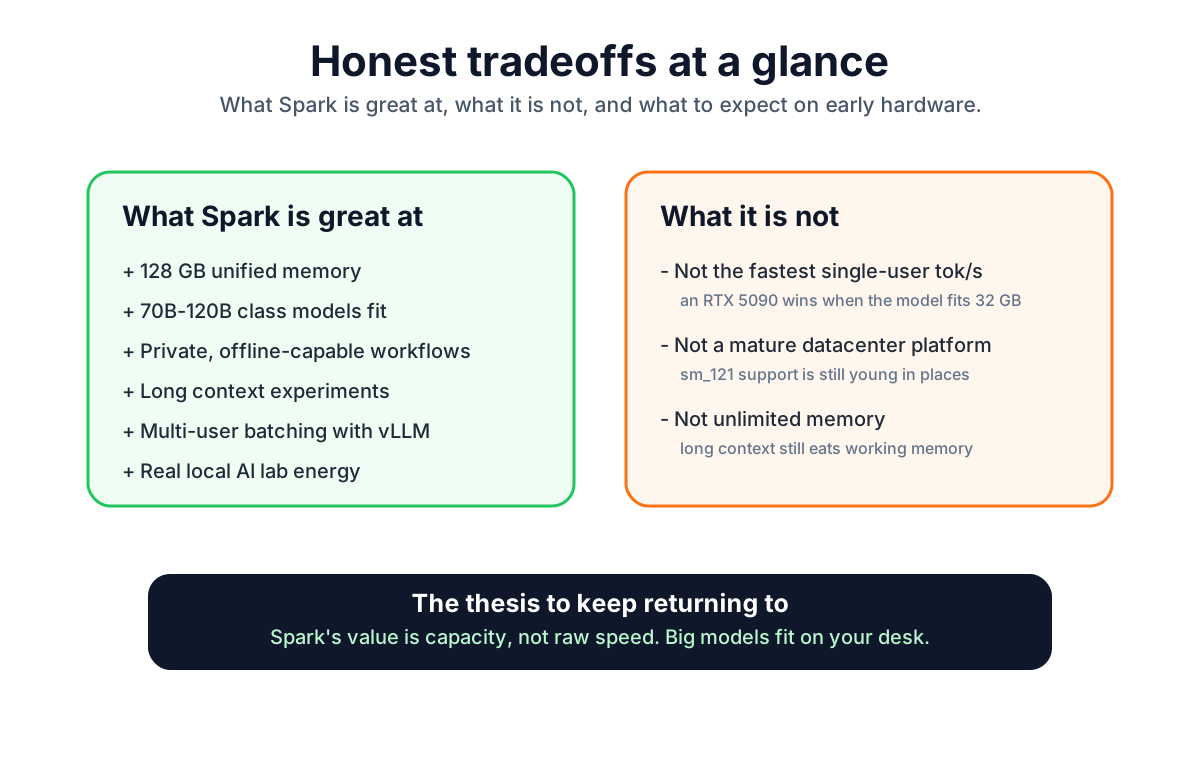
A Spark is not the fastest tok/s machine for a single user. A single RTX 5090 with a model that fits its 32 GB is faster for one person. The Spark's value is capacity, not raw speed. Big models fit. That's the thesis.
Setup pain is real. The Spark uses sm_121 (consumer Blackwell), which isn't sm_100 (datacenter Blackwell). Half the inference libraries you find on the internet ship prebuilt kernels for the wrong architecture. We document the workarounds.
Inference engines on this hardware have had real bugs. I personally tracked one in early 2026 where Ollama wouldn't use the GPU. That bug is fixed in the current Ollama stack, but it's a good reminder that you're on the bleeding edge of consumer Blackwell software. New things break.
Memory pressure is the cliff. The 128 GB looks luxurious until you load a 70B model with a long context and the model's working memory eats real space on top of the weights. How much depends on the model and the inference engine, and the hardware deep dive has the safe-envelope formula that keeps you from face-planting into that cliff.
None of this is dealbreaker territory. It's the cost of being early. And being early on this hardware genuinely feels like being early on a personal computer in 1985.
Where we go next #
Next, we open the black box. We're going to follow a single LLM request from the moment you press enter to the moment a token comes out the other end. You'll learn what tokenization is, why prefill and decode have completely different performance profiles, what a KV cache actually stores, and why memory bandwidth (not compute) is the bottleneck that defines what's possible on a Spark.
If you've ever wondered why a 70-billion parameter model on a 273 GB/s memory bus generates tokens at maybe 7 per second when a 700M parameter model on the same hardware generates 200, the next post answers that.
See you in the next part.
References for this post: NVIDIA DGX Spark Hardware Overview, NVIDIA DGX Spark System Overview, Ollama: Install on Linux, Ollama: nemotron-3-super, Ollama: gemma4, Google: Gemma 4, Ollama: NVIDIA DGX Spark performance, Ollama: NVIDIA DGX Spark overview, NVIDIA Newsroom: Nemotron 3 family, NVIDIA Research: Nemotron 3, NVIDIA Hermes Agent on DGX Spark, Artificial Analysis: Nemotron 3 Super.
Saiyam is working as Head of DevRel at vCluster Labs. He is the founder of Kubesimplify, focusing on simplifying cloud-native & AI infrastructure. He is KubeCon Co-chair and has worked on many facets of Kubernetes, including machine learning platforms, scaling, multi-cloud, & managed Kubernetes services. When not coding, Saiyam contributes to the community by writing blogs and organizing local meetups for Kubernetes and CNCF. He is also a CNCF TAG OpsRes Chair & can be reached on Twitter @saiyampathak.
Get new posts in your inbox.
Spotted a typo or want to improve this post? Edit on GitHub →